

What if your office desk phone was actually a relic of the past, and your smartphone could handle every professional call without ever revealing your private mobile number? Most Australian business owners feel the constant pressure of being tethered to a physical desk. You worry that one missed call while you're out on-site or meeting a client could mean a lost opportunity. You've probably tried generic calling apps before, only to be frustrated by choppy audio or the lack of basic features like professional hold music.
It's time to untether your team. This guide shows you how to leverage a high-performance business voip mobile app australia wide to manage your entire communication suite from your pocket. You'll learn how to maintain a polished "one number" presence across all devices while significantly lowering your telecommunications overheads. We'll preview the essential 2026 updates in unified communications, including how AI-driven tools and robust internet redundancy are making the traditional desk phone optional for the modern workforce.
Key Takeaways
- Maintain a professional image by using a single business number across all devices, ensuring your personal mobile number remains private.
- Master seamless call flipping to move active conversations between your desk phone and your mobile without your clients ever noticing a gap.
- Selecting the right business voip mobile app australia relies on prioritising local support and high-level encryption to keep your communications secure on any network.
- Verify your network readiness by checking NBN or 5G latency to guarantee crystal-clear audio quality for every mobile call.
- Prepare for the future by integrating AI voice agents that handle your enquiries and sync with your CRM while you are focused on-site.
Why Business VoIP Mobile Apps are Essential in Australia
A business VoIP mobile app is often referred to as a softphone. It is an application that effectively turns any smartphone into a full-featured office extension. For many Australian teams, this isn't just a backup; it's their primary communication tool. It allows you to carry your entire office phone system in your pocket. By utilising Mobile VoIP technology, you access advanced features that were once restricted to physical handsets bolted to a desk.
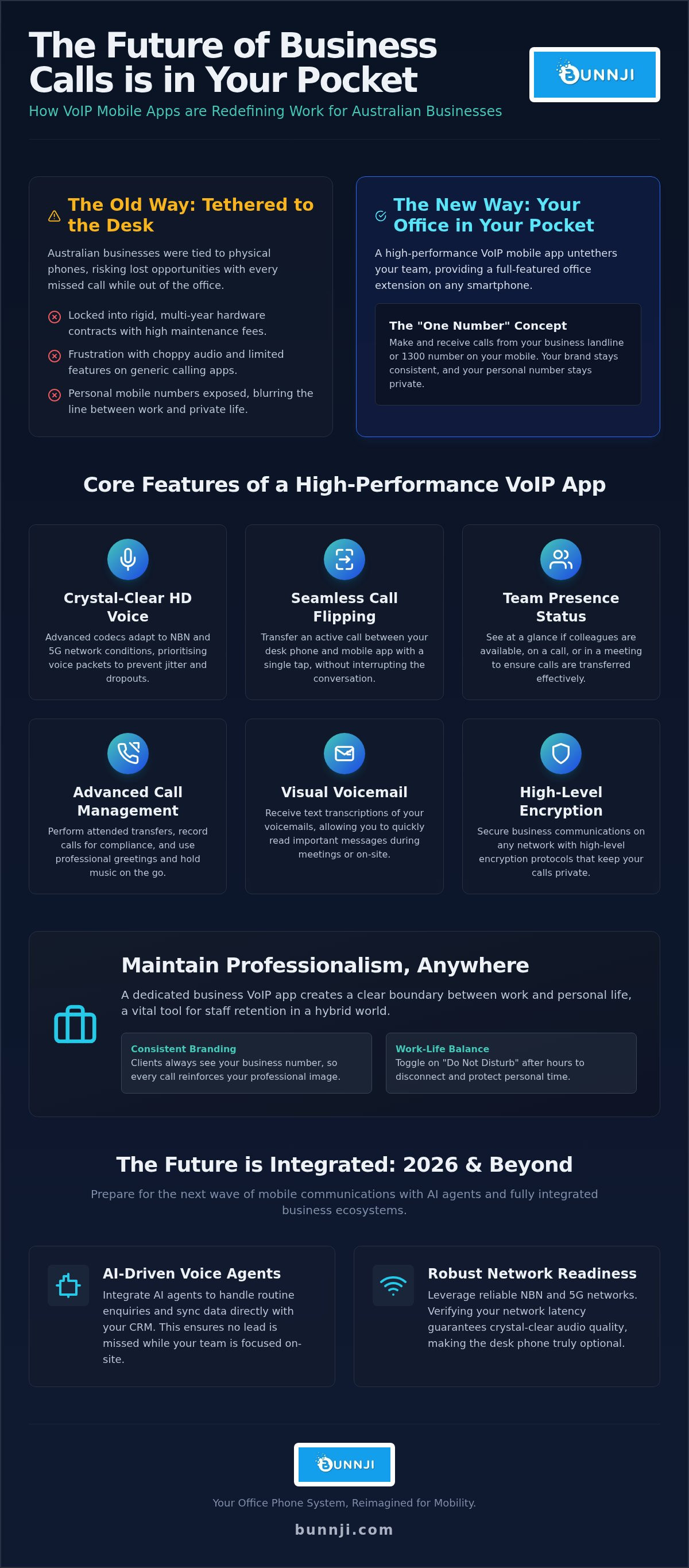
The core of this shift is the "One Number" concept. When you place a call through a business voip mobile app australia wide, the person on the other end sees your professional business identity. They see your office landline or 1300 number, not your personal mobile digits. This keeps your professional brand consistent and ensures your private life stays private. It's a simple change that removes the friction of managing multiple devices while you're on the move.
The Death of the Traditional Desk Phone in Australia
Australian firms are rapidly retiring physical handsets. The days of being locked into 60-month hardware contracts are ending. These rigid agreements often left businesses with outdated tech and high maintenance fees. By moving to flexible software, you eliminate the need for expensive cabling and on-site hardware repairs. This shift supports an agile culture. Whether your team is on-site, at a cafe, or working from home, they have the same tools as if they were sitting in a CBD office. It's about being responsive without being restricted.
Maintaining Professionalism While Working Remotely
Professionalism shouldn't disappear when you leave the office. A dedicated business voip mobile app australia ensures every client call is handled with the same care they'd expect from a reception desk. You can set up professional greetings and hold music that play directly on your mobile. It prevents the awkwardness of a staff member answering a client call with a casual "Hello?" because they didn't know it was a business enquiry.
Privacy is another critical factor. You don't want your employees giving out their personal mobile numbers to every lead they meet. With a dedicated app, they use the company identity for all work traffic. When the workday ends, they can simply toggle the app to "Do Not Disturb." This creates a clear boundary between work and home. It's a vital tool for long-term staff retention in a hybrid world where the lines between office and home are often blurred.
Key Features of a High-Performance Business VoIP App
A high-performance business voip mobile app australia wide needs to offer more than just a dial pad. It starts with crystal-clear audio. High-definition (HD) voice quality depends on advanced codecs that adapt to fluctuating Australian network conditions. Whether you're on a patchy NBN connection or moving between 5G towers, a premium app prioritises voice packets to prevent jitter and dropouts. This ensures your professional conversations remain clear, regardless of your location.
Seamless call flipping is a standout feature for busy professionals. Imagine starting a call on your desk phone and realising you need to leave for a site visit. You can transfer the active call to your mobile app with a single tap. There's no need to hang up and redial. The client never hears a gap in the conversation. This level of continuity is essential for maintaining a polished image while you're on the move.
Presence indicators further bridge the gap between remote and office-based staff. You can see at a glance if a colleague is available, on a call, or in a meeting. This prevents wasted time and ensures calls are only transferred to people who can actually take them. Modern apps also integrate with native mobile features like push notifications. This allows the app to stay dormant and save battery life until a call actually arrives, keeping you reachable without draining your phone.
Advanced Call Management on the Go
Professionalism shouldn't stop because you're using a smartphone. You can perform blind or attended transfers just as easily as you would at your desk. Attended transfers allow you to speak with your colleague first to brief them before handing over the caller. For compliance-heavy industries, mobile call recording is essential. It ensures every interaction is captured for training or legal requirements. Visual voicemail completes the mobile experience, providing text transcriptions of messages so you can read them during meetings instead of dialling into a mailbox.
Unified Communications: More Than Just Voice
The best apps function as a complete communication hub. This includes secure internal chat and file sharing, allowing you to collaborate without switching between multiple platforms. Video conferencing is built-in, making it easy to join a project meeting from your car or a job site. Integrating your mobile app with your CRM is a major efficiency gain. When a client calls, their history and details appear instantly on your screen. This immediate context allows for more personalised service. If you're looking to streamline your setup, you might want to explore how unified communications can simplify your daily workflow.
Evaluating Business VoIP Mobile App Solutions: A Comparison Framework
Choosing the right business voip mobile app australia wide requires looking past basic call features. Reliability is your first hurdle. A "bug-free" experience isn't just about smooth scrolling; it's about the app staying active in the background without missing incoming calls. Regular software updates are a strong indicator of a provider's commitment to quality. If an app hasn't been updated in months, it's likely a security risk and a productivity killer. You need a platform that evolves alongside mobile operating system updates to ensure consistent performance.
Security is critical for Australian firms operating on 5G and public Wi-Fi. Your voice data must be encrypted to prevent eavesdropping and data breaches. Encryption isn't just a checkbox; it's a shield for your sensitive client conversations. Beyond security, consider the simplicity of the User Interface (UI). If your team requires a manual to make a transfer, the system is too complex. A simple, intuitive design ensures high adoption rates across the business. Finally, evaluate the Total Cost of Ownership (TCO). Moving to a mobile-centric model usually shifts costs from heavy upfront hardware investments to predictable, per-user licensing or bundled business plans that scale with your growth.
Mobile App vs Desktop Client vs Physical Desk Phone
A successful business voip australia strategy focuses on using the right tool for the job. Desktop clients are perfect for office-based roles where staff need to manage calls alongside complex CRM tasks. Physical desk phones still have a place in reception areas or boardroom settings where a permanent fixture is required. However, for an agile workforce, the mobile app is the primary interface. It provides the flexibility to take the office anywhere, ensuring you never miss a beat while moving between meetings or working on-site.
The Importance of Local Australian Support
Critical communications should never be left to a provider without a local presence. If your app stops registering or you face porting issues, you need a partner who understands the Australian telecommunications landscape. Performing a telecommunications audit for business is a smart first step. This process verifies your current network compatibility and ensures your number ownership is secure. Local experts can guide you through the complexities of moving from legacy copper systems to a mobile-first environment, removing the friction often associated with technical migrations.
5 Steps to a Mobile-First VoIP Strategy for Your Team
Transitioning to a mobile-first environment requires more than just a download. It demands a deliberate strategy to ensure your team remains connected and professional without being overwhelmed. Follow these five steps to deploy a successful business voip mobile app australia wide.
First, perform a network readiness check. Your app is only as reliable as the underlying connection. High-speed business nbn plans provide the backbone for office-based staff, while 5G offers the low latency required for stable calls on the road. Second, standardise on a single app platform. Using different tools across the team creates silos and complicates technical support. When everyone uses the same interface, collaboration becomes seamless. Third, configure your routing rules. You can set the system to ring your desk phone and mobile app simultaneously, ensuring you never miss a lead while moving between meetings.
Fourth, conduct staff training sessions. This isn't just about how to dial. Teach your team about privacy settings and how to set "Do Not Disturb" schedules. This protects their personal time and prevents burnout. Finally, establish a disaster recovery plan. If your primary office internet fails, a mobile-first strategy allows your team to immediately switch to mobile data and keep the business running without interruption.
Optimising Your Connection for Mobile VoIP
Call stability depends on your network's ability to handle voice packets. While 5G provides excellent performance outdoors, you should set up Wi-Fi calling to ensure coverage in "dead zones" like basement carparks or older concrete buildings. Regarding data usage, a typical VoIP call is highly efficient. Most calls consume between 0.5MB and 1.3MB per minute, meaning your staff won't blow through their data caps during standard business operations.
Policy and Security for Mobile Business Apps
Security must be baked into your mobile policy. Implement Multi-Factor Authentication (MFA) for the VoIP app to prevent unauthorised access to your phone system. It's also vital to set clear expectations for staff regarding after-hours availability. You don't want employees feeling obligated to answer calls at 9 PM just because the app is on their personal device. Lastly, ensure you have a process for revoking app access for departing employees. This protects your client database and keeps your business data secure.
Ready to modernise your team's communication? You can get started with a mobile-first VoIP strategy today by speaking with our local experts.
The Future of Mobile Comms: AI Agents and Integrated Ecosystems
The future of business communication isn't just about making calls; it's about intelligence. A high-performance business voip mobile app australia wide is now the gateway to an integrated ecosystem that works even when you don't. We're moving beyond simple voice traffic into a world where your phone system understands your schedule. AI is the driving force behind this shift, ensuring that being "untethered" from the desk doesn't mean being disconnected from your customers. Intelligence is now baked into the mobile experience, allowing you to focus on high-value tasks while the system handles the rest.
Integrating your mobile app with your CRM provides instant context before you even swipe to answer. You see the caller's name, their last order, and any open support tickets right on your smartphone screen. This immediate data allows for a personalised response that used to require a desktop setup. Beyond simple ID, the rise of ai voice agents for business means your phone system can now book appointments or qualify leads while you're busy on-site. Bunnji focuses on this exact synergy, ensuring your mobile app, AI tools, and underlying connectivity work as a single, reliable unit.
Eliminating Missed Calls with AI Receptionists
Missed calls are a major pain point for mobile teams. An AI receptionist solves this by triaging incoming traffic when your app is set to "Do Not Disturb" or when you're already on a call. The AI can answer common questions, take detailed messages, or only push truly urgent calls through to your mobile. Once the AI finishes a call, it syncs the notes and transcriptions directly to your phone. This allows for immediate follow-up without you ever having to dial into a traditional voicemail box. It's a cost-effective way to supplement your workforce and ensure every enquiry is captured.
Building a Resilient Australian Business Communication Platform
A resilient strategy requires the right foundation. This is why business mobile sim only plans are the perfect partner for your VoIP app. They provide the raw data needed for high-quality calls when you're away from office Wi-Fi. Bunnji organises a no-nonsense, all-in-one comms stack that eliminates the complexity of managing multiple providers. We ensure your internet, mobile data, and VoIP app are perfectly aligned for maximum stability. It's time to move away from fragmented systems and embrace a unified approach. You can book a comprehensive comms audit today to modernise your mobile strategy and prepare your firm for the future of unified communications.
Future-Proof Your Business Communications Today
The transition to a mobile-first workforce is a strategic necessity for Australian firms. By adopting a high-performance business voip mobile app australia wide, you break free from restrictive hardware contracts and embrace a truly agile way of working. You now understand how integrating AI receptionists and CRM data turns your smartphone into a sophisticated business hub that captures every lead, even when you're focused on-site.
Bunnji is a proud Australian-owned and operated expert in AI-integrated cloud phone systems. We provide the local support and technical precision required to ensure your team stays connected without the friction of legacy infrastructure. It's time to stop worrying about missed calls and start focusing on your growth. You can book a 10-minute telecommunications audit with Bunnji to see if a mobile-first VoIP strategy is right for your firm. Let's work together to build a communication platform that actually moves at the speed of your business.
Frequently Asked Questions
Does a business VoIP mobile app use my personal mobile data?
Yes, a VoIP app uses a small amount of your mobile data when you aren't connected to Wi-Fi. On average, a standard voice call consumes between 0.5MB and 1.3MB per minute. This means even a long business conversation won't significantly impact a typical monthly data allowance. For the best experience, we recommend using a 5G connection or stable office Wi-Fi to maintain high-definition audio quality without any frustrating interruptions.
Will using a VoIP app drain my smartphone battery quickly?
Modern apps are designed to be extremely efficient. Unlike older software that had to stay active constantly, a high-performance business voip mobile app australia wide uses push notifications. This technology allows the app to remain dormant in the background until a call actually arrives. It only wakes up when you need it, ensuring your smartphone battery lasts throughout the full workday while you remain completely reachable for your clients and team members.
Can I keep my existing Australian business landline number?
You can definitely keep your existing Australian business landline number. The process is called porting, and it allows you to move your current number from a traditional copper or NBN line into a cloud-based system. Once the porting is complete, that landline number rings directly on your mobile app. This ensures your long-standing business identity remains intact while you enjoy the flexibility of a modern, mobile-first communication strategy for your firm.
What happens to my calls if I lose my internet connection or 5G signal?
If you lose your internet connection or 5G signal, your phone system handles the call based on your pre-set routing rules. Calls can be automatically directed to your professional voicemail, a colleague, or an AI receptionist. Because the system lives in the cloud rather than on your physical device, the caller never hears a "dead" line. Once your signal returns, you'll receive an immediate notification of any missed interactions or messages.
Is the call quality on a VoIP app as good as a regular mobile call?
Call quality on a premium VoIP app is often superior to a regular mobile call. These apps use high-definition (HD) codecs that provide much broader audio frequency than traditional cellular networks. However, the quality is dependent on your underlying connection. Provided you have a stable 5G signal or a high-speed NBN connection, your clients will hear crystal-clear audio that sounds exactly like you are sitting in a professional office environment.
Can I have multiple business numbers on the one mobile app?
You can easily manage multiple business numbers within a single mobile application. This is ideal for business owners who manage different brands or have separate numbers for sales and support teams. The app clearly identifies which number the caller is dialling, allowing you to answer with the correct professional greeting every time. It's a powerful way to centralise your operations without needing to carry multiple physical handsets or extra SIM cards.
How do I stop business calls from ringing on my mobile after work hours?
Stopping after-hours calls is simple through the app’s "Do Not Disturb" settings. You can manually toggle this off when you finish for the day or set an automated schedule that follows your specific business hours. When active, incoming calls can be routed straight to voicemail or handled by an AI agent. This ensures you maintain a healthy work-life balance while your business voip mobile app australia keeps your professional image active 24/7.
Is a VoIP mobile app secure for sensitive business conversations?
Security is a top priority for modern VoIP platforms. Every call placed through a professional app is encrypted, protecting your sensitive business conversations from potential eavesdropping on public Wi-Fi networks. Additionally, you can implement Multi-Factor Authentication (MFA) to ensure only authorised staff can access the system. This multi-layered approach provides peace of mind that your data and client interactions remain secure, regardless of where your team happens to be working.


