

How much did that last missed call actually cost your firm? Most Australian business owners still feel tethered to their office desks, worried that a single unreturned message could mean a lost five-figure contract. You likely know the frustration of squinting at a tiny handset screen or scribbling down garbled messages while you're out on site. It's an outdated way to work that slows down your response times and projects a disjointed image to your clients.
Finding the right business voicemail to email setup shouldn't feel like a technical chore, yet many teams are still struggling with legacy NBN hardware that makes remote work difficult. We agree that your communication should be as mobile as you are. This guide will show you how to seamlessly integrate your office voicemails with your inbox to ensure your firm never misses a lead again. We'll walk through the transition from clunky desk phones to a centralised, professional system that keeps your sales pipeline moving, no matter where you're standing.
Key Takeaways
- Stop losing potential revenue to missed calls by moving your messages from a desk phone to a unified digital inbox.
- Compare the benefits of standard audio attachments against AI-powered transcriptions to find the most efficient way for your team to respond.
- Follow a structured audit of your existing NBN and phone hardware to ensure a smooth business voicemail to email setup without technical downtime.
- Identify the right communication platform for your specific business size, from simple mobile app alerts to a centralised cloud VoIP system.
- Discover how modern AI voice agents can take your workflow further by syncing caller data directly into your firm's CRM.
Why Your Firm Needs Business Voicemail to Email in 2026
The era of the blinking red light on a plastic desk phone is over. In 2026, relying on a physical device to alert you to a missed call isn't just inconvenient; it's a bottleneck for your entire operation. As NBN copper retirement dates pass and businesses fully embrace cloud infrastructure, the way we handle voice messages has fundamentally shifted. Your inbox is now the central hub for all client interactions. A professional business voicemail to email setup bridges the gap between a traditional phone call and the digital speed your clients expect.
Missed calls are costing Australian SMEs more than they think. When a lead goes to voicemail and stays there for hours because you're off-site, that potential client is already calling your competitor. By integrating your voice messages into your email workflow, you treat every call with the same urgency as a high-priority email. This transition is part of a broader move toward Unified messaging, where voice, text, and email live in one searchable, accessible space. It ensures that your firm remains responsive, regardless of whether you're at your desk or meeting a client across the country.
The Problem with Traditional Voicemail
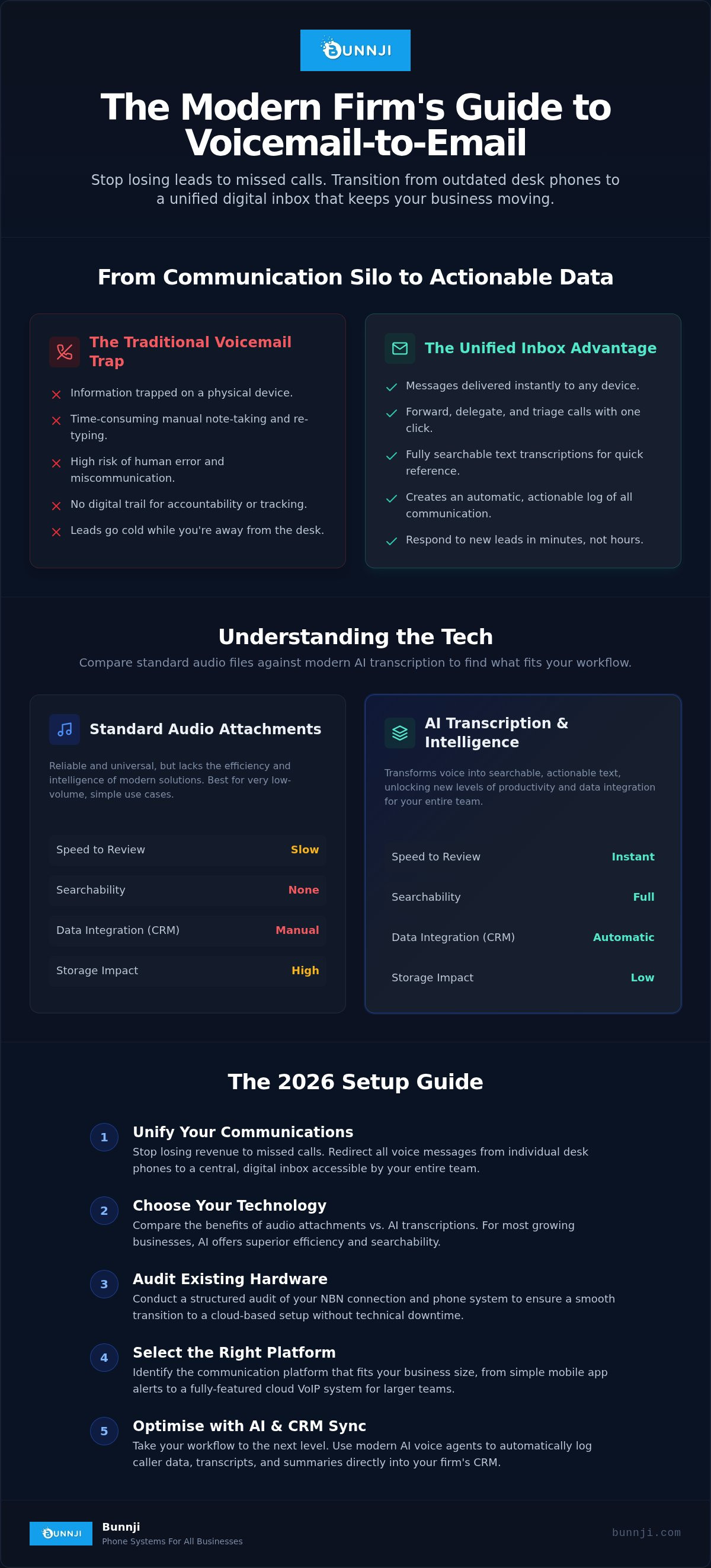
Traditional systems are silos. If a client leaves a detailed instruction on your office phone, that information is trapped. Sharing that message with a remote team member usually involves listening to the audio, taking manual notes, and then re-typing the details into a message. It's a massive time-sink that invites human error. Without a digital paper trail, it's also impossible to track when a message was received or who is responsible for the follow-up. This lack of accountability can lead to fractured client relationships and forgotten tasks.
The Productivity Gains of Inbox Integration
Switching to a modern business voicemail to email setup transforms these audio files into actionable data. You get instant notifications on your mobile device the moment a message is left. This allows for immediate triaging. If a message is for the accounts department, you can forward the audio file or transcription with a single click. Your communication becomes searchable, allowing you to find a specific client's instructions from six months ago by typing their name into your email search bar. This level of organisation builds a professional image that suggests your firm is tech-forward and highly reliable. It turns a passive recording into a proactive tool for growth.
Understanding the Tech: Audio Files vs. AI Transcription
At its core, a business voicemail to email setup is a bridge between two distinct communication worlds. It takes the analogue nature of a human voice and converts it into a digital asset. This process involves capturing the audio from your cloud phone system, compressing it into a manageable format, and delivering it to your chosen email address. For most Australian firms, this marks the transition to a modern PBX that values flexibility over old-fashioned desk hardware.
Standard Audio Attachments
The traditional approach involves attaching a .wav or .mp3 file directly to an email. This is a reliable method because these formats are universal. You can listen to them on a laptop, tablet, or smartphone without needing specialised software. However, there are practical trade-offs. High-quality audio files can be surprisingly large, potentially clogging up your email server if your team receives a high volume of calls. You'll need to monitor your storage quotas to ensure your inbox doesn't bounce important messages due to size limits.
Security is another critical factor. Basic audio attachments are often unencrypted. If a client leaves sensitive information like legal details or private contact data, that information is only as secure as your email password. You also miss out on the ability to search your messages. You can't easily find a specific mention of a project name within an audio file, which limits the long-term utility of the recording. This makes standard attachments a solid starting point, but they aren't the most efficient solution for growing teams.
AI Transcription and Voice Intelligence
Modern systems are moving away from simple audio files toward AI-driven transcription. This technology uses natural language processing to turn speech into text in real-time. Instead of spending minutes listening to a rambling message, you can scan a paragraph of text in seconds. AI can now identify key phrases, specific dates, and even the emotional tone of the caller. Voice Intelligence is a tool for automated call logging that captures the essence of a conversation without manual entry.
This transcribed data is far more powerful than a recording. It can be automatically synced with your CRM, ensuring that every missed call is logged against the correct client profile. This creates a verifiable paper trail for every interaction. If you want to take this efficiency even further, consider how AI voice agents can interact with your callers to gather specific details before the email even hits your inbox. This shifts the burden of data entry from your staff to an automated system, allowing your team to focus on closing sales rather than taking notes.
The 2026 Setup Guide: How to Organise Your System
Transitioning to a digital workflow requires a methodical approach. You cannot simply flip a switch and expect your communications to remain secure and organised. A successful business voicemail to email setup involves auditing your current infrastructure and configuring your software to match your specific business rhythm.
Configuring Your VoIP Dashboard
Log in to your provider's admin portal and locate the "Messaging" or "Voicemail" tab. This is where you'll define how the system handles incoming audio. You usually have two primary options. "Notify Only" sends an email alert with a link to a secure portal, while "Attach and Delete" sends the audio file directly to your inbox and removes it from the phone system storage. The latter is often preferred for maintaining a centralised archive within your email client.
If your firm uses a private email server, you'll need to input your specific SMTP settings to ensure the phone system has permission to send messages on your behalf. This step is vital for security and prevents your voicemails from being flagged as spam. Once the connection is established, you can set your transcription rules. Ensure you select Australian English as the primary language to improve the accuracy of local place names and industry jargon in your transcriptions.
NBN and Hardware Considerations
Your physical infrastructure plays a silent but critical role in this process. By 2026, many older NBN modems may require firmware updates to handle the specific packet prioritisation needed for high-quality VoIP traffic. If your internet connection drops, your cloud system will still capture the voicemail, but the delivery to your email will be delayed. Implementing a redundancy plan, such as a 4G or 5G backup, ensures your communication flow remains uninterrupted during local outages.
For a deeper dive into modern infrastructure, see our Business VoIP Australia: The Complete 2026 Strategy Guide. This resource explains how to align your hardware with the latest cloud standards.
Before finalising your business voicemail to email setup, test the workflow across both desktop and mobile devices. A voicemail that looks great in Outlook on a PC might be difficult to read on a smartphone if the formatting is off. Finally, train your team on how to manage these messages. They should treat an emailed voicemail like a support ticket; once the client has been called back, the email should be archived or marked as complete to avoid duplicate follow-ups.
Choosing the Right Solution for Your Business Size
Selecting the correct business voicemail to email setup depends largely on your team's call volume and how you handle client data. A solo consultant has vastly different needs than a multi-state law firm. In the Australian market, NBN hardware limitations can also dictate which solutions are viable for your specific site. It's about finding a balance between the functionality you need today and the scalability you'll require next year.
Entry-Level vs. Professional Systems
For sole traders, a dedicated business mobile app is often the most cost-effective starting point. These apps provide a professional second number on your personal device, with built-in alerts that forward audio files to your inbox. It's a low-friction way to maintain a professional image without investing in desk hardware. If you're currently comparing these options, our Business Mobile SIM Only Plans: The 2026 Australian Buyer’s Guide provides a breakdown of the best value for local professionals.
As your team grows, you'll likely hit a wall with mobile-only plans. When you have multiple staff members needing to share a single reception line, a cloud-based VoIP system becomes essential. These professional suites allow for centralised reception where voicemails are automatically triaged and sent to the relevant department's shared inbox. This prevents messages from being trapped on a single staff member's mobile device, ensuring accountability across the team. Transitioning from a single line to a multi-user system is the point where most firms see the greatest jump in productivity.
Advanced AI Solutions
Large firms are increasingly moving beyond basic voicemail toward fully integrated voice agents. Unlike a standard recording, an AI receptionist can interact with the caller to qualify leads or even manage schedules. By 2026, many Australian businesses are using these tools to automate appointment bookings via voice-to-calendar integrations. To see how these technologies are reshaping the local landscape, check out our AI Voice Agents: 2026 Trend Report for Australian Firms.
Before committing to a new system, evaluate the hidden costs of your current legacy equipment. Many Australian providers still push 60-month telecommunications contracts that lock you into outdated copper-dependent hardware. These long-term commitments can be a massive financial burden when you need to pivot to modern cloud infrastructure. If you're feeling stuck with an inflexible provider, you can request a legacy system audit from Bunnji to identify a clearer path toward a more modern, integrated system.
Optimising Your Setup with Bunnji Cloud Solutions
Making the switch from a traditional phone line to a modern cloud system is about more than just software. It's about ensuring your business remains reachable during every phase of the NBN copper retirement. Bunnji simplifies this transition by acting as your technical guide, removing the complexity of a business voicemail to email setup while tailoring the workflow to your specific industry. Whether you're a legal firm requiring strict data trails or a tradie needing instant alerts on-site, we customise the logic of your system to match how you actually work.
Working with a managed Australian provider offers a distinct security advantage. Your data and voice traffic are handled by local experts who understand the regulatory landscape and the specific challenges of the Australian telecommunications market. We don't just provide a generic login and leave you to figure it out. We ensure your system is robust, secure, and integrated with the tools you already use, providing the peace of mind that comes from having a capable partner on your side.
A Personal Approach to Technical Setup
Every successful migration starts with a comprehensive telecommunications audit. We look at your existing contracts and hardware to identify bottlenecks that could hinder your performance. Our team specialises in navigating complex Australian telecom contracts, helping you avoid the traps of long-term equipment leases that no longer serve your needs. We also place a heavy emphasis on internet redundancy. A business voicemail to email setup is only effective if your connection is stable, so we implement fibre and NBN backup solutions to ensure your messages always reach your inbox.
You'll have direct access to local support throughout the process. If you have a question about your configuration or need to adjust your call routing, you aren't stuck in an international ticketing queue. You're talking to a specialist who knows your business and understands the local context. This personal touch ensures that your infrastructure remains an asset rather than a source of frustration.
Future-Proofing Your Communication
Your communication system should grow alongside your firm. What starts as a simple voicemail-to-email service can easily scale into a unified communications platform. We help you integrate your phone system with Microsoft Teams or your CRM, ensuring that every interaction is logged and actionable. This level of integration is the first step toward adopting AI voice agents, which can handle high-volume enquiries and book appointments without human intervention. It's about moving from a reactive "missed call" mindset to a proactive, automated workflow.
The death of the traditional office phone is an opportunity to rebuild your communication from the ground up. If you're ready to move away from outdated hardware and see how modern cloud VoIP can transform your response times, we're here to help. Contact the Bunnji team today for a site audit and take the first step toward a more professional, mobile, and efficient firm.
Modernise Your Firm's Communication Today
Moving your voice messages into your digital workflow is no longer a luxury; it's a necessity for any Australian firm that values responsiveness. You've seen how a proper business voicemail to email setup eliminates the bottleneck of traditional desk phones and creates a searchable, actionable archive of client instructions. By integrating these systems, you ensure that urgent leads are never left to languish in an unmonitored inbox. It's about taking control of your communication and projecting a professional image that matches the quality of your work.
As specialists in NBN fibre upgrades and AI-driven receptionist solutions, Bunnji understands the technical friction of legacy infrastructure. We provide expert disaster recovery planning to ensure your system remains resilient during outages. Don't let outdated hardware hold your team back from a more efficient way of working. Book a 10-minute telecommunications audit with Bunnji to see how we can simplify your transition to the cloud. We're ready to help you build a communication platform that actually supports your growth.
Frequently Asked Questions
Is business voicemail to email secure for sensitive client information?
Business voicemail to email is highly secure when configured through a reputable cloud provider using encrypted transmission protocols. Most modern systems use TLS encryption to protect audio files while they're in transit to your inbox. This setup is often more secure than traditional office hardware where physical messages could be accessed by anyone in the room. It's essential to ensure your email provider also uses multi-factor authentication to maintain a robust security perimeter for sensitive client data.
Do I need to keep my computer on to receive voicemails via email?
You don't need to leave any local hardware or computers running to receive your messages. The conversion process happens entirely on the cloud server hosted by your provider. Once a caller leaves a message, the system automatically captures the audio, converts it to your chosen format, and sends it to your email address. This ensures your business voicemail to email setup remains active even if your office experiences a power cut or your staff are working remotely.
Can I still listen to messages on my desk phone if they are sent to my email?
You can still listen to messages on your desk phone depending on the specific settings you choose in your VoIP portal. If you select "Notify Only" mode, the system sends an email alert while keeping the original recording on the handset. However, if you choose "Attach and Delete" to save storage space on your phone system, the message will be removed from the physical device once it's delivered to your inbox. Most firms prefer the latter to keep their communication centralised.
What happens if our NBN connection goes down; will I lose my voicemails?
Your voicemails are never lost during an NBN outage because the recordings are captured at the network level, not on your local premises. Even if your office loses connectivity, the cloud system continues to answer calls and process messages. You can access these voicemails immediately using a mobile device with 5G data. Once your office internet is restored, the emailed recordings will simply sync to your desktop mail client as usual.
Does voicemail transcription work with diverse Australian accents?
Modern transcription technology is specifically designed to handle the nuances of diverse Australian accents and local linguistic patterns. By 2026, AI-driven systems have reached high levels of accuracy by training on millions of hours of local data. This ensures that place names and industry-specific jargon are correctly identified in your text alerts. For firms needing even higher precision, Bunnji’s AI voice agents can be customised to recognise specific terminology unique to your sector.
How much does it typically cost to add email integration to a phone system?
Most modern cloud phone systems include email integration as a standard feature within their monthly subscription tiers. While entry-level plans for basic lines often start around $20 to $30 per user, professional unified communications suites that offer advanced transcription and CRM syncing usually fall into the mid-tier bracket. You won't typically pay a separate add-on fee for the basic business voicemail to email setup, as it's considered a foundational tool for mobile workforces.
Can I set up different email addresses for different staff members?
You can absolutely configure unique email destinations for every staff member or department within your organisation. Each extension in your cloud PBX acts as an independent entity, allowing you to route voicemails to individual professional inboxes or shared group addresses like sales or support. This customisation ensures that client messages are delivered directly to the person responsible for the follow-up, which significantly reduces internal handling time and prevents leads from falling through the cracks.
What file format should I choose for my voicemail attachments?
We recommend choosing the .mp3 format for most standard business requirements due to its excellent balance of audio clarity and small file size. While .wav files offer slightly higher fidelity, they are often much larger and can quickly fill up your email storage quotas. An .mp3 attachment is universal and will play on any modern smartphone or tablet without requiring extra software. This makes it the most practical choice for a team that needs to listen to messages while on the move.


