

What if your office internet drops just as customers are calling and payments are due? Understanding what happens when the nbn goes down is only part of the problem. First, work out whether the fault is with the NBN network, your provider or equipment at your premises.
It’s easy to assume every connection problem is an NBN outage, but a loose cable, faulty router or local power issue can cause similar symptoms. When your connection fails, internet-based services such as cloud software, EFTPOS and VoIP phones may also be disrupted.
This guide explains how to check for a network outage, narrow down the likely cause and decide what to do next. You’ll learn which business services could be affected, what to check before reporting a fault, and how options such as 4G or 5G backup and cloud phone apps can help keep essential communications moving. Because your internet connection and phone system work together, a practical continuity plan should consider both.
Key Takeaways
- To work out what happens when the nbn goes down, check the service address in the NBN Co outage checker, then review provider notices and your office equipment.
- Separate a network-wide disruption from a fault at your premises before deciding what to troubleshoot or report.
- Compare mobile tethering, dedicated 5G and an alternate fixed-line service against the systems your business needs to keep running.
- Set a response plan that prioritises essential operations and follows your provider’s equipment-specific troubleshooting advice.
- Assess your internet and cloud phone setup together so your continuity plan fits your site and business needs.
What happens to your business when the NBN goes down?
An NBN outage is a disruption affecting the network connection that delivers internet to your premises. It may result from a wider network incident, planned work or damage. A single business can also lose service because of a fault at its premises. The National Broadband Network (NBN) uses different access technologies, so the way a disruption presents can vary by location and connection type.
For your business, the key question is which services rely on that connection. If the office internet path is unavailable, cloud-based tools that use it may become slow or inaccessible. Staff might be unable to join online meetings, reach files in cloud applications, update customer records or use internet-based payment workflows. The impact depends on how each service is configured and whether it has another route to the internet.
One premises fault may interrupt your site while nearby businesses remain connected. A broader network disruption may affect multiple premises, but not every service will necessarily be affected in the same way. Treat an outage as a connectivity incident whose business impact needs to be assessed, rather than assuming every system has failed.
Which business services may stop working?
Cloud VoIP calls use an internet connection between your phones or apps and the phone service. If the office NBN connection is their only internet path, calls made from that site may fail or become unreliable during an outage. A cloud phone app using mobile data may still work if the mobile network has coverage and the service is set up for it.
The same principle applies to meetings, cloud software and payments. A laptop using office Wi-Fi may lose access, while a phone using cellular data or a service on a separate connection may continue. Some EFTPOS workflows rely on internet access. The effect depends on the terminal, payment provider and available connection. Check which systems share the office connection and which have an independent path.
Ordinary mobile calls may continue if the mobile network is available. Services with a separate connection may also remain online. Neither outcome is automatic: coverage, device power, configuration and provider arrangements all matter.
Is an NBN outage different from a power outage?
Yes. An NBN outage is a loss or disruption of internet connectivity; a power outage is a loss of electricity at your premises. They can happen separately or together. During a power failure, the modem, router, Wi-Fi access points and desk phones that need mains power may stop working, even if the NBN network itself is operating.
Don’t assume backup power will keep your internet or phones running. Backup arrangements vary by NBN technology and equipment, and a battery may support only specific devices or functions. Check what your connection and phone setup can sustain, including how long powered equipment can operate. This helps distinguish a network problem from a site power issue and clarifies which communications may remain available.
How to tell whether the NBN, your provider or office equipment is at fault
Start with what you can observe, then check for a wider network issue before changing settings. A fault affecting one device may point to that device or its connection. If multiple users and devices lose service, the issue may sit further upstream. These are clues, not a diagnosis. The NBN Co checker and your internet provider’s notices can help narrow down the cause.
An NBN network outage affects the network serving multiple premises, while a provider fault or premises fault may affect an individual service or your own equipment. Knowing the difference helps you report the issue to the right place. The Australian Government’s National Broadband Network (NBN) overview explains the network’s role. Your retail provider manages your business service and is your contact for customer support.
What should you check before reporting an outage?
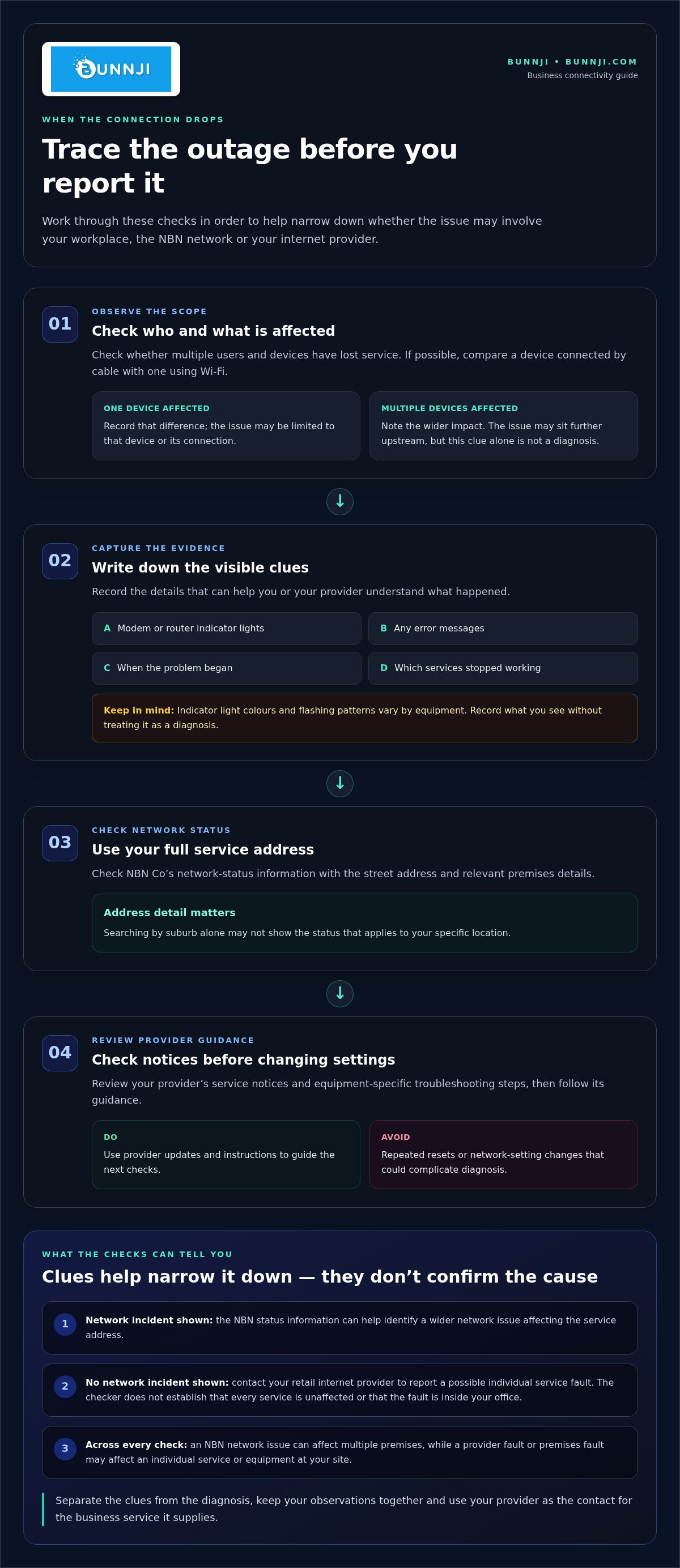
Work through these checks in order. Note what you find rather than guessing at the cause:
- Check the connection across your workplace. See whether multiple devices and users are affected. If one computer is offline but others can connect, record that difference. If possible, check whether a device connected by cable has the same issue as one using Wi-Fi.
- Look for visible clues. Record the modem or router indicator lights, any error messages, when the problem began and which services stopped working. A light’s colour or flashing pattern can mean different things on different equipment, so record it without treating it as a diagnosis.
- Check NBN Co’s network-status information using your full service address. Enter the street address and relevant premises details, rather than searching by suburb alone. A suburb-wide search may not show the status that applies to your specific location.
- Review your provider’s notices and troubleshooting guidance. Providers may share service updates or equipment-specific steps. Follow those instructions, and avoid repeated resets or changes to network settings that could complicate diagnosis.
Who should you contact when the status checker shows no outage?
If the checker doesn’t show a network incident, contact your retail internet provider to report a possible individual service fault. The status tool is useful, but it doesn’t establish that every business service is unaffected or that the fault is inside your office. Your provider can investigate the service it supplies and advise on the next steps.
Make the conversation efficient by sharing the full service address, when connectivity stopped, which users and services are affected, and whether the issue affects wired and Wi-Fi devices. Include indicator-light observations or exact error messages, along with the troubleshooting steps you’ve already taken. Don’t repeat steps unless your provider or equipment instructions direct you to do so.
If this kind of fault is difficult to diagnose or your business relies on reliable connectivity, a telecommunications audit can help identify network risks and resilience needs. Bunnji’s business connectivity support brings NBN, fibre, 5G and communications requirements into the same conversation.
Compare business backup internet options before the next NBN outage
A backup connection is useful only if it can support the work your business needs to continue. The right option depends on which services matter most, how many people need access and whether the fallback remains usable during the same incident. If you’re planning for what happens when the nbn goes down, compare the setup and limitations before choosing a path.
Options range from a quick mobile hotspot to a separately installed connection. None removes every outage risk. A backup modem or phone still needs power, and a second service isn’t automatically independent if it relies on shared infrastructure or the same vulnerable equipment.
| Option | Setup and likely use | Capacity and limitations |
|---|---|---|
| Mobile tethering | Share a mobile phone’s connection with a laptop or another device. It can provide temporary access for essential tasks, such as checking email or joining a call. | Capacity depends on mobile coverage, reception, data allowance and how many devices share the connection. A phone hotspot may not suit a whole office or sustained high data use, and the phone needs power. |
| Dedicated 5G connection | Use a separate 5G service and compatible equipment as a business internet path. It may suit a site where mobile coverage is workable and several users need access. | Practical performance depends on coverage at the premises, indoor reception, network congestion, service terms and equipment capacity. It needs power and should be tested in its intended location. |
| Alternate fixed-line service | Install a separate fixed connection for sites with higher continuity needs or more users and systems to support. | Capacity depends on the service and site. Installation and equipment add complexity, and a second fixed service may still share infrastructure, routes or power with the primary connection. |
When could mobile or 5G backup suit a business?
Mobile tethering can provide a temporary route for a small number of staff who need to complete priority online tasks. A dedicated 5G connection may suit more users, depending on the site and service. In both cases, coverage, congestion, data allowances and indoor reception affect usefulness. Test the actual devices, location and essential applications before relying on either option.
When should a business consider another fixed connection?
An alternate fixed service may be worth considering when more staff, cloud systems or customer-facing operations need connectivity during an interruption. Check whether its physical route and supporting infrastructure are genuinely separate from the primary service. If both depend on a shared point of failure, the second connection may not provide the independence you expect.
Test the fallback under normal working conditions, including the services staff need and the equipment that must stay powered. This shows whether it supports essential work, rather than simply confirming that a connection is available.
NBN outage: a practical business response plan
When the connection drops, give staff a clear order of operations. Start with safety and essential services, then establish what’s affected, choose a workable communication channel and follow provider guidance. A plan helps prevent multiple people making uncoordinated changes while customers and colleagues are waiting for updates.
Record when the outage began, identify affected systems, check provider and NBN Co updates, notify staff, then activate a tested fallback if its connection, capacity and access arrangements are ready. Keep the process simple enough for the person on duty to follow, even if your usual IT contact isn’t available.
Use this checklist as a starting point:
- Prioritise: List the systems that must keep operating, such as customer calls, payment processing or access to essential records. Decide which work can pause.
- Assign: Nominate who contacts the provider, shares staff updates and handles urgent customer enquiries.
- Check: Follow provider instructions and equipment-specific guidance. Don’t apply repeated resets or change settings without direction.
- Switch carefully: Use the agreed fallback only after checking it works at the premises, supports priority tasks and is accessible to the staff who need it.
- Track: Keep an incident timeline and update the plan after service returns.
How should teams keep communicating during an outage?
Choose a contact method that doesn’t rely on the affected office connection, such as mobile calls or messages where coverage and staff access allow. Tell the team which channel to use, who is responsible for urgent customer or operational calls, and how to escalate an issue if the first contact is unavailable. If your cloud phone system has mobile access, include the steps and login details in your continuity plan, stored somewhere staff can reach without the office network.
Keep internal and customer messages factual. Say which services are affected, what alternative contact route is available and when you’ll provide another update. Avoid promising a restoration time unless your provider has given one. Update the message if the situation changes or service is restored.
What should you record for the provider and your outage review?
Write down the start time, affected locations, users and services, plus any equipment lights or error messages. Note the troubleshooting steps taken and their results. When you report the issue, record the provider’s reference details and any restoration updates or instructions. This gives the provider useful context and helps your team avoid repeating checks unnecessarily.
After the connection returns, note what worked, what slowed the response and whether the fallback supported the tasks you expected. Check that systems reconnect properly and staff know normal service has resumed. Use those observations to refine roles, contact details and access arrangements before the next disruption.
Bunnji’s business continuity support can help bring connectivity and phone systems into your outage response planning.
Build a more resilient NBN and cloud phone setup with Bunnji
Resilience isn’t just a second internet connection. It’s a plan for keeping business-critical work moving if your usual service is unavailable. Bunnji can assess your business NBN, fibre, 5G and cloud VoIP requirements together, then help shape a continuity approach around your site and the services your team relies on.
Start with the tasks that matter most. A business that depends on customer calls, cloud records and online transactions may need a different design from a site where staff can pause non-urgent work. The right setup also depends on available connectivity at each location, the capacity priority services need, and who will manage the fallback and recovery process.
How can internet and phone continuity be planned together?
Map how each phone function works before deciding what should happen during an outage. Check whether desk phones, softphone apps, call queues and voicemail rely on the office internet connection, and identify any alternative routes available to staff. Decide how calls should be handled if that path fails. For example, should priority calls reach designated mobiles, or should callers hear a clear recorded message? The right option depends on your phone configuration and business needs.
Staff need a simple process, too. Document who is responsible for urgent calls, how calls are escalated and what to tell customers if normal call handling is disrupted. If mobile connectivity forms part of the plan, consider whether employees need business mobile SIM-only plans to access calls or essential online tools away from the usual connection.
Your phone system and internet design should support the same continuity priorities. Bunnji’s business VoIP guide for Australia explains how cloud calling fits into a broader communications setup.
What should a business review before choosing a solution?
Review the applications, locations and communications that must remain available, then compare possible fallback paths against those needs. Consider whether the connection is independent of your primary service, whether it has enough capacity for priority users, how equipment will stay powered, and what staff must do to switch over and return to normal service. Test the process, not just the connection. A backup that works technically may still be hard to use if access details, call-routing steps or responsibilities aren’t clear.
Keep the plan practical and review it when your site, systems or staffing change. A telecommunications audit can help identify connectivity risks and resilience needs, bringing your internet path, phone routing and recovery priorities into one view.
When assessing what happens when the nbn goes down at your site, consider your internet connection, phone routing and recovery process as one continuity plan.
Make your next outage plan part of everyday operations
The most useful time to decide what your team will do during a disruption is before one begins. Choose a realistic scenario, such as losing the office connection during a busy period, and walk through who makes decisions, how urgent calls are handled and which work can wait. A short practice run can reveal missing access details or unclear responsibilities while there’s still time to fix them.
Thinking through what happens when the nbn goes down also helps turn continuity from a technical issue into a practical business routine. The aim isn’t to eliminate every disruption. It’s to give your people a clear next step and your customers a dependable way to reach you.
Bunnji can help shape a connectivity approach around your site, essential services and communications priorities. Talk with Bunnji about a business connectivity plan and take a practical next step towards keeping your business connected.
Frequently Asked Questions
What should I do first when the NBN goes down?
First, check whether several devices are affected, then use NBN Co’s status checker with your full service address. Review your provider’s updates and contact them if no network outage appears. To understand what happens when the nbn goes down at your premises, note the start time and affected services, such as phones or payment terminals. Follow instructions for your specific equipment rather than repeatedly resetting devices.
How can I check whether there is an NBN outage in my area?
Use NBN Co’s network-status checker and enter the full service address, including the street and premises details. A suburb search can be too broad to identify information relevant to your connection. The checker may show planned work or a reported network incident, but a fault affecting one service may not appear as a wider outage. If service is still disrupted and no outage is listed, contact your retail provider.
Will my business phone work if the NBN goes down?
It depends on how your phone service is configured and whether another connection is available. Cloud VoIP calls using the affected office internet path may be interrupted, while a phone app using mobile data could remain usable if configured and in coverage. Before an outage, document how calls should be handled, who should take urgent enquiries and how staff can access any alternative. Test the agreed call-handling process in advance.
Can I use mobile data while the NBN is down?
Yes, mobile data may provide a temporary internet path if the mobile network has coverage and your device and plan support the work required. Tethering might let one employee access email, but it may not suit several staff or data-heavy applications. Check data allowances and reception where the business operates. Test access to essential systems, including any required sign-ins, rather than assuming a hotspot will support every task.
Does an NBN outage mean my internet provider is down too?
No. An NBN network incident and a fault affecting your provider’s service are different possibilities. NBN Co supplies wholesale network services, while your retail provider manages your customer service relationship and investigates your individual connection. The provider may also have service updates that help explain an interruption. If the NBN Co checker doesn’t show an outage for your full address, report the disruption to your provider for investigation.
How long does it take to fix an NBN outage?
There isn’t one restoration timeframe that applies to every outage. Timing depends on the cause, the network or service affected and the repair work required. Check NBN Co’s status information and your provider’s updates for details about the specific incident, and note any revised information. While you wait, follow your business continuity process and keep staff informed. Don’t plan operations around an assumed restoration time.
Will restarting my NBN connection box fix an outage?
Restarting equipment may help with some local equipment or service issues, but it won’t repair a wider network outage. Follow your provider’s instructions and the guidance for your specific connection equipment before restarting. NBN Co’s restart advice for a particular HFC issue applies to that situation, not every NBN connection. If you’re unsure, record the equipment’s status and ask your retail provider for the appropriate troubleshooting steps.


