

What if your network’s biggest weakness isn’t a slow connection, but the gaps between internet, Wi-Fi, security and support? For Australian businesses, unreliable connectivity can interrupt staff workflows and customer service. Limited internal resources can also make network performance and security harder to oversee. Understanding what managed network services australia can cover is a practical first step towards closing those gaps.
This guide explains what can sit within a managed network arrangement, from connectivity and network monitoring to security and ongoing support. It compares in-house, managed and hybrid approaches, with practical ways to assess them against your team’s capabilities and business needs.
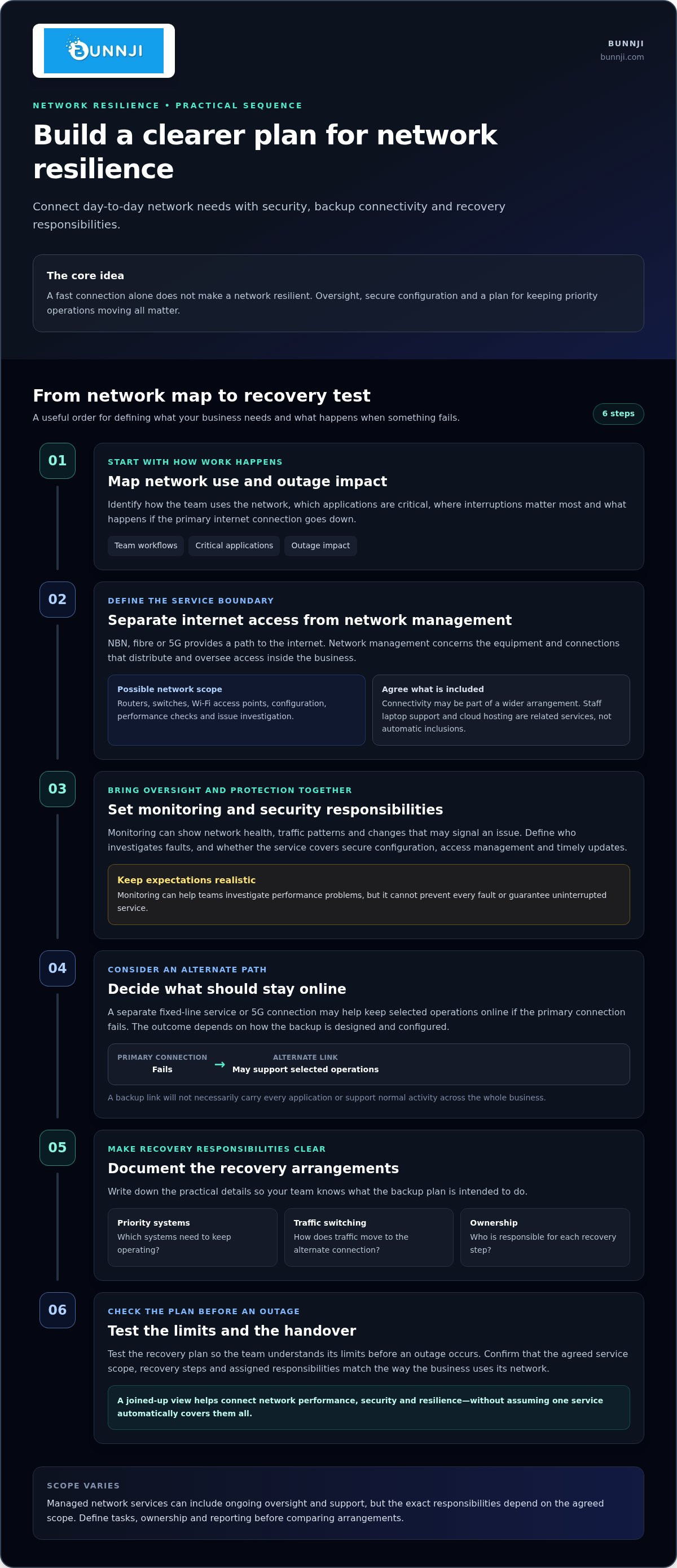
The key is to treat connectivity, security and support as parts of one operational system. Start by mapping how your team uses the network, where interruptions have the greatest impact and what happens if your primary internet connection goes down. Bunnji brings together managed IT, networking and Wi-Fi, business NBN and fibre connectivity, cybersecurity and telecommunications audits to help Australian businesses plan connections with clearer oversight.
Key Takeaways
- Managed network services can include ongoing oversight and support. Define the tasks, responsibilities and reporting you need before comparing arrangements.
- Monitoring can help teams spot performance changes and investigate issues, but it cannot guarantee your network will never go down.
- Compare in-house, managed and hybrid models against your team’s capacity, need for external expertise and plans for growth.
- Assess users, sites, critical applications and the impact of outages to build a clearer picture of your business network needs.
- Managed network services australia can bring networking, security and connectivity planning into a more joined-up approach.
What do managed network services in Australia cover?
Managed network services are the ongoing oversight and support of a business network. The aim is to keep connections, access and network equipment working effectively for day-to-day operations. In practice, managed network services australia can include monitoring, configuration, performance checks and issue investigation. The exact responsibilities depend on the agreed scope.
Network management covers the work involved in operating and maintaining a network. The Network management overview, for example, discusses fault analysis, performance management and provisioning. A managed service may take responsibility for some of these activities, while the business retains others.
Network management is different from internet access alone. An NBN, fibre or 5G connection provides a path to the internet; network management concerns the equipment and connections that distribute and oversee access within a business. General IT support may cover staff devices, accounts and applications, while a cybersecurity service focuses on protecting systems and data. These areas can overlap, but they are not interchangeable.
Which network components might a managed service cover?
Depending on the agreed scope, network equipment may include routers, which direct traffic between networks; switches, which connect wired devices; and Wi-Fi access points, which provide wireless coverage. Connectivity, such as the business internet link, may also form part of a wider arrangement.
Configuration determines how equipment and access are organised. Performance oversight helps track changes, while monitoring can flag issues for investigation. When a fault occurs, the investigation may need to distinguish between local network equipment, Wi-Fi coverage and the internet connection. Monitoring supports daily operations, but it cannot guarantee there will be no outage. Staff laptop support and cloud hosting are related services, not automatic parts of network management.
Which Australian businesses may benefit from managed networking?
Managed networking can be useful for businesses with several sites that need consistent oversight, teams that rely on cloud applications, or organisations without a dedicated network specialist. To assess the fit, consider how much internal expertise is available and how important stable access is to everyday work.
Network performance also affects cloud voice. A congested or unstable connection can disrupt calls as well as staff collaboration and access to cloud tools. Businesses assessing voice traffic and connectivity can explore the Business VoIP Australia strategy guide to understand how phone systems depend on the network.
How managed network services connect performance, security and resilience
A business network is a connected system. Availability depends on the internet connection, how traffic moves through routers, switches and Wi-Fi, who can access resources, and how faults or security risks are handled. A change in one area can affect the others. Congestion may disrupt cloud applications, while weak access controls can expose systems even when the connection is fast.
A fast connection is not the same as a resilient, well-managed network. Resilience also depends on oversight, secure configuration and a plan for keeping priority operations moving when something fails. That joined-up view is central to managed network services australia. The service scope should reflect how the business uses its network and the impact of disruption.
What network monitoring and security can contribute
Monitoring gives a business visibility into network health, traffic patterns and changes that may signal an emerging issue. It can help a support team investigate performance problems, but it cannot prevent every fault or guarantee uninterrupted service.
Secure configuration, access management and timely updates are useful areas to define in the service scope. The Australian Cyber Security Centre’s guidance can help businesses understand practical cyber security measures, but using that guidance does not automatically mean a business complies with every relevant obligation. For telecommunications information and consumer protections, consult the Australian Communications and Media Authority (ACMA).
How redundancy supports business continuity
An alternate connection, such as a separate fixed-line service or 5G, may help keep selected operations online if the primary connection fails. Which services continue depends on how the backup is designed and configured. A backup link will not necessarily carry every application or support normal activity across the whole business.
Document the recovery arrangements: which systems take priority, how traffic switches to the alternate connection, and who is responsible for each step. Test the plan so your team understands its limits before an outage occurs. Bunnji’s internet redundancy guide explores how backup connectivity can support continuity.
A telecommunications audit can help identify network gaps, hidden costs and security vulnerabilities, giving you a clearer basis for planning. Bunnji brings together managed IT, networking and Wi-Fi, cybersecurity, business NBN and fibre connectivity, 5G options and redundancy planning. Explore Bunnji’s managed connectivity and IT services to consider these capabilities together around your business needs.
Comparing managed, in-house and hybrid network management
There is no single model that suits every business. The right fit depends on your internal skills, how much control you need day to day and the time your team can give network operations. Compare ownership, expertise, visibility, workload and scalability to make the trade-offs clearer.
Outsourcing does not have to mean giving up oversight. Your business can retain ownership of priorities and decisions while an external specialist handles agreed tasks. Clear responsibilities, reporting and approval processes help keep that balance visible.
| Consideration | In-house | Managed | Hybrid |
|---|---|---|---|
| Internal ownership | Your team directs network operations. | Agreed work is handled externally. | Your team retains selected decisions and responsibilities. |
| External expertise | Relies mainly on skills within the business. | Provides access to external network expertise. | Combines internal knowledge with specialist support. |
| Visibility | Direct access to internal processes and records. | Depends on agreed reporting and access. | Shared visibility can be built into the arrangement. |
| Workload | Network tasks sit with internal staff. | Agreed tasks shift to the service arrangement. | Work is divided between internal and external teams. |
| Scalability | May require more internal capacity as needs change. | Support can be shaped around the agreed scope. | Responsibilities can be adjusted as internal capacity changes. |
When might in-house network management suit a business?
In-house management can suit a business with experienced network staff and a strong need for direct, day-to-day control. Internal specialists understand the organisation’s systems and can coordinate changes closely with other teams. The trade-off is that the business retains responsibility for coverage, skills development and network changes. External specialist support can complement an internal team when an issue calls for additional expertise.
When can a managed or hybrid model make sense?
A managed arrangement can provide ongoing network expertise without requiring the business to build every capability internally. A hybrid approach may suit internal staff who want to retain oversight but delegate agreed monitoring, configuration or support tasks. Define decision rights, reporting and handover processes so responsibilities remain clear.
For businesses considering managed network services australia, Bunnji brings managed IT, networking and Wi-Fi together with telecommunications audits that can help identify network gaps and hidden costs. Use those findings to decide which responsibilities to keep in-house and where external support may fit.
How to assess your business network needs before choosing a service model
Start with how the network supports work, not with a particular technology or service package. Record your users, applications, pain points and internal capacity. This gives you a practical basis for defining the support you need and comparing managed network services australia options.
What should a practical network assessment examine?
Map your internet connections, routers, switches and Wi-Fi coverage, then note which applications depend on them. Record who currently manages access, updates, monitoring and incident response. Prioritise findings by operational impact. For example, a recurring Wi-Fi dead zone that disrupts staff collaboration may deserve attention before replacing equipment simply because newer technology exists.
- Users and sites: Note who relies on the network, where they work and whether requirements vary between locations.
- Critical applications: Identify essential cloud platforms, file access, customer systems and voice services. For connected voice workflows, the AI voice agents trend report can help you consider how network readiness supports calls and related processes.
- Current pain points: Document outages, slowdowns, Wi-Fi coverage concerns and the effect each has on customers and staff. Note which operations stop and what can continue.
- Connectivity dependencies: Record which services rely on each internet connection and whether any backup arrangements exist.
- Internal capacity: List the skills and time available to oversee network changes, access, updates and incidents.
Keep the map practical. Include where equipment sits, which connection serves each site and any known dependencies between applications and network services.
How can you compare service scope and reporting?
Compare arrangements by responsibilities, visibility and process, not just by the label “managed” or “hybrid”. Establish which tasks are handled internally or externally, what network information is reported, how issues are escalated, and how proposed changes are approved and recorded. Clear boundaries help your business retain oversight and reduce confusion during incidents.
A telecommunications audit can help surface vulnerabilities, hidden costs and resilience gaps, while highlighting unnecessary complexity in existing arrangements. Use its findings to prioritise needs and shape a scope around business impact rather than assumptions. Focus on clearly documented responsibilities and reporting, rather than unverified promises about response times, uptime or savings.
Use your assessment to plan connectivity and support around the way your business operates. Explore Bunnji’s telecommunications audits and managed IT services to help shape that plan.
How Bunnji brings managed networking and business connectivity together
A business network does not operate in isolation. Internet access, Wi-Fi, security and communications all affect how staff use cloud tools and serve customers. Bunnji brings managed IT, networking and Wi-Fi, cybersecurity and business connectivity together, helping Australian businesses consider those moving parts as one operational system.
A joined-up view of networks, connectivity and communications
Cloud phone systems and connected workflows rely on a stable network. Inconsistent connectivity or Wi-Fi performance can affect calls and collaboration tools. Plan network management alongside the internet services and communications your team depends on.
Bunnji provides business NBN, fibre upgrades and 5G internet, as well as internet redundancy planning. The right mix depends on your business requirements, existing connectivity and the impact an outage could have on important operations. Backup connectivity can form part of a plan, with recovery arrangements shaped around the services your team needs to keep moving.
For a closer look at how business voice and connectivity planning fit together, read the Business VoIP Australia strategy guide.
A clear next step for Australian businesses
A telecommunications audit can help you understand the services you rely on, identify hidden costs and uncover network gaps, security vulnerabilities or resilience concerns. It gives you a clearer starting point for deciding what needs attention and how connectivity and support could be organised.
Recommendations can be tailored to your business requirements, rather than built around a one-size-fits-all setup. That may mean reviewing how current connections support your applications, identifying where Wi-Fi or network coverage needs attention, or considering whether NBN, fibre or 5G options align with your operating needs.
If you’re exploring managed network services australia, a practical conversation can connect your priorities with an approach to managed IT, networking and business connectivity. Discuss a joined-up network and connectivity approach with Bunnji.
Build a network that’s ready for what’s next
The right network approach starts with a clear view of what your business relies on, where disruption would hurt most and how much expertise your team can provide internally. Managed network services australia can support that planning, but the scope should match your operations rather than a generic checklist.
Keep three points in mind: monitoring helps teams investigate network changes, but cannot prevent every outage; in-house, managed and hybrid models can each work when responsibilities are clear; and reliable connectivity depends on planning for the applications and communications your staff use every day.
Bunnji brings managed IT, networking and Wi-Fi together with business NBN, fibre upgrades, 5G connectivity and internet redundancy planning. A telecommunications audit can also help uncover hidden costs and security vulnerabilities, giving you a practical starting point for decisions.
Ready to discuss a network approach shaped around your business needs? Talk with Bunnji about a managed network approach.
Frequently Asked Questions
What are managed network services?
Managed network services provide ongoing oversight and support for a business network. Depending on the agreed scope, this may include monitoring network health, configuring equipment, investigating performance issues and managing changes. The aim is to support reliable access to the systems staff use every day. Managed network services are distinct from internet access alone, and responsibilities depend on the arrangement.
What is included in managed network services in Australia?
Managed network services in Australia may cover routers, switches, Wi-Fi access points, network configuration, performance monitoring and fault investigation. Some arrangements also include connectivity planning, access management or security tasks. Define what is handled, what reporting you’ll receive and how changes are managed. Endpoint support, cloud hosting and broader cybersecurity may be related services, but they are not automatic parts of network management.
Are managed network services worth it for a small business?
They may be worthwhile if your small business relies on cloud applications, Wi-Fi or cloud phone systems but lacks the time or specialist skills to manage the network internally. Consider the effect of outages, recurring connectivity issues and the workload placed on staff. A managed or hybrid arrangement can provide external expertise for agreed tasks while you retain oversight. The value depends on your needs and the scope of support.
What is the difference between managed network services and managed IT services?
Managed network services focus on the connections and equipment that move data around your business, such as routers, switches and Wi-Fi. Managed IT services can cover broader technology support, including staff devices, systems and day-to-day IT needs. The scopes can overlap, particularly around security and troubleshooting. Clarify which team handles each task so network faults and related IT issues do not fall between responsibilities.
Can managed network services help prevent internet outages?
They can help identify performance changes and investigate network issues, but they cannot prevent every internet outage. An outage may originate with an internet connection or equipment beyond the internal network. Monitoring can improve visibility, while an alternate connection and documented recovery plan may help maintain selected operations. Whether services switch over successfully depends on the design, configuration and business continuity arrangements.
How do I choose between managed and in-house network management?
Choose based on your internal skills, available time and need for direct control. In-house management may suit a business with experienced network staff who can oversee changes and daily operations. Managed support can provide external expertise for agreed responsibilities. A hybrid model lets your team retain oversight while specialists handle selected tasks. Compare reporting, escalation processes and decision-making responsibilities before setting the scope.
How can I tell whether my business network needs an audit?
Consider an audit if outages or slowdowns recur, Wi-Fi coverage is inconsistent, responsibilities for updates and access are unclear, or you lack a clear picture of connectivity costs and dependencies. Bunnji’s telecommunications audits can help identify hidden costs, security vulnerabilities and network gaps. Document affected sites, applications and business impacts first. That context helps make the findings useful for planning next steps.


