

A phone menu only helps when every option leads somewhere useful. If callers sit through a long greeting, guess which number to press or reach a dead end, the script is adding friction rather than solving a problem. These auto attendant script examples show how to make each message clear, concise and easy to act on.
One script rarely covers every situation. Business hours, after-hours and busy periods often need different messages and call paths. Use the examples in this guide to choose menu options and routing around what callers need. You’ll see how to order options, set expectations and give callers a clear next step when nobody answers.
We compare practical call-flow approaches for Australian businesses, from a straightforward menu to options for more involved requests. You’ll also learn how a cloud phone system can bring greetings, schedules, routing and fallback paths together, so the words callers hear match the way your team handles calls.
Key Takeaways
- Use these auto attendant script examples as adaptable starting points for greetings, menus and changes to your usual operating hours.
- Choose a menu-first, direct-routing or hybrid call flow based on what callers need and how your team handles calls.
- Make sure every spoken option leads to an active destination, with a clear next step if a team member can’t answer.
- Test your script from a caller’s perspective, then review it whenever your call-handling process or business hours change.
- A cloud phone system can bring greetings, routing and staff availability together. An AI voice agent may also help with tasks such as booking appointments.
What Is an Auto Attendant Script, and What Should It Do?
An auto attendant is the automated greeting and call-routing layer callers hear when they ring a business. It can identify the business, offer menu choices and direct a caller to a team, person, voicemail or another configured destination. It isn’t a replacement for every conversation. Its job is to make the next step clear, not to make callers navigate a maze before they can speak with someone.
An auto attendant script is the spoken guide that welcomes callers, explains their choices and directs each selection to a useful destination or a clear fallback. That last part matters. Each menu option should connect to an active destination, or explain what happens if nobody answers. A polished greeting can still frustrate callers if the options lead nowhere.
The terms can overlap, but the parts of the call flow do different jobs. An auto attendant generally routes callers based on their choices. A voicemail greeting invites them to leave a message. An on-hold message plays while they’re waiting in a queue or transfer. A broader Interactive Voice Response (IVR) system may go beyond routing by connecting with business systems to complete tasks. The Automated attendant overview provides further background on the function and terminology.
How Does an Auto Attendant Help Callers?
A concise opening tells callers they’ve reached the right business and helps them decide what to do next. For example: “Thanks for calling [Business Name]. For appointments, press 1. For accounts, press 2.” The choices reflect familiar caller needs rather than internal team names.
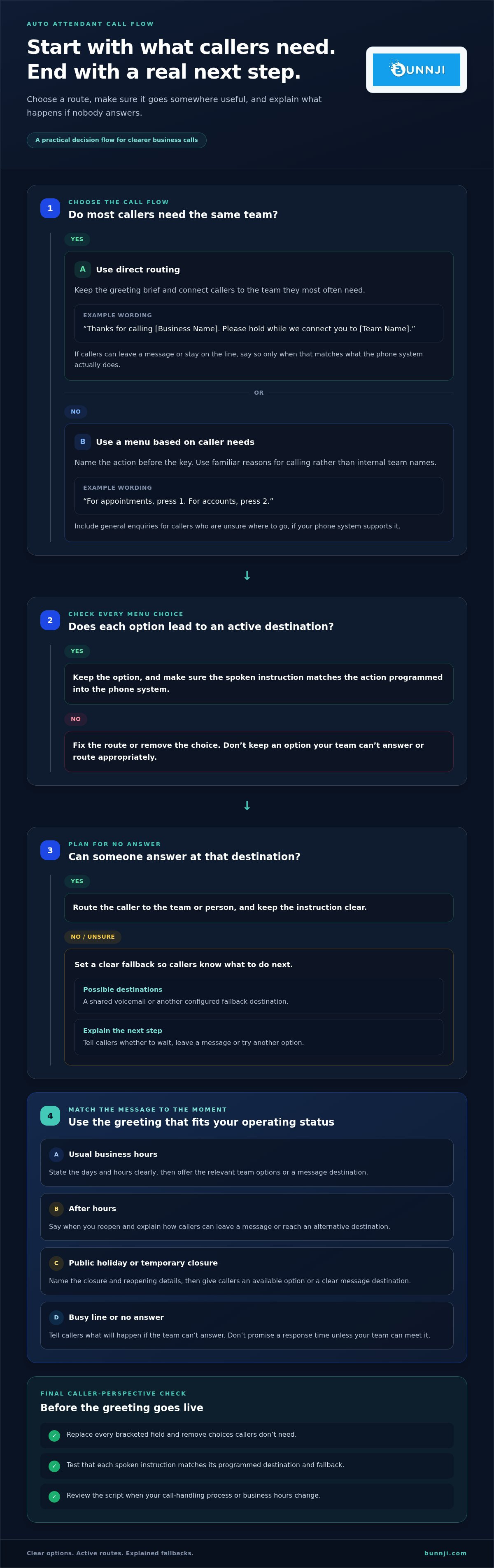
Depending on how the phone system is configured, a selection can route to a team, a named staff member, voicemail or another destination. If the appointments team can’t answer, for instance, the call might go to a shared voicemail or a fallback destination. Clear routing can reduce unnecessary transfers, but it can’t guarantee a particular outcome. Explain the fallback so callers know whether to wait, leave a message or try another option.
What Makes a Business Phone Greeting Effective?
Use plain English, a calm tone and short sentences that are easy to understand over the phone. Put callers’ likely needs first and describe each option the way a customer might ask for it. “For billing, press 1” is clearer than an internal label such as “Accounts Receivable”. Leave out background information that doesn’t help callers choose.
Order essential options logically, then check that each spoken instruction matches the action programmed into the phone system. If callers can reach reception by pressing zero, say so. If an operator isn’t available through the menu, don’t imply that one is. The same applies to voicemail and fallback paths: explain what will happen in direct language.
These fundamentals make auto attendant script examples more than polished greetings. They connect the words callers hear to a working call flow, helping people find the right next step without confusing choices or unexplained dead ends.
Auto Attendant Script Examples for Common Business Situations
Use these auto attendant script examples as starting points, not scripts to install without checking the call flow. Replace every bracketed field and make sure each instruction matches a real destination in your phone system. Keep only the options callers need, and remove any choice your team can’t answer or route appropriately.
Main Greeting and Menu Script Examples
Customisable main greeting: “Thanks for calling [Business Name]. For [Team or purpose], press [Key]. For [Team or purpose], press [Key]. To speak with [Reception or general enquiries], press [Key].”
Give callers a short introduction, then name the action before the key. Group menu options by what callers want, such as appointments, sales or accounts. Add a general enquiries choice for callers who aren’t sure where to go, if your phone system supports it. Avoid listing teams callers won’t recognise.
Customisable direct-to-team greeting: “Thanks for calling [Business Name]. Please hold while we connect you to [Team Name]. If you’d prefer to leave a message, press [Key] or stay on the line.” Use this when most callers need the same team and the route has a clear fallback. Make sure the instruction about staying on the line matches what the system actually does.
Business Hours and Special Closures
Customisable business-hours greeting: “You’ve reached [Business Name]. Our hours are [Days and Hours]. For [Team or purpose], press [Key]. For [Team or purpose], press [Key]. To leave a message for [Destination], press [Key].” Keep the hours current and state them in a format callers can understand quickly.
Customisable public-holiday message: “Thanks for calling [Business Name]. We’re closed for [Public Holiday] and will reopen at [Day, Date and Time]. You can leave a message for [Destination] by pressing [Key].”
Customisable temporary-closure message: “Thanks for calling [Business Name]. We’re temporarily closed until [Day, Date and Time]. For [available option], press [Key]. Otherwise, leave a message for [Destination], and [explain the next step].” Don’t promise a response time unless your team can meet it.
After-Hours, Busy and No-Answer Script Examples
Customisable after-hours message: “You’ve reached [Business Name] outside our usual hours. We reopen [Day] at [Time]. To leave a message for [Team or Person], press [Key]. For [alternative destination], press [Key].” This gives callers a next step without suggesting someone is monitoring messages outside business hours.
Customisable busy-line message: “All [Team Name] team members are assisting other callers. Please stay on the line to [wait or keep your place, if supported], or press [Key] to leave a message.” Only mention keeping a place in the queue if the system does that.
Customisable no-answer fallback: “We haven’t been able to connect your call. Press [Key] to leave a message for [Team], or press [Key] to return to [destination].” If callers need urgent assistance, name the appropriate alternative contact or service only when one is available and configured. For callers who can’t use the menu, explain how to reach [alternative destination], if your system supports it.
Read every script aloud and test each key, transfer and voicemail route. For a cloud phone workflow that brings greetings and call routing together, see Bunnji’s tailored business phone systems.
Menu-First, Direct Routing or Hybrid: Which Call Flow Fits?
The right call flow depends on why people ring and how your team handles those calls. A menu can help callers choose between distinct enquiry types, while direct routing may suit a business where most calls go to the same team. A hybrid combines both. More options aren’t automatically more helpful. Remove any choice that doesn’t lead to a useful, working destination.
| Call flow | Caller clarity and choices | Staff availability | Maintenance effort |
|---|---|---|---|
| Menu-first | Callers choose from clearly named teams or enquiry types. Useful when needs differ, but a long or unfamiliar menu can make the next step harder to spot. | Can direct callers to separate teams, but each route needs a sensible fallback when that team can’t take the call. | Review the wording and destinations when teams, services or responsibilities change. |
| Direct routing | Callers are connected straight to the main team or person, with few or no choices to navigate. | Works best when the usual destination has a clear alternative for busy periods or unanswered calls. | Fewer menu choices to maintain, though the main route and fallback still need testing. |
| Hybrid | Common calls go directly to the right destination; callers with other needs get a short menu or general route. | Can accommodate different call patterns if both the direct route and menu options have workable fallbacks. | Needs clear ownership of both the direct route and any menu options, with updates when call handling changes. |
When Does a Menu-First Auto Attendant Make Sense?
Choose a menu-first approach when callers commonly need different teams, such as bookings, accounts and sales, and those destinations are distinct in practice. It gives callers a way to direct themselves instead of relying on a receptionist to identify and transfer every enquiry. Keep labels familiar and options easy to tell apart. Review the menu whenever your services, team structure or call destinations change.
When Are Direct or Hybrid Call Flows Better?
Direct routing can suit a smaller business or a specialised team where most callers have the same reason for ringing. A hybrid pattern works when one enquiry type is especially common but other callers still need a choice: direct the main call type to its team, then offer a concise menu or general fallback for everyone else. The practical difference is simple: a menu asks callers to choose first, direct routing sends them to the usual destination, and hybrid does both where each makes sense.
Automation doesn’t have to feel impersonal. A calm, natural greeting, caller-friendly labels and a fallback that reflects how your team handles calls can make the experience feel considered. A technically neat menu won’t help if staff availability doesn’t match the routing, or if callers are offered choices no one owns.
Before settling on a flow, map the common reasons people call, identify who handles each one, then decide what happens when that person or team is unavailable. If a choice has no clear destination or fallback, simplify the design rather than adding another menu layer. The best approach is one callers can understand and your team can keep accurate.
How to Write, Test and Improve Your Auto Attendant Script
A reliable script starts with the way calls are handled, not with clever wording. Use this five-step process to connect caller needs to working destinations, then check that the spoken instructions match your phone system before and after launch.
- 1. Identify caller needs. List the common reasons people ring, such as bookings, sales, accounts or general enquiries. Group similar requests and prioritise the needs callers are most likely to have. Don’t ask callers to sort themselves into categories that only make sense inside your business.
- 2. Map each need to a destination. Assign every option to a person, team, voicemail or other configured route. Decide what happens if the destination doesn’t answer, is busy or is unavailable. A choice without an owner or fallback shouldn’t appear in the menu.
- 3. Draft the wording. Use plain, spoken language and put the action before the key, such as “For bookings, press 1.” Keep choices distinct. Avoid lengthy explanations, unnecessary information requests and internal labels callers may not recognise.
- 4. Test the whole call path. Call the business number and try every key, along with no selection, an incorrect selection and an unanswered transfer. Check that callers reach the expected destination and hear a useful next instruction at each point.
- 5. Review and maintain it. Confirm that the greeting reflects current business hours and every spoken option still matches an active destination. Revisit the script when opening hours, staff responsibilities, services or call-handling arrangements change.
Map Caller Needs to Script Options
Keep a simple call map beside the draft. For each caller need, record the menu wording, key, destination and fallback. For example, “Bookings, press 1” might route to a bookings team, then to its voicemail if unanswered. This makes gaps easier to spot before recording and helps prevent callers being sent to an outdated extension or an unmonitored mailbox.
Use the map to check whether options are genuinely different from a caller’s point of view. If two choices reach the same team and lead to the same outcome, consider combining them. Ask only for information needed to direct the call. The greeting shouldn’t become a form callers must complete before getting help.
Test the Greeting Before and After Launch
Read the wording aloud at a natural pace. If a phrase is awkward to say or hard to follow over the phone, simplify it. Then test the live call flow during business hours and out of hours, including what happens after a missed selection, a busy line and an unanswered call. Repeat the checks after routing or schedule changes.
Testing turns auto attendant script examples into a working caller experience. A cloud phone system can bring greetings, schedules, routing and fallback paths into one call workflow. Learn more about tailoring your business phone system with Bunnji.
Put Your Auto Attendant Script to Work with a Cloud Phone System
A clear script needs a phone workflow that follows through. Cloud VoIP brings greetings, schedules and call routing into one managed system, helping connect what callers hear with how your team handles calls. The aim isn’t to add more technology to every interaction. It’s to make the chosen route, and what happens next, match your business operations.
Connect Script Logic with Your Business Phone Workflow
Start with the real path behind each spoken option. If callers press a key for bookings, that route should reach the people or destination responsible for bookings. Consider how the call is handled when that destination is busy, unavailable or outside its scheduled hours. A useful fallback might be voicemail or another team, depending on your process.
Schedules matter too. A greeting that says you’re open while the phone system uses an after-hours route creates a confusing experience. Keep recorded hours aligned with your actual business hours, and review both after changes to staff coverage or call responsibilities. Cloud phone systems can manage calls across devices, helping teams handle calls beyond a single desk phone. The routing still needs to reflect who is responsible for responding.
Use your auto attendant script examples as a working map: each sentence should correspond to a destination, schedule or fallback in the phone workflow. This connection is central to planning a business VoIP system in Australia around how your team communicates.
Know When an AI Voice Agent Could Add Another Step
A standard auto attendant presents choices and routes a call. It’s a good fit when callers can reach the right outcome by selecting a team or destination. Some tasks involve more than choosing a menu option. A caller may want to book an appointment or have information added to a business record. These are examples where an AI voice agent may be more suitable than a basic menu.
Bunnji’s AI voice solutions can handle calls, book appointments and integrate with business CRMs and calendars. That makes them a possible fit when a call needs to do more than direct someone to a person. The right flow depends on the caller’s task: use a concise auto attendant for straightforward routing, and consider AI voice handling for defined tasks that involve a conversation or an update to connected systems.
Whichever approach you choose, keep the caller’s next step clear and make sure the route fits the way your business works. Bunnji’s business VoIP and AI voice solutions bring call handling and business workflows together.
Make Your Phone Journey Easier to Adapt
Your call flow shouldn’t stay fixed while your business changes. Treat the script as part of the caller experience and revisit it when you add a service, change responsibilities or notice callers regularly need a different route. Small, deliberate updates can keep the words callers hear aligned with the way your team works.
Use these auto attendant script examples as a starting point, then shape the wording and routing around your customers’ needs. Make sure your phone system supports that call journey, from the first greeting to the destination that handles the enquiry. Bunnji brings together business VoIP and cloud phone systems, with AI voice solutions for more involved call tasks.
Explore Bunnji’s business phone and AI voice solutions to plan a phone experience that can evolve with your business. A clear, well-matched call flow gives callers a more confident place to start.
Frequently Asked Questions
What is an auto attendant script?
An auto attendant script is the spoken guide that helps callers navigate an automated phone system. It tells them what choices are available and what to do next. For example, a caller might select “appointments” rather than needing to know the name of the staff member who manages bookings. The most useful auto attendant script examples reflect real caller needs, not internal reporting lines or team labels.
How long should an auto attendant greeting be?
There’s no single ideal duration for every business. Keep the greeting brief, but include enough information for callers to recognise the business and understand the choices. Read it aloud at a natural pace, then ask someone unfamiliar with the menu to listen once and explain their options. If they miss a choice or need to hear the message again, simplify the wording and remove details that don’t help them decide.
Can an auto attendant transfer callers to a person?
Yes, if the phone system is set up to route a selection to a person or team. A caller might choose “speak with reception” and be transferred to the relevant destination. Decide what happens if that person doesn’t answer, such as offering a voicemail option or returning the caller to another route. Test the transfer from an outside phone, as well as at different times when staff availability may change.
What should an after-hours auto attendant message say?
An after-hours message should tell callers they’ve reached the business outside its usual hours and give them a useful next step. State when the business reopens, including the day and time, then explain how to leave a message or use another available route. For a public holiday or temporary closure, update the message with the relevant reopening details so callers aren’t relying on the usual schedule.
Should an auto attendant offer callers a menu or route them directly?
Choose based on the reasons people call. If callers regularly need distinct teams, a short menu can help separate enquiries. If most calls go to the same person or team, direct routing may be simpler. A hybrid can send the common call type straight to its destination while offering other callers a small menu. Consider who can answer each route and what callers experience if that destination is unavailable.
What happens if a caller does not choose an auto attendant option?
The phone system follows its configured timeout behaviour, which might repeat the menu, send the call to a destination or direct it to voicemail. The result depends on how the call flow is set up. Don’t assume silence will connect callers to a person. Test what happens if you wait without pressing a key, and make sure the greeting tells callers how to proceed if they can’t use the menu.
Can an AI voice agent do more than an auto attendant?
Yes. An auto attendant typically presents options and routes calls, while an AI voice agent may support tasks that involve a conversation. For example, it may help a caller book an appointment or update information through a connected business system. Bunnji’s AI voice solutions can handle calls and integrate with business CRMs and calendars. Consider an AI voice agent when callers need to complete a task, not just choose where their call should go.


