
Everything Australian Businesses Need to Know About VoIP, Cloud Phones, NBN, Fibre, SIP, Phone Numbers, Internet Failover and AI Reception
Australian business communications have changed dramatically.
Not long ago, setting up a business telephone system usually meant installing physical telephone lines, purchasing a PBX and connecting desk phones around an office.
Today, a business may have employees working from an office, home, interstate or overseas. Calls can ring simultaneously on desk phones and mobiles. A Melbourne telephone number can be answered from Sydney. Internet connections can automatically fail over to 4G or 5G. An AI receptionist can answer a telephone call at midnight, book an appointment and transfer an urgent caller to an employee.
At the centre of all this are two essential services:
your business phone system and your internet connection.
Yet Australian businesses frequently have questions about how these technologies actually work.
What is VoIP?
What is SIP?
Do businesses still need landlines?
Can you keep your existing telephone number?
What happens to your phones when the NBN goes down?
What's the difference between FTTP, FTTN and HFC?
How much internet speed does a business actually need?
Is business fibre better than NBN?
Can employees answer their office phone from home?
Can an AI receptionist answer your business number?
This guide answers the questions Australian businesses most commonly ask about business phone systems, VoIP, NBN, fibre and modern business communications.
PART ONE: BUSINESS PHONE SYSTEMS
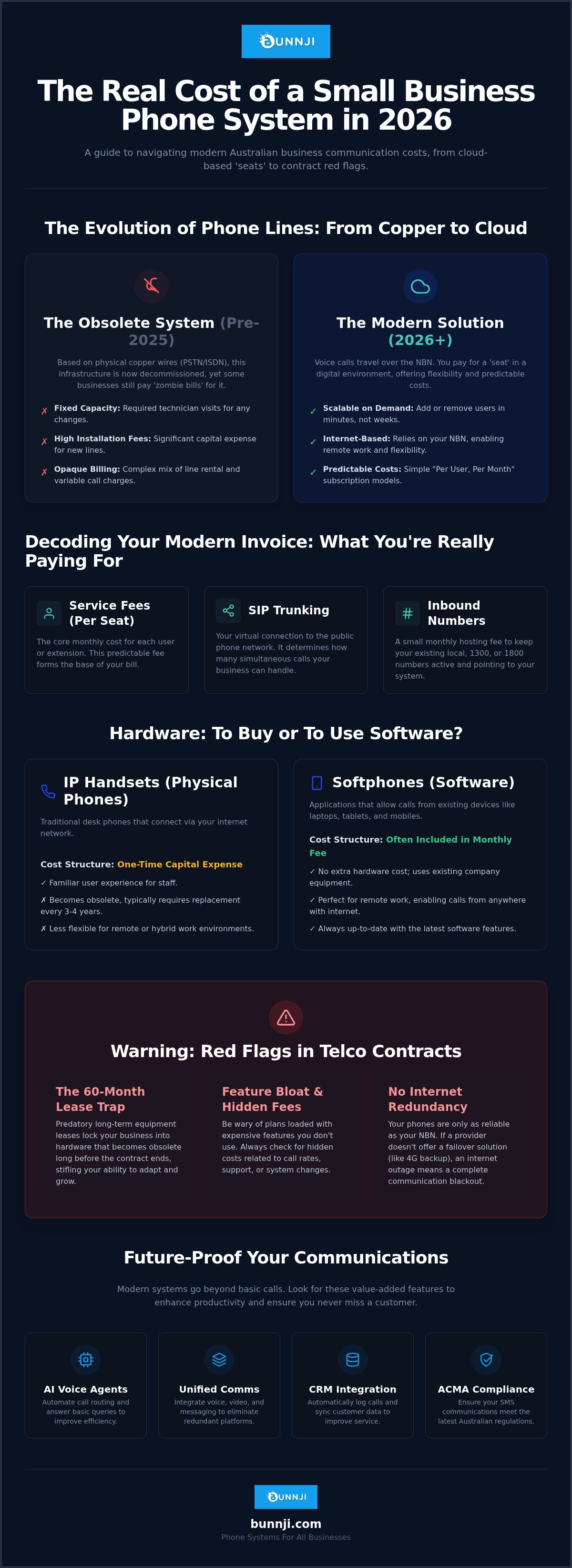
What is a business phone system?
A business phone system is the technology used to manage incoming and outgoing telephone calls for an organisation.
Unlike a simple mobile phone, a business phone system can provide features such as:
- multiple extensions
- call transfer
- call queues
- auto attendants
- voicemail
- business hours routing
- call recording
- conference calling
- mobile and desktop applications
- call reporting
- CRM integration
- remote working
- AI voice agents.
Modern systems are generally software-driven rather than relying on the large physical PBX equipment traditionally installed in communications rooms.
What is VoIP?
VoIP stands for Voice over Internet Protocol.
Instead of transmitting a telephone conversation through a traditional analogue telephone line, VoIP converts voice into digital information that travels across an IP network.
That network may be:
- NBN
- business fibre
- private data connectivity
- 4G or 5G
- an office LAN
- the internet.
This makes business telephone systems considerably more flexible.
Employees no longer necessarily need to be physically connected to a telephone socket in an office to use the company's phone system.
Is VoIP the same as a cloud phone system?
Not exactly.
VoIP describes the technology used to transport voice over an IP network.
A cloud phone system generally means that the PBX functionality is hosted remotely rather than relying entirely on telephone equipment located at the customer's premises.
So most modern cloud phone systems use VoIP, but the terms describe different parts of the technology.
What is a PBX?
PBX stands for Private Branch Exchange.
Think of the PBX as the brain of the company's telephone system.
It determines what happens when someone calls.
For example:
Incoming call
→ play greeting
→ ring reception
→ if unanswered, ring customer service
→ if unanswered, send to voicemail
The PBX also manages extensions, transfers, call queues, outbound calls and many other functions.
What is a cloud PBX?
A cloud PBX provides PBX functionality from hosted infrastructure.
Instead of having the entire telephone system physically located inside the office, much of the intelligence resides in a data centre or cloud environment.
Users connect using:
- IP desk phones
- desktop applications
- mobile applications
- web applications
- compatible devices.
This makes cloud PBX particularly useful for businesses with multiple locations or remote employees.
What is SIP?
SIP stands for Session Initiation Protocol.
It is one of the core protocols commonly used to establish, manage and terminate VoIP communications.
Businesses don't generally need to understand the engineering details, but SIP is an important part of modern telecommunications infrastructure.
What is a SIP trunk?
A SIP trunk connects a compatible phone system to the public telephone network using IP connectivity.
It effectively replaces many functions traditionally provided by physical telephone lines.
A business may therefore have:
Business number → SIP service → PBX → extensions
SIP trunks are particularly useful for organisations operating their own PBX or requiring more control over their telephone infrastructure.
Do Australian businesses still need landlines?
Not necessarily.
Many Australian businesses have migrated away from traditional fixed telephone lines towards VoIP and cloud-based systems.
However, a business can still retain a familiar geographic number such as:
02 — NSW/ACT
03 — Victoria/Tasmania
07 — Queensland
08 — South Australia/Western Australia/Northern Territory
Moving to VoIP does not automatically mean abandoning your existing telephone number.
PART TWO: BUSINESS PHONE NUMBERS
Can I keep my existing business phone number when changing providers?
Usually, yes.
This process is called number porting.
Australian businesses can generally port local numbers, mobile numbers, 13/1300 numbers and 1800 numbers between providers.
The service normally needs to remain active while the port is being completed.
Never casually cancel an existing telephone service before confirming the number has been successfully transferred.
How long does number porting take?
It depends on the type and complexity of the service.
Mobile numbers can often transfer quickly.
Individual local numbers generally take longer, while complex number ranges or multiple services can take considerably longer.
Businesses should plan migrations carefully so that telephone services remain available during the transition.
Can my Melbourne business keep its 03 number if employees work remotely?
With modern VoIP technology, employees don't necessarily need to be physically located where the telephone number originates.
An employee may answer calls to a business number through an authorised cloud phone application while working remotely.
Specific numbering and provider requirements still apply.
Can I have multiple phone numbers?
Yes.
A business can have separate numbers for:
- different offices
- departments
- marketing campaigns
- geographic regions
- individual businesses
- support services.
All of those numbers can potentially terminate on the same cloud phone system.
What is a 1300 number?
A 1300 number is an Australian inbound telephone service often used by businesses wanting a nationally recognisable number.
Calls can be routed to different destinations depending on the business's configuration.
What is an 1800 number?
1800 numbers are freephone numbers.
The calling arrangement differs from normal geographic numbers because the receiving organisation generally bears the relevant inbound call costs under its service agreement.
What's the difference between a 13 and 1300 number?
Both are used for inbound business services.
A 13 number has six digits and is generally considered easier to remember, while a 1300 number has ten digits.
Pricing and acquisition arrangements can differ substantially.
Can a business have numbers in different Australian states?
Modern telecommunications systems make multi-state number strategies much easier.
For example, an organisation could have:
03 Melbourne
02 Sydney
07 Brisbane
with calls routed into one central communications platform, subject to applicable numbering requirements.
PART THREE: HOW CLOUD PHONE SYSTEMS WORK
Can one business number ring several employees?
Yes.
This is one of the fundamental features of business phone systems.
A call can ring:
Reception + Sarah + John + Michael
simultaneously.
Alternatively, it can ring employees sequentially.
What is a ring group?
A ring group is a collection of extensions that receive calls according to predefined rules.
For example:
Sales Ring Group
→ Extension 101 → Extension 102 → Extension 103 → Extension 104
This helps businesses reduce missed calls.
What is a call queue?
A call queue holds callers until an employee becomes available.
Customers might hear:
"Thanks for calling. All our team members are currently assisting other customers. Please stay on the line."
More sophisticated queues can provide announcements, estimated wait information, callback options and reporting.
What is an auto attendant?
An auto attendant provides callers with options such as:
"For sales, press 1. For support, press 2. For accounts, press 3."
It then routes the call accordingly.
Modern AI voice agents can go further by allowing callers to simply explain what they need.
Can employees answer business calls on their mobile phones?
Yes.
Cloud phone systems commonly provide smartphone applications.
An employee can potentially make and receive calls through the business phone system without publishing their personal mobile number.
Can employees answer calls from home?
Yes.
Remote working is one of the major advantages of modern cloud communications.
Provided the system is correctly configured and suitable connectivity is available, employees can use:
- IP phones
- computers
- mobile applications
from outside the office.
Can employees make calls showing the business number?
Yes, depending on the configuration and regulatory requirements.
Calls placed through the company's phone system can present an authorised business caller ID rather than an employee's personal mobile number.
Can we transfer calls between offices?
Yes.
A properly designed cloud phone system can treat geographically separate employees almost as if they were sitting in the same building.
A Melbourne employee can potentially transfer a call to a Brisbane colleague using an internal extension.
Can we have different greetings after hours?
Yes.
For example:
8:30 am–5:30 pm
"Thanks for calling ABC Accounting. Please hold while we connect you."
After 5:30 pm
"Thanks for calling ABC Accounting. Our office is currently closed."
The after-hours call can then go to voicemail, an on-call employee, an answering service or an AI receptionist.
PART FOUR: BUSINESS INTERNET IN AUSTRALIA
What is the NBN?
The National Broadband Network is Australia's wholesale broadband access network.
Retail service providers purchase access and supply services to customers.
Businesses therefore normally purchase an NBN service from a retail telecommunications provider rather than directly from NBN Co.
What types of NBN connections are there?
Depending on the location, technologies may include:
- FTTP
- FTTN
- FTTC
- FTTB
- HFC
- Fixed Wireless
- Satellite.
Availability depends on the premises.
What is FTTP?
Fibre to the Premises means fibre runs to the premises.
For businesses, FTTP is generally highly desirable because it removes much of the old copper access component used by some other technologies.
It can support higher-speed services where available.
What is FTTN?
Fibre to the Node uses fibre to a neighbourhood node and existing copper infrastructure for the final connection to the premises.
The length and condition of the copper can affect performance.
This means two businesses purchasing the same nominal speed tier may not necessarily achieve identical line performance.
What is FTTB?
Fibre to the Building is commonly found in multi-dwelling or multi-tenant buildings.
Fibre reaches the building, with existing building cabling used for part of the final connection.
What is FTTC?
Fibre to the Curb brings fibre closer to the premises than FTTN, with a shorter copper section completing the connection.
What is HFC?
Hybrid Fibre Coaxial uses fibre and coaxial cable infrastructure.
It is commonly found in areas that historically had cable television networks.
What is Fixed Wireless?
NBN Fixed Wireless uses radio communications between the premises and NBN infrastructure rather than relying entirely on a physical cable to the building.
It is used particularly in regional and rural areas.
PART FIVE: INTERNET SPEED
What does 100/20 Mbps mean?
The first number generally represents the maximum nominal download speed.
The second represents upload speed.
So:
100/20
means a plan with nominal maximum rates of approximately:
100 Mbps download
20 Mbps upload
subject to technology, network, provider and service conditions.
What's the difference between download and upload speed?
Download is information travelling to your business.
Examples include:
- opening websites
- downloading documents
- streaming video
- receiving cloud data.
Upload is information travelling from your business.
Examples include:
- cloud backups
- uploading large files
- sending video
- video conferencing
- transmitting business data.
Businesses often underestimate the importance of upload capacity.
How much internet speed does my business need?
There is no single answer.
It depends on:
- number of employees
- cloud applications
- video conferencing
- VoIP usage
- file sizes
- cloud backup
- security systems
- guest Wi-Fi
- remote access
- industry.
A five-person accounting office and a fifty-person engineering company have very different requirements.
Is 100 Mbps enough for a business?
For some small businesses, absolutely.
For others, no.
Speed requirements should be determined by actual usage rather than employee count alone.
A small media company transferring enormous video files may need considerably more bandwidth than a larger office primarily using email and web applications.
Is 500 Mbps or 1 Gbps worth it?
For organisations using large cloud workloads, large file transfers, many concurrent users or bandwidth-intensive applications, higher-speed plans can substantially improve productivity.
However, purchasing 1 Gbps doesn't fix poor Wi-Fi, old cabling or badly configured network equipment.
The entire network needs to be considered.
PART SIX: NBN VS BUSINESS FIBRE
Is NBN the same as dedicated business fibre?
No.
NBN services and dedicated business fibre products can have different network architectures, service characteristics, support arrangements and commercial terms.
Businesses with mission-critical connectivity should consider more than headline download speed.
What is NBN Enterprise Ethernet?
NBN Enterprise Ethernet is a business-grade fibre service designed for organisations requiring higher-performance connectivity and business-oriented service characteristics.
NBN has established hundreds of Business Fibre Zones around Australia to increase access to Enterprise Ethernet.
Availability and commercial conditions depend on location and service provider.
When should a business consider dedicated fibre?
It becomes particularly relevant when connectivity is genuinely mission-critical.
Examples include businesses heavily dependent on:
- cloud applications
- VoIP
- hosted infrastructure
- large file transfers
- remote desktops
- video conferencing
- multi-site connectivity
- critical SaaS applications.
For these organisations, internet downtime can cost considerably more than the connectivity itself.
PART SEVEN: RELIABILITY AND BACKUP
What happens if my internet goes down?
Without redundancy, employees may lose access to:
- cloud applications
- VoIP
- payment systems
- remote desktops
- internet services.
This is why businesses should think about failover, not merely speed.
What is internet failover?
Failover means having another connection available when the primary connection fails.
For example:
Primary fibre
↓
Internet failure detected
↓
Firewall/router switches automatically
↓
4G/5G backup activates
↓
Business remains connected
When the primary connection returns, traffic can switch back.
Should every business have backup internet?
If losing internet would materially disrupt operations, backup connectivity deserves serious consideration.
For many modern businesses, internet redundancy is becoming comparable to insurance: you hope you never need it, but its value becomes obvious during an outage.
Is 4G or 5G good enough as backup?
Often, yes.
Mobile connectivity can provide excellent emergency failover.
However, performance depends on:
- signal strength
- network congestion
- building construction
- carrier coverage
- modem/router capability
- antenna placement.
Businesses with particularly critical requirements may use two physically diverse fixed connections instead.
Does backup internet automatically keep VoIP working?
Potentially, but only if the network is correctly designed.
Failover needs to consider:
- SIP connectivity
- firewall behaviour
- NAT
- IP addressing
- DNS
- session recovery
- phone registration
- QoS.
Simply plugging a 5G modem into an office does not automatically create a resilient telephone environment.
PART EIGHT: WI-FI AND NETWORKING
Why is my internet fast next to the router but slow elsewhere?
The problem may be Wi-Fi rather than the internet service.
Wi-Fi performance is affected by:
- distance
- walls
- interference
- access-point placement
- device capability
- channel utilisation
- building materials.
Internet and Wi-Fi are related, but they are not the same thing.
Will upgrading NBN fix bad Wi-Fi?
Not necessarily.
Buying faster internet doesn't magically improve wireless coverage.
If the internet reaches the building at 1 Gbps but an employee has poor Wi-Fi reception, the employee can still experience terrible performance.
What's better: Wi-Fi or Ethernet?
For stationary devices where reliability matters, wired Ethernet is often preferable.
Wi-Fi provides mobility and convenience.
Most businesses use both.
Do VoIP phones need special cabling?
Most modern IP desk phones use Ethernet networking.
Many support Power over Ethernet, allowing the network switch to provide power and data through the same Ethernet cable.
PART NINE: VOIP QUALITY
Does VoIP use much bandwidth?
Usually not compared with modern internet connections.
Voice calls are relatively lightweight.
The bigger issues are often:
- latency
- jitter
- packet loss
- congestion
- poor Wi-Fi
- incorrect network configuration.
Why does VoIP sometimes sound robotic?
Common causes include packet loss, jitter, congestion, poor wireless connectivity or network configuration problems.
A business may have plenty of theoretical bandwidth and still experience poor calls if the network is unstable.
What is latency?
Latency is the time it takes information to travel between endpoints.
Excessive latency creates noticeable conversational delay.
What is jitter?
Voice packets don't always arrive at perfectly regular intervals.
Variation in arrival timing is called jitter.
Too much jitter can degrade call quality.
What is packet loss?
Networks transmit information in packets.
If some packets don't reach their destination, voice quality can deteriorate.
Users may hear:
- missing words
- distortion
- robotic audio
- broken conversation.
What is QoS?
Quality of Service allows network equipment to prioritise certain traffic.
For example, properly configured QoS can prioritise voice traffic over a large background download.
This can help maintain call quality during periods of network congestion.
PART TEN: SECURITY
Can VoIP systems be hacked?
Any internet-connected system can face security risks if poorly configured.
Threats can include:
- compromised passwords
- fraudulent calls
- exposed SIP services
- unauthorised PBX access
- voicemail compromise
- denial-of-service attacks.
Business phone systems should therefore be treated as part of cybersecurity infrastructure.
How should a business secure its phone system?
Measures may include:
- strong authentication
- restricted administrative access
- firewalls
- encryption where supported
- monitoring
- software updates
- geographic calling restrictions
- fraud detection
- access controls
- secure backups.
Security should be designed into the system rather than added after an incident.
PART ELEVEN: MOVING OFFICE OR CHANGING PROVIDERS
Can I move offices and keep my business number?
Often, yes, particularly with modern VoIP services.
However, businesses should confirm number portability, service availability and emergency-location implications before moving.
Should I cancel my old service before porting?
Generally, no.
An active number is normally required for porting.
Cancelling prematurely can make the migration considerably more complicated and may risk losing the number.
What should I check before changing telcos?
Check:
- existing contract expiry
- equipment rental agreements
- early termination charges
- phone number ownership
- porting requirements
- internet availability
- hardware compatibility
- cancellation procedures
- support arrangements.
One of the most common migration mistakes is looking only at the new monthly price while ignoring obligations under the existing agreement.
Can my old provider refuse to port my number because I owe money?
Australian porting rules generally prevent a losing provider from refusing or delaying an authorised port simply because money is owed.
Contractual debts and number porting are separate issues.
The customer can still remain responsible for legitimate outstanding charges.
PART TWELVE: AI RECEPTIONISTS
What is an AI receptionist?
An AI receptionist is a voice agent capable of answering telephone calls and having natural-language conversations with callers.
Unlike a traditional IVR:
"Press 1 for sales."
an AI receptionist can ask:
"How can I help you today?"
The caller explains what they need.
What can an AI receptionist do?
Depending on the platform and integration, an AI receptionist may be able to:
- answer calls
- identify why someone is calling
- answer common questions
- collect customer details
- qualify leads
- book appointments
- transfer calls
- send SMS confirmations
- create CRM records
- create support tickets
- provide after-hours answering
- summarise conversations.
Can AI answer my existing business number?
Potentially, yes.
A properly designed business phone environment can route calls from an existing number to an AI voice service.
This is particularly powerful when the AI is integrated with the existing PBX rather than operating as an isolated service.
Can AI transfer callers to real employees?
Yes, appropriately configured voice agents can transfer calls to human staff.
This creates a useful hybrid model:
AI answers
↓
AI identifies requirement
↓
Simple request → AI handles it
Complex request → employee
Will AI replace receptionists?
Not necessarily.
Human receptionists remain considerably better at many situations requiring empathy, judgement, relationship management or unusual problem solving.
AI is particularly useful for:
- repetitive enquiries
- overflow calls
- after-hours answering
- appointment booking
- lead capture.
The strongest model for many businesses will be AI + humans, rather than AI instead of humans.
PART THIRTEEN: EMERGENCY CALLING
Will my VoIP phone work during a power failure?
Not necessarily.
Traditional telephone services and modern IP-based services behave differently during power failures.
If your:
- modem
- router
- firewall
- network switch
- NBN equipment
- IP phone
loses power, the service may stop working unless appropriate backup power and connectivity have been provided.
Businesses should not assume an IP phone will continue operating during a blackout.
What about Triple Zero?
Businesses must take emergency calling seriously when designing VoIP and cloud telephone systems.
Users need to understand the limitations of their service and have alternative methods available where appropriate, particularly during power or internet failures.
Mobile phones can form part of an emergency communications plan, subject to network availability.
PART FOURTEEN: CHOOSING A PROVIDER
What should I look for in a business telecommunications provider?
Don't choose solely on the cheapest monthly price.
Consider:
Support
Who answers when something breaks?
Technical capability
Does the provider actually understand VoIP, networking and internet infrastructure?
Ownership of the solution
Who controls your phone numbers and configuration?
Resilience
What happens when the primary connection fails?
Scalability
Can the system grow from 10 employees to 50?
Integration
Can it work with CRM, Teams, mobile applications or AI?
Transparency
Do you understand the contract, equipment financing and cancellation obligations?
Migration capability
Can the provider manage number porting and service transition properly?
Is the cheapest phone system the best?
Rarely.
Telecommunications costs should be considered alongside:
- reliability
- support
- downtime
- call quality
- productivity
- scalability
- security
- missed calls.
Saving $50 per month is meaningless if an outage causes thousands of dollars in lost business.
PART FIFTEEN: CUSTOMER RIGHTS
What if I have a problem with my Australian telco?
Contact the provider first and make a formal complaint.
Australian telecommunications providers have obligations concerning complaint handling and customer protections.
Keep:
- complaint reference numbers
- emails
- invoices
- dates
- names of representatives
- screenshots
- relevant contracts.
If the matter cannot be resolved with the provider, eligible customers may be able to seek assistance from the Telecommunications Industry Ombudsman.
PART SIXTEEN: QUESTIONS BUSINESSES SHOULD ASK BEFORE BUYING
Before signing a new telecommunications agreement, ask:
Phone system
Can we keep all our existing numbers?
Can staff answer from mobiles?
Can employees work remotely?
Can calls ring multiple employees?
Can we transfer between offices?
Can we record calls where appropriate?
Can the system integrate with our CRM?
Can we add an AI receptionist later?
What happens if the PBX fails?
Internet
What NBN technology is available?
What speeds can the premises actually support?
What upload capacity do we need?
Is FTTP available?
Is business fibre available?
What happens during an outage?
Is 4G/5G failover included?
How quickly are faults handled?
Commercial
What's the total monthly cost?
Is GST included?
Is there a contract?
Who owns the hardware?
Is equipment financed separately?
What are the early termination costs?
Are there installation fees?
What happens if we relocate?
Support
Where is support located?
Who manages number porting?
Who configures the firewall?
Who supports the phones?
Who supports the internet?
What happens when the problem sits between the internet, network and phone system?
That final question is more important than it sounds.
When different companies manage the internet, firewall, network and phone system, faults can quickly become:
"It's not our problem. Call the other provider."
An integrated provider can remove much of that complexity.
PART SEVENTEEN: WHAT DOES THE IDEAL MODERN BUSINESS COMMUNICATIONS SYSTEM LOOK LIKE?
For many Australian businesses, the architecture is increasingly becoming:
Primary business fibre or NBN
4G/5G backup
Managed business network
Cloud PBX
IP desk phones
Mobile/desktop applications
CRM integration
AI receptionist
Human employees
The important point is that these shouldn't be considered isolated technologies.
They are parts of one communications environment.
The internet carries the data.
The network connects the devices.
The PBX manages communications.
The AI handles routine interactions.
Employees handle conversations requiring human expertise.
The Future of Business Communications in Australia
The distinction between "telephone system" and "IT system" is disappearing.
Business communications are becoming software-driven.
The traditional office telephone is becoming one endpoint within a much larger environment involving:
- cloud applications
- mobile devices
- AI
- CRM
- messaging
- video
- internet connectivity
- automation.
The next generation of business telephone systems won't merely ask:
"Where should I send this call?"
They will increasingly ask:
"Why is this customer calling, and what needs to happen next?"
That is a profound change.
A customer might call at 10:30 pm and say:
"I'd like to book someone to look at our air conditioner tomorrow."
The communications system could potentially:
answer the call
→ understand the request
→ identify the customer
→ check availability
→ book the appointment
→ update the CRM
→ send confirmation
→ notify the appropriate employee.
The telephone call becomes a business workflow.
Frequently Asked Questions About Australian Business Phones and Internet
Can I keep my business number when changing providers?
Usually yes. Australian local, mobile and inbound numbers can generally be ported between providers, subject to the relevant porting rules.
Does changing to VoIP mean changing my number?
No. In many cases your existing number can be ported to the new service.
Do I need NBN for VoIP?
You need suitable IP connectivity, but that doesn't necessarily have to be NBN. VoIP can operate across various suitable internet and private network connections.
Can VoIP work over 5G?
Yes, subject to network quality, configuration and provider requirements.
Can I use my business phone overseas?
Many cloud phone applications can operate while travelling, subject to connectivity, configuration, security and applicable charges.
Can I answer an 03 number on my mobile?
A cloud PBX can route an authorised business number to an application or other configured destination.
Can multiple offices use one phone system?
Yes. This is one of the major benefits of cloud communications.
Can I see missed calls?
Modern systems generally provide call history and reporting.
Can calls be recorded?
Technically, many platforms support recording. Businesses must consider applicable privacy, surveillance and consent laws and should obtain appropriate advice for their circumstances.
Can calls automatically go to another employee?
Yes. Call routing, queues and ring groups can automate this.
Can calls go to voicemail after hours?
Yes.
Can an AI answer instead of voicemail?
Yes. AI voice agents can increasingly provide interactive after-hours answering rather than simply recording a message.
Can an AI receptionist book appointments?
Yes, where the voice agent is properly integrated with a compatible calendar or booking platform.
Can an AI receptionist connect to a CRM?
Many modern platforms support APIs and integrations capable of passing information into business systems.
Is fibre better than NBN?
It depends on what is being compared. FTTP itself uses fibre, while dedicated business-grade fibre services may offer characteristics beyond standard broadband products. Requirements, availability and budget determine the appropriate solution.
Do I need backup internet?
If an internet outage would significantly affect revenue, operations or customer service, redundancy should be seriously considered.
Why are my VoIP calls poor when my speed test looks good?
Raw bandwidth isn't the only factor. Latency, jitter, packet loss, Wi-Fi quality, firewall configuration and congestion can all affect VoIP.
Should I buy my phones outright?
That depends on cash flow and commercial preference. If equipment is financed or rented, understand the term, ownership and early termination conditions.
Can I change provider if I'm still under contract?
Usually you can change service, but contractual termination charges or equipment obligations may remain.
Who owns my business telephone number?
Australian numbers are regulated resources rather than conventional property. Customers receive rights of use, and porting rules generally allow eligible active numbers to move between providers.
Should my internet and phone system come from the same provider?
They don't have to.
However, using a provider capable of supporting the complete communications environment can make troubleshooting considerably easier.
Final Thoughts
The best business phone and internet solution isn't necessarily the one with the most features.
It's the one that reliably allows customers and employees to communicate.
For a small business, that might mean:
NBN + cloud phones + 5G backup.
For a larger organisation:
Business fibre + redundant connectivity + cloud PBX + CRM integration + managed network.
For a customer-service-heavy business:
Cloud PBX + AI receptionist + human escalation.
The technology should follow the business requirement—not the other way around.
And perhaps the most important question to ask isn't:
"How much does the phone system cost?"
It's:
"What happens to my business when customers can't reach us?"
For organisations increasingly dependent on cloud applications, online transactions and telephone enquiries, communications infrastructure is no longer simply an office utility.
It is business-critical infrastructure.
Talk to Bunnji About Business Phones, Internet and AI Communications
Bunnji helps Australian businesses bring together business phone systems, VoIP, SIP, NBN, fibre, mobile connectivity, networking and AI voice technology into one communications environment.
Whether you're replacing an ageing phone system, opening a new office, upgrading internet connectivity, introducing failover, supporting remote workers or exploring an AI receptionist, the starting point should be understanding how your business actually communicates.
Bunnji — connecting Australian businesses to what comes next.


