

A buyer rings while you’re inspecting a property. A seller calls back as you’re driving to the next appointment, and the enquiry lands on someone else’s mobile with no context. A voip phone system for real estate agents should do more than make calls. It should help your team respond promptly and keep each conversation visible.
If you’re comparing systems, you’re likely weighing the same essentials: fewer missed calls, reliable call quality and a clear record of who followed up. You also need to know what happens when an agent is away from the office, the internet connection drops or you decide to change providers.
This 2026 buying guide compares the features and workflows that matter in an Australian real estate agency. You’ll learn what to check in mobile apps, call routing, shared call history and CRM connections, as well as internet resilience, support and provider-switching arrangements. The aim is to help you choose a system that keeps buyer, seller, tenant and vendor enquiries moving without adding complexity to your team’s day.
Key Takeaways
- Map how calls move between agents during inspections, appraisals and office hours before comparing systems.
- Choose a voip phone system for real estate agents with useful call routing, mobile access and shared visibility.
- Assess internet performance, network setup, devices and expected call volumes to understand what can affect call quality.
- Before switching providers, clarify number ownership, porting steps, contract terms and who manages each part of the transition.
- Check that CRM or calendar integrations suit your agency’s workflow, and confirm support and continuity arrangements with the provider.
Why a VoIP phone system for real estate agents needs to fit the workday
A buyer’s enquiry can arrive while an agent is showing a property. An appraisal request may come through during negotiations, while the office handles vendor updates and tenant calls. If calls go unanswered or reach a colleague without enough context, follow-up can be delayed or duplicated.
A cloud VoIP system manages calls over an internet-connected service rather than relying only on a traditional phone line. The underlying technology, Voice over Internet Protocol (VoIP), carries voice calls over internet networks. For an agency, the practical question is how the system handles each type of call: who should receive it, what happens if they’re unavailable, and how the next team member can see what has already happened.
Features alone don’t guarantee better call handling. Routing may direct enquiries to the right team, but the result depends on how the rules are configured, whether the connection and devices perform well, and whether staff follow consistent handover practices. A voip phone system for real estate agents should fit the agency’s actual call flows, not just offer a long feature list.
Which real estate calls should the system handle?
Start by matching callers to the people best placed to help. Buyer enquiries might go to sales, appraisal requests to the relevant agent, vendor updates to the listing team, and tenant calls to property management. Then decide which calls need a prompt conversation and which can wait for a callback or another suitable response.
Depending on the system and its configuration, routing can use teams, roles, availability or other business rules. For example, an unavailable agent’s call might move to a colleague or team queue instead of simply ringing out. Routine questions may go to voicemail or another appropriate call-handling option. Assign clear responsibility for checking and following up those messages.
What changes for agents working away from the desk?
Agents move between inspections, appraisals and the office, so supported mobile and desktop calling can help them manage business calls across locations. A business number may also help keep work and personal calls separate, depending on the system’s features and setup. Before choosing, confirm which devices and operating systems are supported and what the mobile app can do.
Shared call history can make handovers clearer. If a buyer rings back while their usual agent is busy, an authorised colleague may be able to check available call details and see what follow-up is due. That visibility depends on configuration, access settings and staff processes. Mobile data coverage, internet performance and device settings also affect the calling experience, so test the setup where agents actually work.
Which VoIP features help real estate agents manage calls and follow-ups?
Assess features against real agency tasks, not a provider’s headline feature count. The table below separates core capabilities from options that may suit particular teams. Availability and behaviour can vary by system and configuration, so ask to see your own call flows in action.
| Priority | Capability | Agency task it supports |
|---|---|---|
| Essential | Call routing by team, role or availability | Direct buyer enquiries, appraisal requests, vendor calls and tenant issues to the right person or team. |
| Essential | Voicemail with clear access and follow-up ownership | Help staff identify messages that need a response and avoid leaving callbacks in one person’s inbox. |
| Essential | Business numbers and supported mobile apps | Keep agency calls accessible away from the desk while separating business and personal communications. |
| Useful | Shared call history or team visibility | Give colleagues context for a handover, where permissions and configuration allow. |
| Useful | CRM or calendar connections | Reduce manual steps if the agency’s exact systems and required workflows are supported. |
| Optional | AI voice handling | Assess for routine enquiries, appointment requests or calls outside staffed periods, with clear escalation paths. |
Use this framework to check whether each feature solves a real workflow problem. For example, shared call history is useful only if the right team members can access relevant context and know who owns the next follow-up.
How should calls connect with an agency CRM?
Don’t rely on a logo list or a broad claim about integrations. Ask whether a call can be associated with the correct contact or record in your chosen CRM, and which details, notes or follow-up actions transfer. Some connections may need configuration. Have the provider demonstrate a buyer enquiry or vendor call using your actual CRM, including what happens when the caller isn’t already a contact.
When are AI voice agents useful for property enquiries?
AI voice agents may help handle routine questions, appointment requests or calls that arrive when staff can’t answer. Decide in advance which situations should be passed to a person, particularly sensitive matters or requests outside the agent’s scope. Check CRM and calendar compatibility, how handovers work and what caller disclosures are required before enabling the feature.
Use this checklist to compare systems, then confirm each capability in a practical demonstration. If you want to review call flows and connectivity alongside your requirements, Bunnji’s cloud VoIP and business connectivity may be a useful starting point.
How can an agency assess VoIP call quality and continuity?
VoIP relies on a suitable internet connection and a system configured for the way your agency works. A fast connection alone doesn’t guarantee clear calls. Network setup, Wi-Fi coverage, devices and the number of people calling at once can all affect performance. For a voip phone system for real estate agents, assess it where staff actually take calls, including the office and the places they work between appointments. The National Association of REALTORS® offers broader context on technology trends for real estate agents, but your own call tests should guide connectivity decisions.
What should an agency check before moving calls to VoIP?
Start with your current internet service, Wi-Fi coverage in work areas and the number of people likely to use the phones at the same time. Test desk phones and mobile devices during a normal busy period, not only when the office is quiet. Make inbound and outbound calls, and check whether audio remains clear as colleagues call or use other online services.
Ask the provider how it investigates call problems and what staff should record when reporting one. Useful details include the time, location, device, whether the call was incoming or outgoing, and what the caller experienced, such as drop-outs or delay. This gives support teams a clearer starting point for diagnosis. Confirm what support arrangements apply rather than assuming a particular response time.
What happens to calls during an internet or power disruption?
Ask which calls can be redirected if the office connection fails, and whether calls can reach approved mobile devices or other nominated numbers. Don’t assume every app or handset will keep working. Mobile calling may depend on the device, configuration and available mobile data. A local power disruption can also affect network equipment and desk phones that rely on it.
Discuss whether a secondary connection, such as another suitable NBN service, fibre or 5G, could support your setup. Availability and suitability depend on location, equipment and configuration, so confirm these before relying on a backup. Document who can arrange call-routing changes, which staff should be contacted, and how the team will communicate if usual systems are unavailable.
Test the plan rather than just filing it away. Run a practical check with the devices, connection and call volumes your team uses, then review what happens when the primary connection is unavailable. Ask the provider to confirm any proposed failover behaviour and the conditions it depends on. A clear, tested procedure helps staff know the next step without implying that every disruption can be prevented.
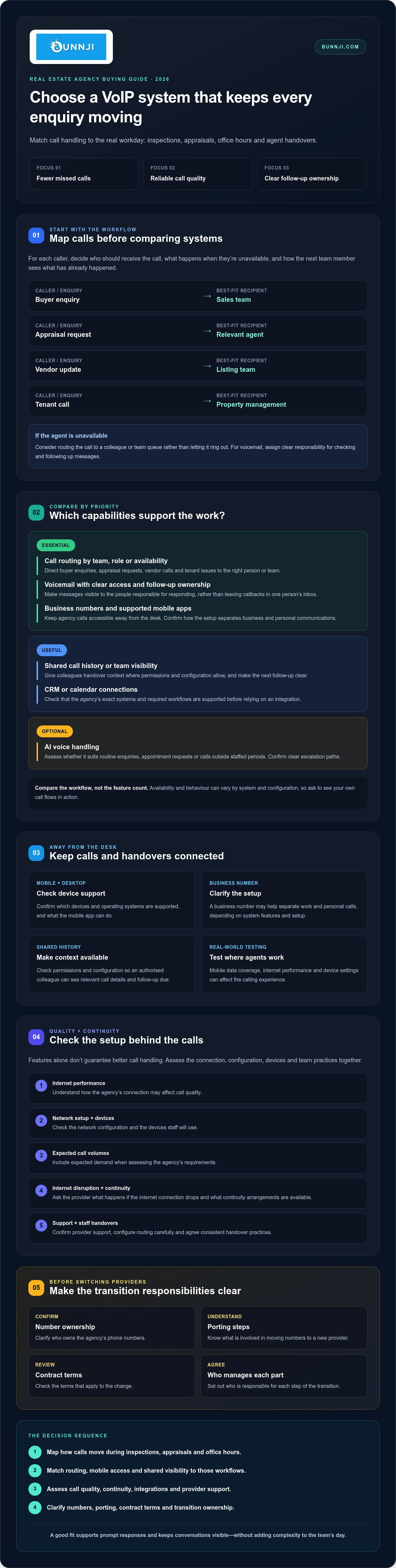
How to compare VoIP providers for a real estate agency
Compare providers against the same agency workflow, not just their feature lists. A practical buying process can reveal whether a system supports your team’s calls, tools and transition needs. Review your current telecommunications setup before choosing a new configuration, so you know what must stay, change or be resolved.
- 1. Map the calls. Record how buyer enquiries, appraisal requests, vendor updates and tenant calls should be handled, including who takes over when the first person is unavailable.
- 2. Check your systems. List the agency’s CRM, calendars, devices and existing numbers. Ask which are supported and what configuration is required.
- 3. Test connectivity. Assess the internet and Wi-Fi where staff work, then trial calls from the office and mobile devices during normal busy periods.
- 4. Compare support. Ask how staff report call issues, how configuration changes are handled, and what support arrangements apply.
- 5. Review migration. Confirm number ownership, porting steps, contract terms, dependencies and who is responsible for each transition task.
Which questions should agents ask in a provider demonstration?
Ask the provider to demonstrate a buyer call routed to sales, a missed call that needs follow-up, a handover to a colleague and mobile use between appointments. Test the CRM and calendar workflow with your agency’s actual tools where possible, including what happens when caller details aren’t already recorded. Clarify who manages configuration changes and staff onboarding, and how ongoing support works.
Use realistic scenarios to check the details. Can the right team see that a vendor has called back? Can a colleague understand what follow-up is due? Confirm what call history is available and how permissions are managed. Don’t treat a feature as suitable until the provider shows how it works in your proposed setup.
How can an agency plan number porting and migration?
Before scheduling a transfer, identify every number you want to retain and confirm the ownership and account details associated with each. Ask the provider to explain the porting steps, dependencies and any contract conditions that could affect timing. Agree on who coordinates the change, how staff will be kept informed and who to contact if a call-flow issue arises during the transition.
Bunnji’s guide, Before You Change Phone Providers, Ask These 10 Questions, covers number porting, ownership and other switching considerations. You can also review your agency’s call flows and connectivity with Bunnji before committing to a setup.
Choosing a VoIP phone system for real estate agents with Bunnji
The right system should fit how your agency handles calls, not force staff into a generic workflow. Match call routing, mobile and desktop use, team visibility, CRM or calendar connections, continuity planning and support arrangements to your requirements. Then confirm which capabilities are available in the proposed configuration and who is responsible for setting them up.
Bunnji provides Australian businesses with cloud VoIP and business connectivity, including NBN, fibre and 5G options. Its telecommunications audits can help review existing arrangements and identify hidden costs or vulnerabilities. An audit can be a useful starting point if you need to consider phone services, internet connectivity and call workflows together before making a change.
When should an agency consider a Bunnji review?
A review may help if call handling, connectivity and current provider arrangements need to be assessed together. Bring practical details so any discussion can reflect how your team works. Ask for clear confirmation of which features and integrations suit your setup, and how number porting, configuration and migration responsibilities would be handled.
What should the agency prepare before getting started?
A short requirements brief makes the first conversation more useful. Include:
- Staff roles, user numbers and the devices agents use in the office and away from their desks.
- Common call scenarios, such as buyer enquiries, appraisal requests, vendor updates and tenant calls, including when calls are most likely to be missed.
- Current business numbers, internet services, CRM and calendar tools, plus any known contract or equipment commitments.
- Questions about mobile access, call routing, continuity, support and the steps involved in a provider change.
Bunnji also offers AI voice agents that can handle calls and book appointments. For an agency, these may be worth assessing for routine enquiries or appointment requests. Confirm how escalation works and whether the proposed CRM and calendar integrations are supported. Treat call handling, connectivity and AI features as configuration decisions to verify, not assumptions about what every setup will include.
With your requirements in hand, you can compare options on practical fit and agree on next steps with fewer unknowns. Discuss a VoIP phone system for your agency and the call workflows, connectivity and migration questions you need to resolve.
Choose a phone system that keeps your agency connected
The right voip phone system for real estate agents should match how your team handles enquiries, handovers and calls away from the desk. Check that its features work with your agency’s actual tools, then test call quality and continuity using your own devices and working conditions. Clear migration, support and outage arrangements matter as much as the feature list.
Bunnji provides Australian businesses with cloud VoIP and business connectivity, alongside telecommunications audits and guidance on internet redundancy. Its AI voice solutions can also handle calls and book appointments, subject to the selected configuration and confirmed integrations.
Bring your call scenarios, current numbers, internet details and CRM requirements to the conversation. Discuss your agency’s VoIP requirements with Bunnji and explore the next steps for a system suited to your workday.
Frequently Asked Questions
What is the best VoIP phone system for real estate agents?
The best option is the one that fits your agency’s call workflows, devices, connectivity and support needs. Check how it routes buyer enquiries, appraisal requests, vendor updates and tenant calls, and whether colleagues can access useful call history for handovers. Test the system with your actual CRM and calendar tools, and confirm what happens during an internet disruption. A feature list matters less than whether the proposed setup works for your team.
Can real estate agents use a VoIP phone system on their mobile phones?
Yes, agents can use mobile calling if the selected VoIP system supports a suitable mobile app and it’s configured for their devices. This can help staff handle business calls between appointments, but the experience depends on the system, handset, app settings and available internet or mobile data connection. Before committing, check supported devices and test calls from places agents commonly work, not only from the office.
Will VoIP still work if the internet goes down?
VoIP calls that rely on the affected internet connection may stop working until service is restored or calls are redirected through another available connection. Ask the provider which calls can be forwarded to approved mobile numbers or devices, and what setup that requires. A secondary connection, such as suitable NBN, fibre or 5G, may be an option, but availability and performance depend on your location and configuration. Document who manages outage changes.
Can a VoIP phone system connect to a real estate CRM?
Some VoIP configurations can connect with a CRM, but compatibility depends on the provider, the CRM and the integration available for your setup. Ask whether calls can be linked to the right contact or record, which details or follow-up actions sync, and whether configuration is needed. Request a demonstration using your agency’s actual CRM. Confirm calendar compatibility separately if agents want calls or appointment requests to support scheduling workflows.
How do real estate agencies keep their existing business phone numbers when switching to VoIP?
Ask the new provider whether your existing numbers can be ported, then confirm the account and ownership details, required steps and any dependencies before scheduling the transfer. Make a list of every number to retain and check for contract or equipment commitments that could affect the change. Agree on who coordinates the port, how staff will be updated and who to contact if call routing needs attention during the transition.
Is an AI receptionist suitable for a real estate agency?
An AI receptionist may suit routine property enquiries, appointment requests or calls that arrive when staff can’t answer. Define which queries it can handle and when it should pass a caller to an agent, especially for sensitive or complex matters. Before selecting a system, confirm how handovers work, whether your CRM and calendar are supported, and what callers will be told about the interaction. Test the proposed workflow before relying on it.
What should I compare when choosing a VoIP provider for a real estate agency?
Compare call routing, voicemail handling, business numbers, mobile access and shared call visibility against your agency’s daily work. Test call quality with your connection, devices and expected busy periods. Ask about CRM and calendar compatibility, support arrangements, outage options and configuration responsibilities. Before switching, clarify number ownership, porting steps, contract terms and migration tasks. A provider demonstration using buyer, vendor and tenant scenarios can reveal practical gaps a feature list may miss.


