
How many of your clients are currently calling your staff on their private mobile numbers because your office system can't handle a distributed team? It's a frustrating reality for many Australian business owners who've embraced hybrid work but still struggle with dropped calls on home NBN connections or the inability to transfer a lead to a colleague in another suburb. You realise that appearing professional shouldn't depend on where your team is sitting, yet the technical friction of managing remote communication often feels like a hurdle to your growth.
Finding the right business phone system for remote workers is about more than just making calls; it's about maintaining a unified presence that keeps your team connected and productive across Australia. We've built this 2026 guide to help you strip away the complexity of cloud-based platforms and find a setup that actually works. You'll discover how to provide every employee with a single business number reachable on any device, backed by automated call handling that removes the need for a physical receptionist. We'll break down the latest in VoIP stability and the specific tools you need to ensure your remote operations feel like a single, cohesive office.
Key Takeaways
- Understand why modern Australian firms are ditching physical hardware for cloud-hosted platforms that provide a single business number across every device.
- Learn how to select the right business phone system for remote workers by prioritising advanced call routing and unified communication tools.
- Compare the convenience of Microsoft Teams with the robust, professional-grade reliability of dedicated cloud VoIP systems for distributed teams.
- Discover why your remote voice quality depends on the NBN factor and how to choose the correct speed tiers to avoid dropped calls.
- Explore how to future-proof your business with AI receptionists while avoiding the hidden costs of outdated 60-month equipment contracts.
What Is a Remote Business Phone System?
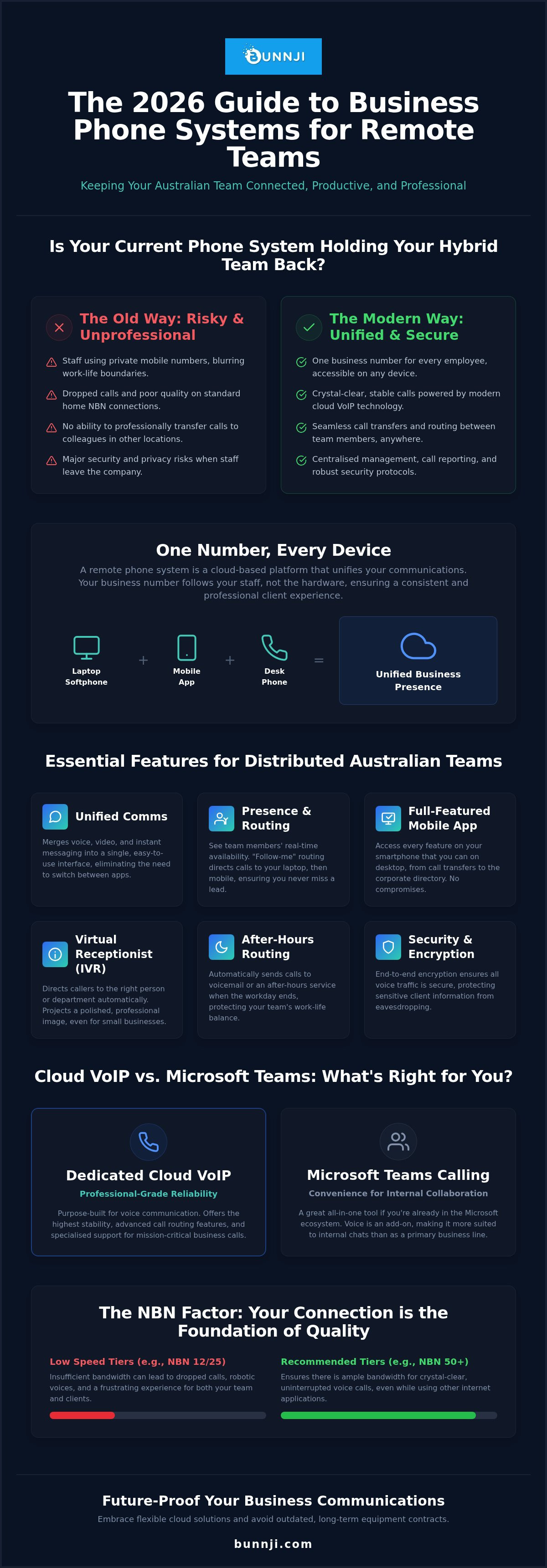
The days of bulky hardware sitting in a dusty office cupboard are finished. For a modern Australian firm, a business phone system for remote workers is no longer a luxury; it's the backbone of daily operations. A remote phone system is a cloud-based platform that unifies voice, video, and messaging into one interface. This shift to cloud-hosted VoIP means your communication infrastructure lives on the internet rather than on physical copper lines or on-site servers. It allows for the "One Number, Every Device" philosophy, where your office identity follows you whether you're working from a home study, a regional hub, or a local café.
The Evolution from Desk Phones to Softphones
You don't need a plastic handset on a desk to sound professional. While physical phones still have their place for some, softphone applications have become the primary tool for distributed teams. These apps live on laptops and smartphones, allowing staff to make and receive calls as if they were sitting in a CBD headquarters. This transition ensures that when a client calls, they experience a polished corporate greeting rather than a casual "hello" on a personal mobile. It organises your team under a single digital roof, regardless of where they actually log in. The technology is sophisticated, yet the user experience remains simple and accessible for everyone.
Why a Standard Mobile Plan Isn’t Enough
Relying on personal mobile plans for business calls is a risky strategy that often backfires. Privacy is the first casualty. When staff use their own numbers, they lose the ability to switch off after hours, and clients gain direct access to an employee's private life. Beyond privacy, standard SIM cards lack the sophisticated features required to run a business effectively. Consider these limitations:
- No Professional Transfers: You can't easily move a live call from a sales rep to a technician.
- Lack of Visibility: Managers cannot see call volumes, monitor service levels, or ensure staff are supported during peak times.
- Security Risks: If an employee leaves the company, they take your client contacts and their primary line of communication with them.
A dedicated business phone system for remote workers centralises your management. It provides a clear boundary between work and life while ensuring every customer interaction is recorded, tracked, and handled with the same care as an in-person visit. This approach removes the friction of technical infrastructure, giving you peace of mind that your team remains reachable and professional on any connection, including the standard NBN setups found in most Australian homes.
Essential Features for Distributed Australian Teams
By 2026, Unified Communications (UC) has transitioned from a technical advantage to a standard requirement. It merges voice, video, and instant messaging into a single interface. For a distributed team, this eliminates the friction of switching between fragmented apps. When selecting a business phone system for remote workers, you need to look beyond the basic dial tone. You need a platform that replicates the office environment digitally, ensuring your staff remain productive regardless of their physical location.
Knowing who is available is the biggest challenge of a virtual office. Presence indicators provide real-time visibility, showing if a colleague is in a meeting, on a call, or away for lunch. This is paired with "follow-me" routing. This feature ensures that an incoming call rings on a laptop first, then a mobile, before finally reaching a teammate if you're unavailable. Your team shouldn't feel like they're using a "lite" version of the software when they're on the road. Mobile app parity ensures that every feature available on the desktop, from call transfers to accessing the corporate directory, works identically on a smartphone.
Professional Call Handling and Routing
First impressions matter. A virtual receptionist or IVR menu directs callers to the right department without needing a human operator. This is particularly effective for small firms that want to project a larger presence. Time-of-day routing is another essential tool. It automatically redirects calls to voicemail or an after-hours service once the workday ends, protecting the work-life balance of your remote staff. If you're unsure how your current setup compares, a telecommunications audit can often reveal where these professional features are missing.
Security and Compliance for Remote Staff
Moving voice traffic to the cloud requires a focus on protection. Every call should be encrypted to prevent eavesdropping on sensitive client discussions. Centralised call recording is no longer just for large call centres. It's a vital tool for quality assurance and meeting Australian regulatory requirements. Managing data sovereignty is equally important. You must ensure your provider keeps your communication data within Australian borders to comply with local privacy laws. This provides the peace of mind that your business remains secure while your team stays flexible. Reliability and transparency in how your data is handled are the foundation of a modern remote setup.
Cloud VoIP vs. Microsoft Teams: Which Suits Your Remote Team?
Choosing between Microsoft Teams and a dedicated cloud VoIP provider is a common crossroad for Australian firms. Many organisations start with Teams because they already pay for Microsoft 365, making the "Teams Phone" phenomenon an easy entry point. It offers the simplicity of a single interface for chat, video, and internal voice calls. However, as your remote operations scale, you might find that a standard collaboration tool lacks the depth required for high-volume customer interactions. The right business phone system for remote workers should align with your specific workflow, not just your existing software stack.
Integration with your broader business tools is a significant factor. While Teams works perfectly within the Microsoft ecosystem, dedicated VoIP platforms often offer superior "out of the box" syncing with CRMs like Salesforce or HubSpot. This allows your remote staff to see a caller's entire history before they even pick up the phone. Cost considerations also play a role. You must weigh the complexity of Microsoft's add-on licencing fees against the straightforward, all-inclusive nature of a professional VoIP plan. Often, the perceived savings of using a free tool are eroded by the technical hurdles of setting it up correctly.
When Microsoft Teams is the Right Call
Teams is an excellent choice for businesses that are "all-in" on Microsoft. If your staff spend their entire day within the app, adding external calling through the "Operator Connect" model in Australia makes sense. This allows you to bring your own telco provider into the Teams interface, giving you local numbers and Australian-based support while keeping everything in one window. It's a clean solution for teams with straightforward calling needs who value a unified user experience above all else.
The Case for a Dedicated Cloud Phone System
A dedicated system outshines general tools when you require advanced call management. If your business relies on sophisticated call queues, granular reporting, or live whisper-and-join features for training remote staff, a specialist VoIP platform is the superior option. These systems are built by telco experts who prioritise voice quality and reliability over general productivity features. They also provide a natural foundation for modern innovations like AI voice agents, which can handle routine enquiries while your human staff focus on complex tasks. This level of specialised support ensures your business phone system for remote workers remains a powerful asset rather than just another app to manage.
Connectivity and Redundancy: The Foundation of Remote Voice
Your business phone system for remote workers is only as reliable as the internet connection supporting it. In Australia, this usually means the National Broadband Network (NBN). If your staff are battling jittery audio or dropped calls, the culprit is rarely the software; it's the underlying data pipe. You need a setup that treats voice traffic as a priority rather than a secondary thought. Technical infrastructure should facilitate conversation, not hinder it through lag or pixelated video.
Choosing the right NBN speed tier is the first step toward crystal-clear communication. While download speeds get all the marketing attention, VoIP relies heavily on upload capacity. A standard consumer plan might struggle when multiple family members are online simultaneously. In 2026, many business premises are eligible for NBN fibre upgrades, which provide the symmetrical speeds needed for high-definition voice and video data. Upgrading ensures there's enough headroom for your distributed team to work without the frustration of technical dropouts.
Optimising Home NBN for Business VoIP
Home routers often struggle to distinguish between a critical client call and a Netflix stream. Enabling Quality of Service (QoS) settings allows the router to prioritise voice packets, reducing lag and echo. The difference between consumer and Business NBN often comes down to service level agreements and contention ratios. Business plans are designed to handle the consistent data flow required for professional voice services, providing a more stable foundation for your distributed team than a standard residential connection. This small shift in how you organise your home office can have a massive impact on call quality.
Disaster Recovery and Redundancy Strategies
Outages are an inevitable part of the telecommunications landscape. A robust strategy includes 4G or 5G failover, which acts as an essential safety net for any business phone system for remote workers. In some regional areas, 5G might even serve as the primary connection if fixed-line fibre isn't yet available. If the fixed line drops, the system should automatically switch to a mobile network without disconnecting the call. Modern cloud platforms also offer automated rerouting to mobile apps, ensuring your staff remain reachable even if their home power fails completely.
Identifying these weak points before they cause a crisis is vital. We recommend conducting a telecommunications audit to map out your redundancy requirements. This proactive approach removes the friction of technical failure, giving you the peace of mind that your business remains online. If you're ready to ensure your connectivity is up to standard, you can book a consultation with our team to review your current infrastructure and find a tailored solution for your remote staff.
Future-Proofing with Bunnji: Beyond the Basic Phone
Many Australian businesses are still shackled to outdated 60-month telecommunications equipment contracts. These rigid agreements were designed for a world of physical office desks and fixed hardware. We take a different approach. We believe a business phone system for remote workers should be as flexible as the team using it. Instead of forcing you into a generic, off-the-shelf plan, we focus on bespoke solutions that adapt to your specific operational needs. This removes the technical friction and hidden costs often associated with legacy infrastructure.
Reliability and transparency are the pillars of our service. As a local expert, we understand the unique challenges of the Australian landscape. We provide the resources of a global player with the personal touch of a boutique provider. You aren't just another account number; you're a partner. Our team is present and responsive, ensuring your transition to the cloud is seamless and supported every step of the way. We help you move away from "generic" experiences toward a high-quality, custom setup.
AI Voice Agents for Remote Productivity
Missed calls are a significant drain on productivity and revenue. When your remote staff are deep in meetings or handling complex tasks, they can't always answer the phone. AI receptionists solve this problem by handling enquiries 24/7. These aren't simple voicemail boxes. They are intelligent agents that can book appointments directly into your calendar and sync with your CRM. This eliminates the need for an expensive physical receptionist while ensuring no lead goes cold. It reduces overheads and allows your distributed team to focus on the work that actually grows your business.
Getting Started with a Modern Cloud System
Moving your communication to the cloud doesn't have to be a headache. The migration process is straightforward. You have a legal right to keep your existing numbers through porting, ensuring zero disruption to your brand identity. We guide you through this transition, from technical setup to training your remote staff on softphone best practices. Once your team understands how to use their "One Number, Every Device" capability, they can work from anywhere with total confidence. If you're ready to move beyond the limitations of traditional hardware, you should speak to a Bunnji expert about your remote phone strategy today. We'll help you build a communication platform that is truly future-proof.
Building a Connected Future for Your Distributed Team
The shift toward remote and hybrid work is no longer a temporary adjustment; it's the standard for modern Australian businesses. Choosing the right business phone system for remote workers is the difference between a fragmented team and a unified, professional operation. You've seen how moving to the cloud removes the technical friction of legacy hardware and how essential connectivity is to maintaining crystal-clear voice quality across your entire network. By embracing features like AI-driven receptionists and robust redundancy, you ensure your business remains reachable and reliable regardless of where your staff log in.
As an Australian owned and operated specialist, we provide no-nonsense advice on everything from NBN fibre upgrades to AI-driven voice solutions. We're here to help you navigate the complexities of the cloud with bespoke strategies that actually work for your specific needs. You can get a free telecommunications audit for your remote team to identify hidden costs and find the most efficient path forward. It's time to give your team the tools they need to stay productive and give yourself the peace of mind you deserve.
Frequently Asked Questions
Can I keep my existing business phone numbers when moving to a remote system?
Yes, you can. This process is known as number porting, and it's a legal right for Australian businesses. We manage the entire technical migration to ensure your brand identity remains consistent. This transition allows you to move away from legacy hardware while keeping the numbers your clients already know. It's a seamless way to transition to a business phone system for remote workers without any downtime or loss of contact.
Do my remote workers need special hardware or desk phones at home?
No, physical hardware is entirely optional for a modern distributed team. Most staff prefer using softphone applications on their existing laptops or smartphones. This setup provides full office functionality without the clutter of a traditional desk phone. If an employee does prefer a physical handset, we can provide pre-configured VoIP phones that plug directly into a home router, although a professional USB headset is usually the most practical choice.
How much internet bandwidth does a VoIP call actually use?
A standard high-definition voice call typically uses approximately 100kbps of bandwidth for both upload and download. While this is a small amount of data, the quality depends on the stability of the connection. On a home NBN plan, the main challenge is often "latency" caused by other household members streaming or gaming. We recommend a stable connection with at least 1-2Mbps of dedicated upload headroom to ensure crystal-clear audio during every conversation.
Will a remote phone system work if my staff are using Mac and iPhone?
Yes, modern cloud communication platforms are completely platform-agnostic. Professional softphone apps are built to work seamlessly across macOS, iOS, Windows, and Android. This flexibility allows your team to use their preferred Apple devices while maintaining a professional corporate identity. Whether they are answering a call on an iPhone while on the road or using a Mac in a home office, the user experience and features remain identical and fully integrated.
What happens to our phone system if the NBN goes down?
Your phone system remains active in the cloud even if your local internet fails. Because the "brain" of the system lives online rather than in a physical office, calls can automatically reroute to mobile apps using 4G or 5G data. We specialise in internet redundancy and disaster recovery planning. This ensures that an NBN outage at a staff member's home doesn't stop your business from answering calls or serving your customers.
Can I see if my remote staff are currently on a call or available?
Yes, this is achieved through real-time presence indicators. Your dashboard provides a live view of every team member's status, showing if they are available, on a call, in a meeting, or offline. This visibility is a core component of a business phone system for remote workers. It allows managers to coordinate the team effectively and ensures callers are only transferred to staff who are ready to take the call.
Is it difficult to set up a business phone system for a 100% remote team?
The setup is straightforward because there is no physical infrastructure to install at your premises. We configure your virtual environment and call routing rules in the cloud, and your staff simply download an app to begin. The most detailed part of the process is often organising the number porting, which we handle on your behalf. Most remote teams can be fully operational within a few days, depending on their specific routing needs.
How do AI voice agents help a business with remote workers?
AI voice agents act as a 24/7 digital receptionist for your distributed team. They can answer common enquiries, book appointments directly into your calendar, and capture lead information when your staff are unavailable. This ensures you never miss a call during peak periods or after hours. These agents sync directly with your CRM, removing the administrative burden from your remote staff and allowing them to focus on more complex, high-value tasks.


