
When a customer calls, staff should be able to find the right record, capture what happened and assign a clear next step without re-entering details across systems. That’s the practical goal of integrating voip with business crm. When call notes, outcomes and follow-up sit in separate places, customer histories can become patchy and staff lose time switching between tools.
VoIP handles calls; a CRM integration can make call activity part of your customer workflows. This guide compares common approaches, from native connectors and embedded softphones to middleware and API-based links. You’ll also see how workflows such as click-to-call, incoming-call screen pops and automatic call logging can help sales, service and reception teams.
Before rolling out an integration, decide what information should move between systems, who owns the process and how you’ll test real call scenarios. Add clear rules for access to customer data and call records. The aim is a setup that fits how your team works, with call flows, CRM processes and dependable connectivity planned together.
Key Takeaways
- Connect call activity with customer records so staff can see relevant context and record what happened.
- Understand how call events move between platforms and where connectors, APIs or middleware fit.
- Compare native connectors, middleware and custom APIs by setup effort, flexibility, maintenance and visibility of failures.
- Plan a measured rollout by mapping workflows, testing key scenarios, training staff and reviewing agreed outcomes before expanding.
- See how integrating voip with business crm can support consistent follow-up, including workflows with AI voice agents and receptionists.
What does integrating VoIP with a business CRM actually do?
VoIP-CRM integration links a business phone system with customer records, allowing call information to appear in the CRM or trigger activity there. The goal is to give staff useful customer context and one consistent place to record what happened, rather than making them switch between disconnected systems. A Customer Relationship Management (CRM) system brings customer information and interactions together. Connecting business calling can make telephone activity part of that history.
A typical incoming-call workflow works like this: the phone platform identifies the caller’s number, the CRM searches for a matching customer, and the relevant record appears for the staff member handling the call. After the conversation, the call may be logged and a follow-up assigned. The exact sequence depends on the phone platform, CRM and configured workflow.
These are different levels of capability. Caller identification matches a number to a record. Call logging saves details about an interaction. Workflow automation can go further by creating a task or directing an interaction into a process. Using VoIP and a CRM side by side doesn’t automatically provide all three.
Which call details can appear in a CRM?
Call metadata may include the caller’s number, call time, direction, outcome and assigned staff member. This information can help teams see who spoke with a customer and what happened next. The fields available and how they’re recorded depend on the systems and configuration.
Notes, recordings and automated summaries are separate from basic metadata. A staff member might enter a short note, while a configured workflow may attach a recording or generate a summary. Decide which information your team needs before configuring the connection, and don’t assume these features are included in basic call logging.
What can an integrated call workflow help a team do?
An incoming call can display the caller’s CRM record before staff answer, giving them a useful starting point. After the call, a team member can select an outcome, add a note and create a follow-up task for a colleague. This turns the conversation into an owned next step instead of relying on someone to remember it later.
For example, a reception team could record that a caller needs an appointment and assign the next action to the right person. Sales and service teams can define different call outcomes and follow-up steps to match their processes. For more context on planning calling and connectivity together, read Bunnji’s Business VoIP Australia strategy guide.
How does a VoIP-to-CRM integration work behind the scenes?
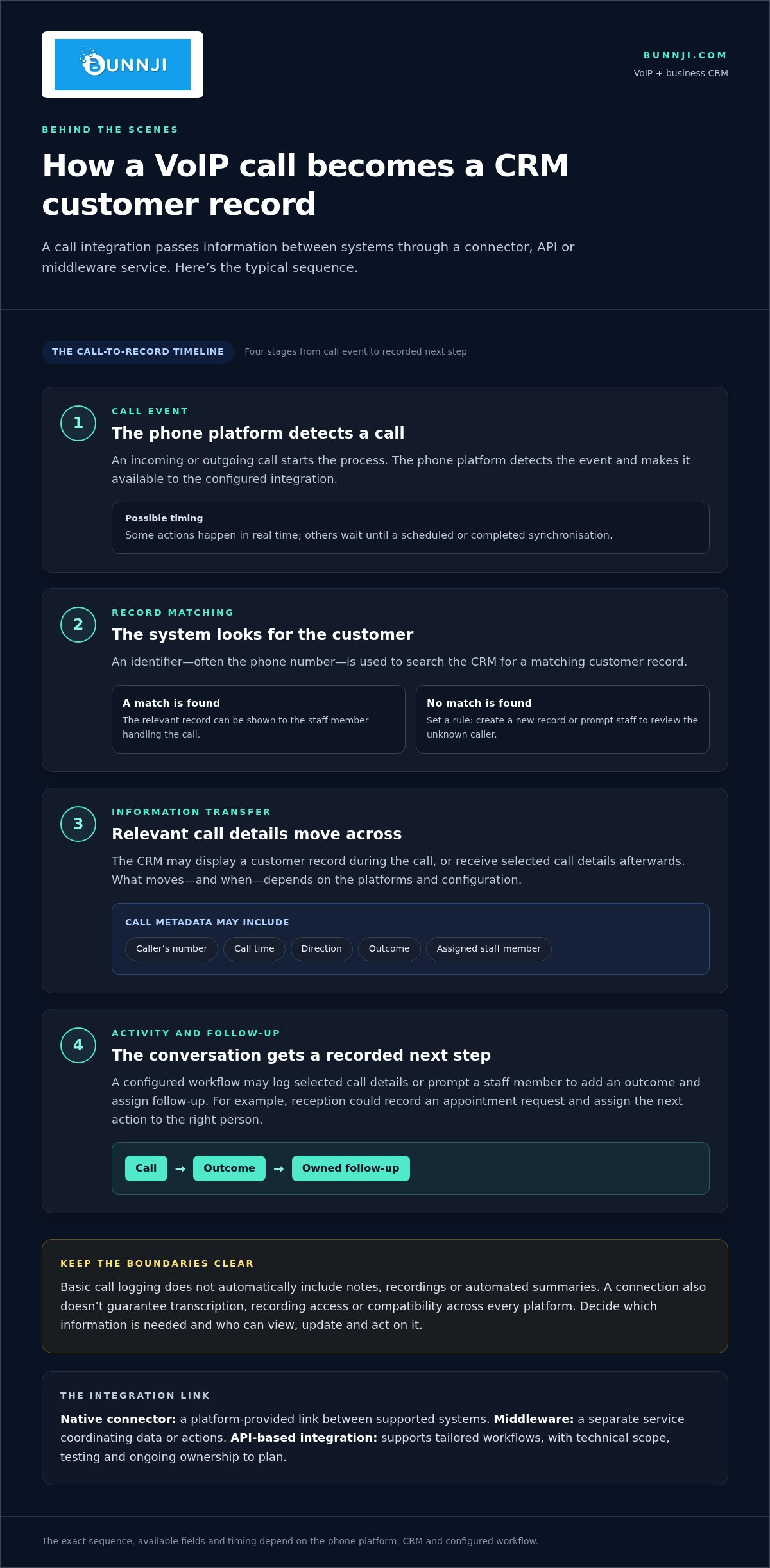
A call integration is a chain of events, not simply a phone screen appearing inside a CRM. A connector, application programming interface (API) or middleware service passes information between the phone platform and customer database. An API is a controlled way for software systems to request and exchange information. It defines what data can be shared and when.
- A call event occurs. The phone platform detects an incoming or outgoing call.
- The system checks for a match. It uses an identifier, often the phone number, to search for a CRM record.
- Relevant information moves across. The CRM may display a record during the call, or call details may be sent afterwards.
- An activity or next step is recorded. A configured workflow may log selected call details or prompt a staff member to add an outcome and assign follow-up.
Some actions happen in real time; others wait for a scheduled or completed synchronisation. The timing depends on the systems and configuration. A connection doesn’t guarantee automatic transcription, access to recordings or compatibility across every platform. For an overview of integration methods, see this guide to how to integrate VoIP with CRM.
Native connector, middleware or API: what’s the difference?
A native connector is a platform-provided link between systems that support it. Middleware is a separate service that coordinates data or actions across platforms. API-based integration can support tailored workflows, but its technical scope, testing and ongoing ownership need to be planned. Choose based on the process you want to improve, not just the technology available.
Which customer and call data should move between systems?
Give each field a clear business purpose. Your team might need the caller’s number, call time, direction, outcome and staff member responsible. Consider notes, recordings and automated summaries separately rather than assuming they’re part of basic call data. Agree who can view, update and act on each item, and pass only information that supports the workflow.
Set rules for matching records. Decide how the system will handle phone numbers in different formats, duplicate contacts, and unknown callers. For an unknown number, choose whether the workflow should create a new record or prompt staff to review it. These rules help prevent mismatches and unreliable CRM entries.
Build privacy into the design by limiting access to appropriate roles, setting purposeful permissions and deciding how long useful records should remain available. This is practical data governance, not a substitute for checking current Australian privacy and call-recording obligations for your circumstances. Bunnji’s cloud VoIP and business calling solutions can form part of a broader plan for aligning call flows, CRM processes and connectivity.
Which VoIP and CRM integration approach suits your business?
The right approach depends on the call workflow, the platforms involved and who will maintain the connection. A simple caller lookup may not need the same setup as routing information across several systems or triggering different actions for different call outcomes. Compare options against the exact CRM and VoIP configuration you use.
| Approach | Setup effort | Flexibility | Maintenance and failure visibility |
|---|---|---|---|
| Native connector | Often lower when the required systems and features are supported. | Usually fits the connector’s available fields and actions. | Updates may be handled by the platform, but teams still need a way to spot failed or incomplete activity. |
| Middleware | Moderate, as the service needs to be configured between platforms. | Can coordinate data and conditional steps across multiple systems. | Needs monitoring and a clear owner for errors, changes and service updates. |
| Custom API | Higher, as the workflow and data mapping must be designed and built. | Can be tailored to defined business processes. | Requires ongoing technical ownership, testing and monitoring; failure alerts should be planned. |
When is a native CRM connector the simplest fit?
A native connector can suit a team whose needs are covered by its supported call actions and CRM fields, such as matching incoming numbers and logging basic activity. A simpler setup still needs implementation work. Confirm the relevant platform versions and permissions, assign an owner for connector settings, then test typical calls and train staff to follow the workflow consistently.
When might middleware or an API-based workflow make sense?
Middleware may fit when several systems need to exchange information or a call outcome should trigger different steps. An API-based workflow can support specific data mapping or actions that a standard connector doesn’t cover. Both options add responsibility for monitoring, handling failures, testing changes and maintaining the integration. Include that work in your decision, not just the initial setup.
How do AI voice agents fit into CRM-connected calling?
AI call handling is a separate layer from ordinary caller matching and call logging. An AI voice agent can handle an interaction and pass information into a CRM, or support appointment booking as part of a configured workflow. These aren’t automatic features of every VoIP-CRM connection. Bunnji implements AI voice agents and receptionists that handle customer calls, book appointments and sync with business CRMs and calendars. For wider context, read Bunnji’s AI voice agents trend report.
When integrating voip with business crm, choose the least complex approach that reliably supports your workflow, and assign clear ownership for maintaining it.
How to plan, test and roll out VoIP-CRM integration
A controlled rollout helps uncover workflow gaps before they affect every caller and staff member. Start with one team or call type, such as reception handling appointment enquiries. Agree what success looks like, assign an owner for each system and expand only after the pilot meets its measures.
Use this staged checklist to keep implementation practical:
- Map workflows: Document who handles each call type, what the CRM should record and who owns follow-up.
- Confirm systems: Identify the phone platform, CRM, connector or integration method, permissions and relevant versions.
- Configure: Set up call matching, fields, outcomes, tasks and agreed exception handling.
- Test: Run realistic call scenarios, check records and follow-up, and record issues for resolution.
- Train: Show staff how to use the workflow, enter notes and report problems.
- Review: Compare results with agreed measures, gather staff feedback and refine before extending the rollout.
Decide ownership early. A nominated person should oversee permissions, connector or workflow updates, exception review and staff feedback. For integrating voip with business crm, this ongoing responsibility matters as much as the initial configuration. Changes to user access, call handling or CRM fields can affect how information flows.
What should a pilot test before wider deployment?
Test incoming and outgoing calls, known and unknown contacts, missed calls, and what happens if the CRM or internet connection is unavailable. Check caller matching, duplicate handling, call outcomes and follow-up task creation. Verify that staff can access only the records their roles allow them to see, and decide what happens to activity that can’t be passed across.
Set acceptance criteria before the pilot starts. For example, assess whether staff complete fewer manual steps and whether call records contain the agreed fields. Review exceptions as well as successful calls. If the workflow misses records or creates duplicates, address the cause before expanding it.
How should teams manage privacy and change?
Limit access to relevant customer records and define how long call data and recordings should be retained. Train staff on what the integration logs, where notes belong and how to correct a mistake. Make it clear who handles questions and escalates issues.
Review current Australian privacy and call-recording requirements against your organisation’s circumstances before setting policies. Bunnji’s cloud calling and communications solutions can support a rollout planned around your call flows and CRM processes. Plan your business VoIP integration with clear ownership, testing and safeguards.
Connect business calling and CRM workflows with Bunnji
A useful integration starts with how your team serves customers, not with a list of features. Bunnji helps Australian businesses align cloud calling, CRM processes and customer experience so the call journey and follow-up record support the same outcome. That might mean helping reception route enquiries, giving a sales team a clearer handover or connecting call handling with customer records.
The right design depends on your call volumes, staff roles, customer data and existing systems. Bunnji’s AI voice agents and receptionists handle calls, book appointments and sync with business CRMs and calendars. These capabilities sit alongside ordinary VoIP calling. Plan which interactions staff handle, which an AI voice solution handles and what information each needs to pass on.
What should a tailored integration plan account for?
Map the journey from the first ring to completed follow-up before configuring systems. Identify how calls are answered and transferred, which customer records staff need, what information to capture and who owns the next action. This shapes an integration around the work your team actually does, rather than adding unnecessary steps.
Include connectivity and continuity in the design. Business calling and CRM access both rely on dependable connections, so consider how an internet disruption could affect calls, record updates and staff handovers. Bunnji provides business connectivity, telecommunications audits and guidance on internet redundancy to help organisations account for these dependencies in communications planning.
Set practical success measures before rollout. Assess whether staff spend less time re-entering call details, whether agreed records are more complete and whether customer enquiries receive a clear response. Use the results to review the workflow and decide what to improve or extend.
What are the next steps for your team?
Document your CRM and phone setup, the teams involved, the call journeys that matter most and the manual tasks that slow people down. Choose one high-value call journey for an initial rollout, then define the records, handovers and follow-up actions it should support. This gives your team a clear scope to plan and assess.
Integrating voip with business crm works best when the technology reflects your customer processes and the people responsible for them. Talk with Bunnji about business VoIP and a practical plan shaped around your team’s calling and CRM workflows.
Turn your call data into better follow-up
A successful integration is more than a call appearing on a customer record. Choose an approach that fits your VoIP and CRM setup, decide which information genuinely helps your team, then test the workflow with one team or call type before expanding. Clear ownership and sensible safeguards help keep the connection useful as systems and processes change.
For Australian businesses, dependable connectivity belongs in the plan too. Bunnji provides cloud VoIP, SIP trunking and business connectivity, with telecommunications audit guidance to help organisations plan how calling will operate. Bunnji’s AI voice agents and receptionists handle calls, book appointments and sync with business CRMs and calendars.
Make integrating voip with business crm a practical step towards more consistent customer records and follow-up. Plan a business VoIP and CRM workflow with Bunnji, shaped around your systems, staff and customer journeys. Start with one clear workflow and build from there.
Frequently Asked Questions
Can VoIP integrate with any business CRM?
No. Integration depends on the phone platform, CRM and available connection method. Some combinations offer a native connector for common tasks, while others may need middleware or a custom workflow. First define the actions you need, such as caller matching, call logging or task creation, and the fields to transfer. Then assess system compatibility, supported versions and user permissions before planning a rollout.
What information does a VoIP system send to a CRM?
A configured integration may pass call details such as caller number, time, direction, outcome or assigned staff member. Depending on the workflow, it may also create a task or allow staff to add a note. Recordings, transcripts and AI-generated summaries are separate features that depend on the systems and setup. Decide which information supports your business process, then limit access to appropriate staff and records.
How do you connect VoIP with a CRM?
Start by documenting the call journey and identifying your phone system, CRM and required actions. Choose a supported connector or another suitable integration method, then map records, data fields and permissions. A practical approach to integrating voip with business crm includes testing before wider deployment: check known and unknown callers, missed calls and failure scenarios. Train staff, review exceptions and adjust the workflow before expanding it.
Do I need an API to integrate VoIP with my CRM?
Not necessarily. If your phone platform and CRM support a native connector with the call logging or caller identification you need, that may be sufficient. Middleware can coordinate more involved processes across systems, while API-based development may suit specific custom actions or data mapping. Compare the flexibility you need with setup and ongoing maintenance. Check the actual capabilities of your platforms rather than assuming an API is required.
Is integrating VoIP with a CRM secure?
It can be designed with appropriate safeguards, but security depends on the systems, configuration, access controls and data handling. Give staff access only to the records and functions their roles require, protect credentials and set clear retention practices for call notes and recordings. Assign responsibility for monitoring and access reviews. Check current Australian privacy and call-recording requirements against your organisation’s circumstances before setting or changing policies.
Can a VoIP-CRM integration automatically log calls and create follow-up tasks?
Some configured workflows can log call activity and create follow-up tasks, but available actions vary by phone platform, CRM and integration method. Define which calls should trigger a record or task, who receives each assignment and how exceptions are handled. Before launch, test missed, transferred and unidentified calls. This helps uncover duplicate or incomplete records and ensures automation supports staff instead of adding unreliable activity to the CRM.
What is the difference between VoIP-CRM integration and an AI receptionist?
VoIP-CRM integration connects phone activity with customer records and business workflows. An AI receptionist or voice agent can handle parts of a caller interaction, such as answering enquiries or booking appointments, when configured for that process. They’re distinct capabilities, though they can work together. Bunnji implements AI voice agents and receptionists that handle calls, book appointments and sync with business CRMs and calendars. Decide whether you need call visibility, automated handling or both.


