

An AI receptionist earns its place by completing a caller’s next step, not simply answering the phone. For an ai receptionist for small business australia, that could mean capturing an enquiry, routing a call or booking an appointment while your team is busy. The key is to make sure it handles calls reliably without frustrating customers or disrupting the systems you already use.
Small teams can’t always answer every call, and repetitive questions and booking requests take staff away from other work. A well-scoped setup can handle suitable routine tasks while keeping a clear path to human support when a caller needs it.
This guide explains what an AI receptionist can handle and how to assess whether it fits your business, call patterns and customer expectations. You’ll learn what a practical rollout involves, from connecting the receptionist to your phone workflow and relevant CRM or calendar tools to testing call routing, handovers and caller experience. The goal is to capture and manage enquiries consistently without making the human side of your business harder to reach.
Key Takeaways
- An AI receptionist can greet callers, answer agreed routine questions, capture details and route calls through configured workflows.
- Map the caller journey from greeting to action, then identify where CRM or calendar integration could help your team follow through.
- Review your call types, busy periods, missed calls and staff capacity to decide which tasks suit automation and which need a person.
- Start with a narrow rollout scope, approved answers, defined escalation triggers and a staff member responsible for follow-up.
- See how an ai receptionist for small business australia can work as part of a connected phone workflow, linking call handling with cloud VoIP and agreed business actions.
What an AI receptionist for a small business in Australia actually does
An AI receptionist is a voice agent that handles agreed phone interactions through workflows configured for your business. It can greet callers, respond to routine questions, collect details and route calls or requests according to rules you set. An ai receptionist for small business australia should be designed around real call needs, not expected to manage every conversation independently.
It builds on familiar phone-system functions such as an automated attendant, which directs incoming calls. A basic attendant usually presents options for callers to select. An AI voice agent can respond to spoken requests and follow a configured workflow. Depending on the setup, it may capture caller information, pass a request to staff or support an appointment booking.
Which calls can an AI receptionist handle?
Start with straightforward, repeatable enquiries: a caller checking opening hours, asking about a basic service or requesting an appointment. The receptionist can ask for their name, reason for calling and preferred next step, then route the call or record the information for follow-up. Appointment requests can also be handled through a configured booking workflow.
Not every call belongs in that workflow. A complaint, urgent issue, sensitive matter or complex question may need a person’s judgement and empathy. Set clear handover triggers so the voice agent directs those callers to human support rather than trying to resolve an issue outside its scope.
How is it different from voicemail or a phone menu?
Voicemail records a message for someone to review later. A traditional phone menu offers options, often selected with keypad numbers, then routes the call. An AI receptionist can ask what the caller needs and respond based on its configured information and workflow.
That interaction can do more than capture a message. For example, after identifying an appointment request, the agent might collect the caller’s preferred time and pass the details into an agreed booking process. If it can’t understand the request or the caller needs help beyond its scope, the workflow should offer a suitable handover or message-taking option.
The practical distinction is action, not human-like conversation. A well-scoped AI receptionist can reduce routine call handling for a small team, while staff remain responsible for decisions and conversations that need personal attention. Its role is to support the caller journey, not replace every human interaction.
How an AI receptionist fits into a small-business call workflow
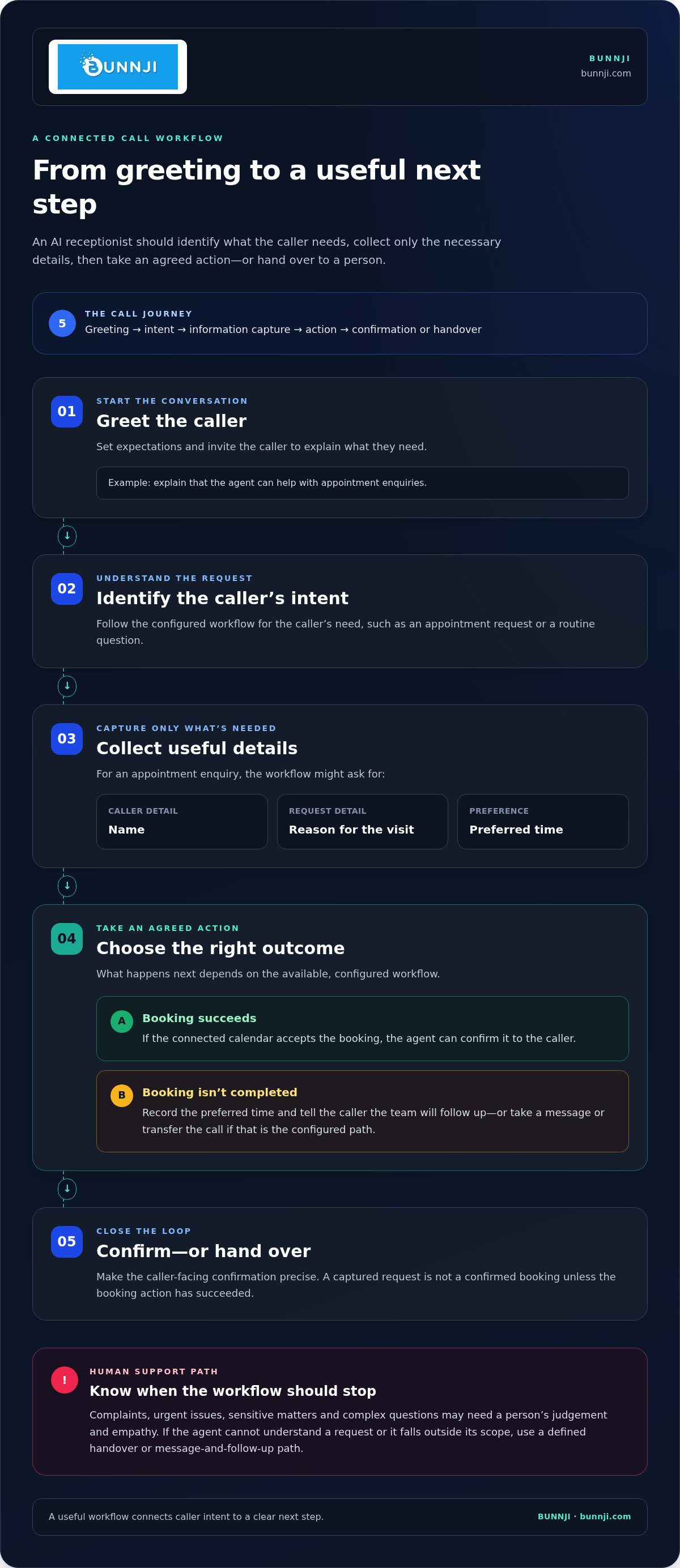
A useful call workflow gives each caller a clear path from the first greeting to the next step. The agent identifies the caller’s intent, collects only the details needed for that request, then takes an agreed action or hands the call to a person. This makes call handling part of a connected business process, rather than an isolated voice response.
Keep the steps simple: greeting → intent → information capture → action → confirmation or handover. The greeting sets expectations and invites the caller to explain what they need. The agent follows the relevant workflow, asks for essential details, then completes an available action or routes the request appropriately. If the caller’s need falls outside its scope, a defined handover path helps staff take over with useful context.
From first greeting to a useful next step
For an appointment enquiry, the agent might collect a name, the reason for the visit and a preferred time. What happens next depends on the configured workflow: it may book into a connected calendar, capture a request for staff follow-up, take a message or transfer the call. Make the caller-facing confirmation precise. A request is not a confirmed booking unless the booking action has succeeded.
A simple example:
- Greeting: The agent explains it can help with appointment enquiries.
- Intent and details: The caller requests a booking and provides the information the workflow needs.
- Action: If the configured calendar accepts the booking, the agent confirms it. If not, it records the preferred time and tells the caller the team will follow up.
That distinction protects trust. Don’t tell callers an action is complete when the system has only captured a request. For urgent or complex matters, route to a person or use a clear message-and-follow-up pathway instead.
Connecting calls with CRMs and calendars
With a suitable configuration, call details can pass into a CRM or calendar, giving staff a useful record without relying on someone to re-enter every detail. A CRM entry can help the team see who called and why; a calendar connection can support appointment booking. Define what information the workflow captures, where it goes and what staff need to do next.
For further guidance on linking call handling with business systems, see Connecting AI Phone Agents to Your CRM and Calendar. The Australian Bureau of Statistics also provides context on Australian business AI adoption rates. For a connected phone workflow, explore Bunnji’s AI voice and cloud phone solutions.
How to assess whether an AI receptionist suits your Australian small business
Start with your actual calls, not a feature list. Review a representative set of recent call notes or staff recollections. Group calls by reason, then look for recurring enquiries, busy periods, unanswered calls and the time your team spends on routine requests. Consider staff capacity too: a workflow that captures requests but leaves nobody to follow up may simply move the bottleneck.
An ai receptionist for small business australia is generally a better fit for predictable tasks with a clear answer or next step. Nuanced advice, complaints, sensitive issues and urgent matters are better suited to a human-led pathway. Caller experience depends on plain language, realistic boundaries and a handover route that works. If callers can’t understand what the agent can do, or can’t reach a person when needed, automation may add friction instead of reducing it.
Which small-business tasks are good automation candidates?
Use real call examples to identify patterns before setting the agent’s scope. Group enquiries by purpose, then compare how consistent the answer is and what action should follow. Routine information requests may suit automation; conversations requiring judgement should have a clear human fallback. A useful test is whether you can write down the approved answer and next step without relying on staff to interpret each caller’s situation.
| Call task | Automation suitability | Information needed | Human fallback |
|---|---|---|---|
| Basic, recurring enquiry | Often suitable if the answer is approved and consistent | Caller’s question and any details needed to respond | Transfer or take a message if the answer doesn’t fit |
| Appointment request | Suitable when the workflow supports the requested action | Caller details and preferred next step | Staff follow-up if the request can’t be completed |
| Complaint or sensitive issue | Usually better as a human-led conversation | Only the context needed for an appropriate handover | Route promptly to the relevant person or process |
| Complex or urgent request | Limited to identifying intent and directing the call | Essential details for routing | Use a defined escalation pathway |
How to protect caller trust and privacy
Be transparent from the opening: tell callers they’re speaking with an automated receptionist, explain its role and provide a way to reach human support. Keep questions focused. Capture only information needed for the agreed call task, and decide how staff will access and use it.
Privacy obligations depend on the business and how information is handled. Check relevant guidance from the Office of the Australian Information Commissioner (OAIC), including material on the Privacy Act 1988 and Australian Privacy Principles (APPs), and verify which obligations apply to your circumstances. Build privacy considerations into the workflow before launch, rather than treating them as an afterthought.
How to plan an AI receptionist rollout without disrupting service
A reliable rollout starts small. Choose one call type or a defined pathway, such as capturing a particular enquiry when staff can’t answer. Keep the existing route available while you test, so callers still have a way to reach your team if the new workflow doesn’t handle their request as intended.
Use this checklist to prepare an ai receptionist for small business australia around your actual processes:
- 1. Set the first scope. Choose a recurring enquiry with a clear next step. Record what the agent should handle and what remains with staff.
- 2. Prepare approved information. Document common questions, accurate answers, current business details and limits on what the agent should say. Assign someone to keep this information up to date as services or processes change.
- 3. Define handovers and follow-up. Set out when the agent should transfer a call, take a message or explain that a team member will follow up. Name the staff member or role responsible for acting on captured requests.
- 4. Test realistic calls. Try common enquiries, unclear requests, interruptions and questions outside the agent’s remit. Test what happens if a transfer fails or a requested action can’t be completed.
- 5. Review and refine. Check call outcomes and caller feedback regularly. Adjust wording or workflow steps when callers are confused, requests go unresolved or staff lack the context they need.
Prepare call flows, approved information and handovers
Write down the questions callers actually ask, the approved response and the action staff need to receive. Keep instructions direct and use language callers will understand. For each workflow, decide what the agent should do when it recognises a request, doesn’t understand it or reaches a boundary. Make sure staff know where messages or follow-up tasks appear and who owns them.
Test, launch and improve the experience
Before launch, check the whole path from incoming call to final action. If the workflow is meant to capture details or support a booking, verify that the information reaches the intended team process, CRM or calendar. Confirm that callers hear an accurate next step, especially when a request is pending rather than completed.
After launch, review whether intended actions were completed, whether handovers gave staff enough context and whether callers’ needs were left unresolved. Use these findings to refine the workflow. For help planning an AI receptionist within your phone workflow, explore Bunnji’s AI voice solutions.
How Bunnji helps small businesses connect AI reception with phone systems
An AI receptionist works best as part of the business phone workflow, not as a disconnected add-on. Bunnji brings AI voice solutions together with cloud VoIP and business phone systems, helping businesses plan how calls are answered, routed and handed to staff as one connected setup.
That connection matters in practice. A receptionist may need to direct a caller to the right person, pass on a message or support an appointment request. The phone system handles the call path; the configured AI workflow handles the agreed interaction. CRM or calendar integration can carry call details into a business process, helping staff see the request and act on it. The design should make clear what the AI can complete and what needs human follow-up.
Connect the receptionist to the wider business phone setup
Think through the full journey: where incoming calls arrive, how the agent identifies what the caller needs, which calls should reach a staff member and how follow-up is managed. Plan routing and handovers alongside the cloud phone system to avoid building an isolated experience that doesn’t fit the way your team works.
For broader context, read AI Voice Agents: 2026 Trend Report for Australian Firms and Business VoIP Australia: The Complete 2026 Strategy Guide. Together, these topics help frame the role of voice agents and the phone-system foundation they connect with.
Choose a practical first step for your team
Start with one repetitive call workflow rather than trying to automate every enquiry at once. Before planning a setup, note:
- Which call types take up staff time or are often missed
- How your current phone system routes calls and supports handovers
- What outcome you want, such as capturing a request or supporting appointment booking
- Which calls should go directly to a person, and who will follow up on requests
This gives the planning process a practical starting point. Bunnji’s AI voice agents and cloud phone systems can be brought together around your call handling, routing and agreed business actions. Shape the workflow around your team’s processes and callers’ needs.
Discuss an AI call-handling workflow with Bunnji and explore a setup that connects your receptionist with your business phone system.
Make your next call-handling step a practical one
An ai receptionist for small business australia can take on agreed routine calls, capture details and support appointment bookings, while people remain available for complex, sensitive or urgent conversations. The best starting point is a clear workflow: identify the calls you want to improve, define what the receptionist can do and make human handover straightforward.
Keep the caller’s experience at the centre. Configure CRM or calendar connections around the actions your team needs, test the full call journey and review outcomes so you can refine the setup over time. When AI reception works alongside cloud VoIP and your business phone system, it becomes part of a connected way to manage calls, not a bot operating in isolation.
Bunnji brings AI voice solutions together with cloud VoIP and business phone systems for Australian businesses. Start with one practical improvement and build from there. Explore Bunnji’s AI voice solutions to plan a call workflow around your team.
Frequently Asked Questions
What is an AI receptionist for a small business?
An AI receptionist is a voice agent configured to handle agreed phone interactions for a business. It can greet callers, answer approved routine questions, collect details, route calls and support appointment requests. For an ai receptionist for small business australia, workflows should also set clear limits and a human handover path. It supports staff with suitable calls; it isn’t a replacement for every conversation or decision.
Can an AI receptionist book appointments and update a CRM?
Yes, if the relevant workflow and integrations are configured to support those actions. An AI receptionist may collect appointment details and book into a connected calendar, or pass call information into a CRM for staff to review. The setup should distinguish a confirmed booking or completed update from a request awaiting follow-up. Define which details are needed, where they should go and what the caller is told if the action can’t be completed.
Is an AI receptionist suitable for every small business?
No. It’s most useful where calls include recurring questions or predictable requests with a clear next step. A business handling nuanced advice, sensitive concerns or complex complaints may need more human-led call handling. Review your call patterns, busy periods and missed calls, then compare likely automation tasks with caller expectations. Suitability depends on whether the agent can handle the chosen scope clearly and provide a practical route to a person.
How does an AI receptionist transfer a call to a person?
A configured workflow can transfer a call when the caller asks for a person, the request falls outside the agent’s scope or an escalation trigger is reached. The transfer path depends on the phone setup and whether the intended staff member is available. Plan a fallback for unanswered or failed transfers, such as taking a message and explaining who will follow up. Don’t lead the caller to believe a transfer or follow-up is guaranteed if it hasn’t been completed.
Can callers tell when they are speaking with an AI receptionist?
Callers should be told clearly at the start that they’re speaking with an automated receptionist and what it can help with. A well-configured voice experience can use clear wording and a focused call flow, but don’t promise that every interaction will sound natural or resolve the request. Give callers a way to ask for human help, and make the next step clear if the agent doesn’t understand or can’t complete an action.
Is it safe for an AI receptionist to collect customer information in Australia?
It can be designed to collect only the information needed for its agreed task, but safety also depends on how that information is handled, stored and accessed. Before launch, review the data flow and check relevant guidance from the Office of the Australian Information Commissioner (OAIC) on the Privacy Act 1988 and Australian Privacy Principles. Applicability can depend on your business and circumstances, so verify your obligations rather than assuming one rule fits every small business.
How do you set up an AI receptionist for a small business?
Start by reviewing common call types and choosing one clear workflow to automate. Document approved answers, the details to collect, the action to take and when to hand over to staff. Configure call routing and any CRM or calendar connection around that process. Test common, unclear and out-of-scope requests before launch, then review call outcomes and feedback. Refine the workflow as business information or customer needs change.


