

What if the most useful phone feature is the one your team barely notices? The right VoIP features for business productivity should make calls easier to answer, direct customers to the right person and fit into the systems staff already use.
It’s frustrating when calls go unanswered, employees have to jump between their phone and business tools, or call bottlenecks are hard to spot. A long feature list can make it difficult to tell what will actually help. You don’t need more complexity; you need a phone system that supports the way your team works.
This guide compares practical features by the problems they solve, from call routing and voicemail to CRM integrations and call reporting. You’ll learn how to assess their value by looking at missed calls, manual work and visibility into demand. We’ll also cover how connectivity and a telecommunications audit can help you plan a smoother move to cloud VoIP, so your next system fits your workflows rather than adding another disconnected tool.
Key Takeaways
- Choose voip features for business productivity by matching each capability to a real workflow issue, not by counting features.
- Compare auto-attendants, ring groups and call queues by how they help callers reach the right person.
- Assess integrations, mobility and call analytics by the tasks they support and the people who’ll use them.
- Sort features into must-haves, useful-later and situation-dependent options to keep your system practical.
- Map calls, prioritise workflows, then configure, test and review. A telecommunications audit can help identify costs and technology vulnerabilities.
Which VoIP features for business productivity solve real work problems?
Where do calls slow work down or disappear? A caller might wait while staff work out who should take the call, leave a message that isn’t followed up, or reach someone who can’t help. Start with these points of friction, not a feature list.
Productivity-focused VoIP features are phone-system capabilities that help your team handle calls smoothly, reduce manual follow-up and see where demand or delays build up. VoIP carries voice calls over internet networks; the Voice over Internet Protocol (VoIP) overview explains the underlying technology. The useful features depend on your call volume, team roles and how customers expect to get help.
Start with the call-handling bottleneck
Trace the journey from the first ring to the outcome. Are calls missed when staff are busy? Do transfers send customers from person to person? Are callers left waiting, or do voicemail messages reach the right person too late to act?
Map who answers, owns and follows up each common call type, such as a new enquiry, an existing customer request or an appointment change. Separate recurring problems from one-off inconveniences. Calls regularly landing with the wrong team point to a routing issue; a missed call during an unusual staff absence may not justify adding another feature.
Judge a feature by its business outcome
For each problem, define the result you want before considering a capability. A clearer call path might reduce manual hand-offs; a reliable way to capture messages could make follow-up ownership clearer. A feature is worthwhile only if it supports that outcome in your actual workflow.
Separate everyday essentials from tools that serve a particular role. A small team may value straightforward call handling and shared visibility, while a sales or service team may have more use for call records or reporting. Neither needs every available option. The most relevant voip features for business productivity address repeated friction without creating extra steps for staff.
- Recurring issue: Calls regularly reach the wrong person. Define the right destination and who owns the next step.
- Follow-up issue: Messages or call details are easy to lose. Decide who needs the information and what action follows.
- Visibility issue: Delays are hard to spot. Identify which call activity the team needs to review.
For broader planning around system design and business needs, see Business VoIP Australia: The Complete 2026 Strategy Guide. The same principle applies here: start with how work happens, then choose capabilities that fit.
Which VoIP call-handling features help customers reach the right person?
Good call handling feels straightforward to the caller. Behind the scenes, routing rules can send calls to a team, a staff member with the right skills, an available employee or a destination based on business hours. The FCC explanation of VoIP offers a high-level overview of internet-based calling. For your business, the practical question is how calls should move through the team.
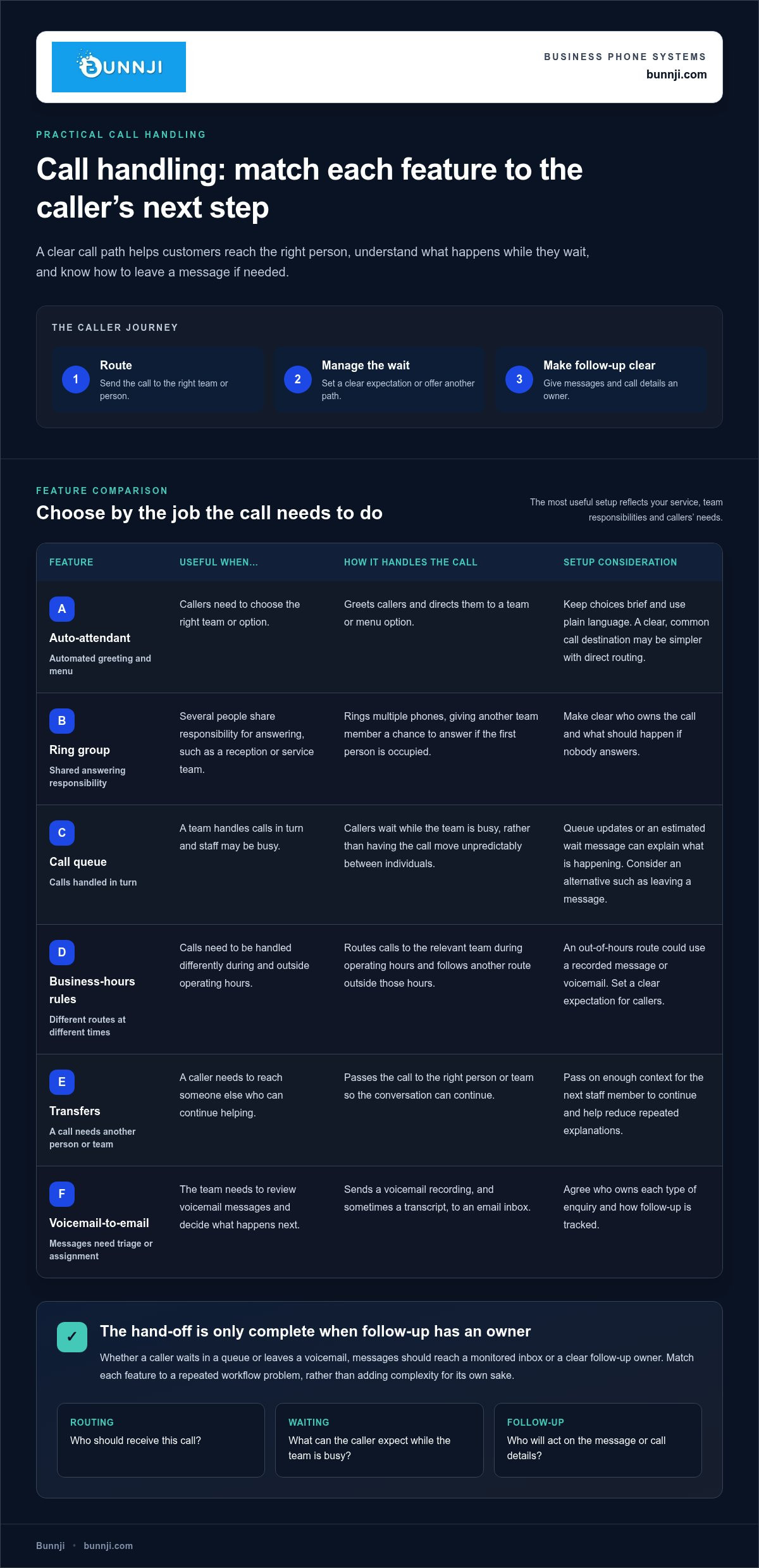
An auto-attendant is an automated menu that greets callers and directs them to the right team or option. Keep its choices brief and use plain language. Callers shouldn’t have to listen to a long menu to find sales or support. If a common call type has one clear destination, direct routing can make the path simpler still.
Match the routing method to the caller’s need
Different call-handling features suit different responsibilities. Use a ring group when several people share responsibility for answering, such as a reception or service team. Calls can ring multiple phones, giving another team member a chance to answer if the first person is occupied. A queue suits a team that handles calls in turn: callers wait while staff are busy instead of having the call move unpredictably between individuals.
Business-hours rules add another layer. During operating hours, calls might go to the relevant team; outside those hours, they can follow another route, such as a recorded message or voicemail. The right setup reflects the service you provide and sets a clear expectation for the caller.
Make waiting and follow-up clear
A queue can help manage demand, but the caller experience matters. Queue updates or an estimated wait message can help callers understand what’s happening. An alternative, such as leaving a message, gives them another path if waiting isn’t convenient. These options work best when they lead to a monitored inbox or a clear follow-up owner, rather than leaving callers unsure whether anyone received their request.
Transfers need similar thought. Direct calls to the right person or team, and pass on enough context for the next staff member to continue the conversation. This can reduce avoidable hand-offs and repeated explanations.
Voicemail-to-email sends a voicemail recording, and sometimes a transcript, to an email inbox. It can make messages easier to triage and assign, provided the team agrees who owns each type of enquiry and how follow-up is tracked. These voip features for business productivity work together as a caller journey: route the call, manage any wait, then make the next action clear. To explore how these capabilities fit into a connected phone setup, see Bunnji’s cloud VoIP and business communications.
How do VoIP integrations, mobility and analytics improve team productivity?
A call is only one part of the work. Staff may also need to identify the customer, check earlier interactions, record the outcome and decide what happens next. Connecting phone activity with those steps can reduce repeated data entry and make handovers clearer, when the phone system supports the relevant connections.
| Feature | Workflow supported | Likely user | Question to assess fit |
|---|---|---|---|
| CRM integration | Connect call activity with customer records and follow-up tasks | Sales and customer service teams | Would linking calls to customer records reduce manual updates? |
| Click-to-call | Start a call from a supported business application or contact record | Staff who make frequent outbound calls | Do employees often copy and dial numbers from another system? |
| Call history | Review previous calls and their context | Teams sharing customer relationships | Does the next person need to know what has already been discussed? |
| Mobile and desktop access | Make or manage business calls across supported devices | Hybrid, mobile or desk-based staff | Where and on which devices does your team need to handle calls? |
| Call analytics | Review call volumes, unanswered calls and queue activity | Team leaders and operations staff | Which patterns would help you identify a workflow bottleneck? |
CRM links can reduce the need to update customer records by hand when the system and workflow support that connection. Click-to-call can remove the extra step of entering a number, while call histories help staff see previous interactions before responding. Together, these capabilities can connect the call, customer context and next action instead of leaving each step in a separate tool.
Mobile and desktop access can help staff manage business calls from the device that suits their role, whether they’re at a desk or working across locations. Don’t compare systems only by the number of supported devices. Check whether calls and relevant context fit naturally into your team’s daily routine.
Use reporting to spot patterns, not just count calls
Call analytics can reveal workflow patterns, such as recurring busy periods, unanswered calls or activity building up in a queue. Reports help you ask better questions about staffing, routing and follow-up, but they don’t guarantee a particular business outcome. Review the patterns alongside how calls are handled rather than treating a call count as the whole story.
Call recordings and transcriptions can support quality review or staff training when they suit the work. Set clear business policies for when these tools are used, who can access the information and how long it’s retained. AI voice agents are another option for handling calls and connecting them with business processes; see AI Voice Agents: 2026 Trend Report for Australian Firms. Consider these voip features for business productivity as parts of one workflow, from answering the call to capturing context and learning from call activity.
How should you compare VoIP features for your business workflow?
Compare features against the work your team needs to do, not against another provider’s longest checklist. For each workflow, weigh four outcomes: a clearer caller experience, less staff time spent on manual steps, better visibility of call activity and continuity when normal connectivity is disrupted.
| Team workflow | Must-have | Useful later | Situation-dependent | Measure the fit by asking |
|---|---|---|---|---|
| Shared inbound calls | Call routing and clear ownership | Ring groups and queue reporting | Voicemail alternatives for particular call types | Can callers reach the right team, and can staff see who follows up? |
| Customer-facing work | Call history and a defined follow-up process | CRM context and click-to-call, where supported | Recording or transcription for review | Does this reduce re-entering information or repeating questions? |
| Distributed staff | Access on the devices staff use | Shared administration and reporting | Continuity options matched to connectivity needs | Can staff manage calls and access the right context across their work locations? |
Use three priority levels for each workflow. Must-have features solve a repeated problem or support essential call handling. Useful-later features could improve a process but aren’t needed to make it work today. Situation-dependent features, such as recording or transcription, belong on the list only when there’s a clear use and suitable policies for them.
Balance ease of use with control and continuity
A feature that’s difficult to administer can add work instead of removing it. Consider who can change routing, manage user access and review reports. Make sure permissions suit staff responsibilities, and that call records or recordings are handled according to your business policies. Reporting should answer practical questions about call patterns, not simply generate more information to review.
Cloud VoIP depends on connectivity, so include internet disruption in your comparison. Decide how callers should be handled if the usual connection or service is unavailable, who needs to know and what alternative contact process staff will follow. Australian businesses can explore this planning in Internet Redundancy: Protecting Your Firm from Outages.
The best voip features for business productivity fit your workflow, remain manageable and support a sensible continuity plan. To explore how business communications and connectivity can work together, review Bunnji’s business communications guidance.
How can Bunnji help you put productivity-focused VoIP into practice?
A smoother phone system starts with the calls your business handles, not a preset bundle of features. Bunnji provides cloud VoIP and business connectivity, helping you consider how call flows, team needs and internet resilience fit together. A telecommunications audit can also help identify costs and technology vulnerabilities as you plan.
Plan a rollout around real calls
Begin by documenting common call types and the people responsible for answering and following them up. Include business hours, transfer points and escalation paths. This gives the system configuration a practical foundation and helps reveal gaps, such as enquiries with no clear owner.
- Map the workflow: Record where each call should go, who takes ownership and what happens if the first contact is unavailable.
- Prioritise capabilities: Choose the routing, voicemail, device access or reporting features that address recurring friction first.
- Configure and test: Run realistic scenarios, including calls during busy periods and outside business hours. Check that routing, voicemail, device access and reports behave as expected.
- Prepare staff: Give each team concise guidance on the features they’ll use and where to direct questions or follow-up tasks.
AI call handling can be considered separately when it fits a defined workflow. Bunnji implements AI voice solutions that can handle calls, book appointments and integrate with CRMs and calendars. Treat this as an option for a specific task, not a requirement for every phone system.
Review results and refine the setup
After rollout, review measures connected to the problems you set out to solve. Unanswered calls can show where calls are being missed; queue activity can reveal periods of pressure; follow-up completion can indicate whether enquiries are reaching an owner. Use this information to adjust the workflow rather than adding features without a clear purpose.
Staff and customer feedback matters too. Ask where callers still get stuck and which phone tasks interrupt other work. Bunnji helps businesses align cloud communications with business connectivity, including planning how calls should be handled if internet service is disrupted. This keeps the phone system connected to the wider business setup, rather than treating it as an isolated tool.
The right voip features for business productivity are the ones your team can use consistently to support clear call handling and follow-up. Talk with Bunnji about a business phone system that fits your workflows and connectivity needs.
Make your next phone system fit the way your team works
The most valuable voip features for business productivity solve real workflow problems. Prioritise capabilities that help callers reach the right person, reduce manual follow-up and give your team useful visibility into call activity. Then test them against everyday scenarios before rolling them out.
Consider the whole setup, not just the phone platform. Your team’s devices, business connectivity and plan for internet disruptions all shape how calls are handled. Bunnji’s telecommunications audits can help identify costs and technology vulnerabilities, while its connectivity services support business internet and redundancy planning.
A clearer call journey doesn’t require every feature on the market. Start by understanding how your people and customers use the phone, then choose tools that support those needs. Talk with Bunnji about a cloud phone system that fits your workflows. With a practical plan, your team can move towards business communications that are simpler to manage and easier to use.
Frequently Asked Questions
What VoIP features are most useful for business productivity?
The most useful features remove a recurring obstacle in your team’s call workflow. Call routing, ring groups, queues and voicemail tools can help manage incoming calls; mobile and desktop access can support staff working across devices. CRM links, call history and analytics may help with customer context and follow-up. Prioritise based on your team’s needs, not the length of a feature list. These are the voip features for business productivity worth comparing.
Can VoIP features help a small business handle more calls?
They can help a small team organise incoming calls, but they don’t create extra staff capacity. Routing can direct enquiries to the right person or group, while a queue can manage calls when that team is busy. Voicemail delivery and clear ownership can also make follow-up easier to coordinate. Start by identifying when calls are missed or delayed, then choose features that address those pressure points.
How does an auto-attendant improve business call handling?
An auto-attendant is an automated greeting and menu that directs callers to the right team or option. For example, a caller could choose sales or support rather than rely on one staff member to transfer every call. Keep the menu short and use familiar wording so callers can choose easily. Business-hours rules can also direct calls differently outside normal operating times.
Is CRM integration important in a business VoIP system?
CRM integration can be valuable if your team regularly looks up customer details or records call outcomes. Where supported, linking phone activity with customer records may reduce manual updates and help staff understand earlier interactions. The value depends on whether the connection supports your actual process and the tools your business uses. Bunnji also implements AI voice solutions that can integrate with CRMs and calendars.
Can staff use business VoIP on mobile phones and computers?
Yes, cloud phone systems can support calls across mobile phones and computers, depending on the system and its configuration. This can help staff manage business calls when they’re away from a desk or working across locations. Consider which devices each role uses, whether staff need access to call history and how calls should be handled if internet connectivity is disrupted.
What VoIP features help businesses track call performance?
Call analytics and reporting can show activity such as call volumes, unanswered calls and queue patterns. These details can help teams investigate where demand builds up or calls are missed, but they don’t explain the cause on their own. Compare reports with staff feedback and the customer call journey. If you use call recording or transcription, set clear policies for access, use and retention.
What happens to VoIP calls if the internet connection goes down?
Because VoIP calls rely on internet connectivity, an outage can disrupt calls using the affected connection. What happens next depends on how the phone service and business continuity plan are set up. Decide in advance how callers can reach your team, what alternative connection or call path may be used and who manages the response. Bunnji advises Australian businesses on connectivity and internet redundancy.


