
What happens if your new phone system works perfectly until the internet drops out? Choosing a cloud based phone system Australia businesses can depend on means looking beyond call features. Your connection, call flows and backup plan all matter. You can gain flexibility without accepting missed calls or an unnecessarily complicated changeover, provided you plan for how the system will work day to day.
This guide explains how cloud telephony, VoIP and traditional phone systems differ, then shows you what to check before choosing a provider. You’ll learn how to match features to your team and call volumes, assess internet resilience, and plan number porting, staff devices and implementation. It also covers questions to ask about support, security and continuity, so you can compare options against your actual requirements.
The practical principle is simple: a cloud phone system works best when call workflows and connectivity are planned together. Whether your team works from one office or across multiple locations, start by deciding how calls should be handled and what should happen if the usual connection isn’t available.
Key Takeaways
- Understand how cloud telephony and VoIP work, and how calls can reach compatible phones and apps.
- Choose everyday features around your call volumes and workflows, from call queues to voicemail and forwarding.
- Plan for connection interruptions by checking which fallback options your provider supports and how they need to be configured.
- Use this cloud based phone system australia guide to compare providers on number portability, support, security and contract terms.
- Map your users, numbers, equipment and call flows before migration, and consider an audit to identify connectivity risks.
What is a cloud based phone system, and what changes for your business?
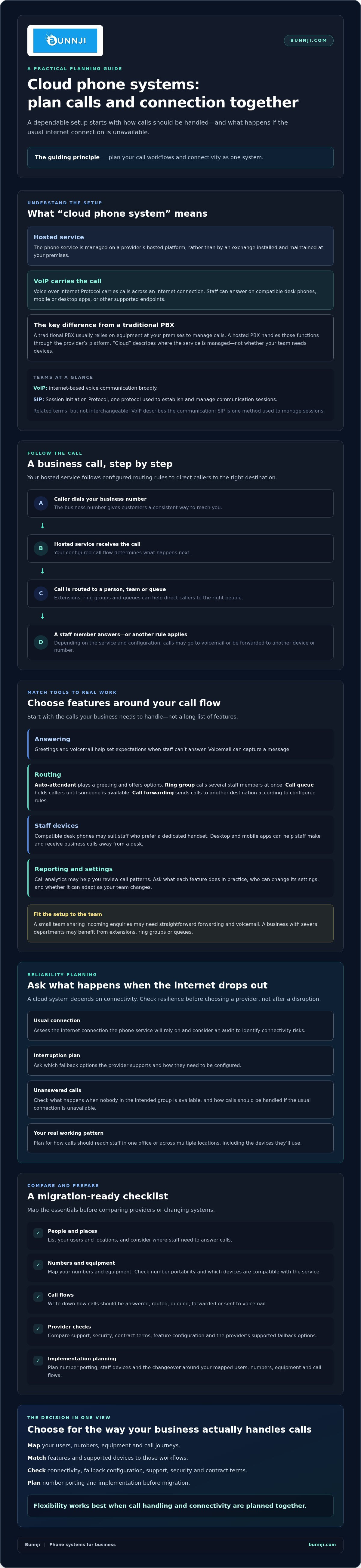
A cloud phone system is a business phone service managed on a provider’s hosted platform rather than by a phone exchange installed and maintained at your premises. It uses VoIP, or Voice over Internet Protocol, to carry calls across an internet connection. Staff can answer through compatible desk phones, mobile or desktop apps, or other supported endpoints.
“Cloud” describes where the service is managed, not whether your team needs devices. You can keep compatible desk phones or use apps for staff working across different locations. A traditional PBX usually relies on equipment at your premises to manage calls, while a hosted PBX handles those functions through the provider’s platform. For a foundational overview, see What is a cloud based phone system, including its explanation of hosted PBX systems.
How does a cloud phone system handle a business call?
A caller dials your business number. The hosted service receives the call and follows your business’s routing rules, directing it to a person, a team or a call queue. A queue can hold callers until a staff member is available. Voicemail can take a message if nobody answers, and call forwarding may send calls to another device or number, depending on the service and its configuration.
For example, a business could route incoming calls to a shared team first, then send unanswered calls to voicemail. Staff might answer using a desk phone or an app if those options are supported. The available features and routing choices vary by provider and setup, so check that the system can handle your actual call journeys.
Cloud phone system, VoIP and SIP: what do the terms mean?
VoIP is voice communication carried over internet protocol networks. It describes how a call travels, rather than a particular handset or provider. A cloud phone system uses VoIP as part of its service, while a traditional phone setup may use different technology or connect to VoIP through specific equipment.
SIP, or Session Initiation Protocol, is one of the protocols used to establish and manage communication sessions. In business telephony, SIP can support voice connections between systems and endpoints. It’s related to VoIP, but the terms aren’t interchangeable: VoIP describes internet-based voice communication broadly, while SIP is one method used to set up and manage sessions. For more context, read the Business VoIP Australia strategy guide.
For a cloud based phone system Australia businesses can use effectively, first decide how calls should reach your staff. Once that workflow is clear, it’s easier to assess compatible devices, essential features and the connectivity the service will rely on.
Which cloud phone system features matter in everyday Australian business use?
Start with the calls your business needs to handle, not a long list of features. A small team sharing incoming enquiries may need straightforward call forwarding and voicemail. A business with several departments may benefit from extensions, ring groups or queues that direct callers to the right people.
Choose features according to your call workflows, users and provider configuration. Ask what each function does in practice, who can change its settings and whether it can be adapted as your team changes.
What call-handling tools should a business assess?
Map a caller’s journey from dialling your number to reaching the right person. An auto-attendant plays a greeting and offers options, while a ring group calls several staff members at once. A call queue places callers in line until someone is available. Voicemail captures a message, and call forwarding sends calls to another destination according to configured rules.
Assess each feature by the outcome you need:
- Answering: A business number gives customers a consistent way to reach you. Greetings and voicemail help set expectations when staff can’t answer.
- Routing: Extensions let callers reach a person or team, while queues and ring groups help distribute incoming calls. Check what happens when nobody in the intended group is available.
- Collaboration: Desktop and mobile apps can help staff make and receive business calls away from a desk. Compatible desk phones may suit workers who prefer a dedicated handset.
- Reporting: Call analytics may help you review call patterns. Consider recording only if there’s a clear business need and you’ve checked the rules that apply to your use.
- Administration: Ask how authorised staff update greetings, routing and user access, and whether they can make these changes without provider assistance.
Choose endpoints around how people work. A desk phone can suit a fixed workstation, while an app may be more practical for a mobile or hybrid team. Confirm which devices and operating systems the provider supports before deciding, especially if staff need to use more than one device.
Can cloud phone systems connect with business apps?
Ask whether the system integrates with the CRM, calendar and collaboration tools your team already uses. Check what an integration actually enables, such as displaying customer details or linking call handling with a calendar. Availability and functions vary by provider, so confirm what’s included rather than assuming every integration works the same way.
AI voice agents are an optional capability, not a requirement for every business. They may handle routine calls or appointment bookings, and Bunnji’s AI voice solutions can connect with CRMs and calendars. Explore the AI voice agents trend report for more context. If you’re assessing cloud VoIP alongside connectivity needs, Bunnji’s business phone and connectivity services may be relevant to your research.
To assess a cloud based phone system australia businesses can use confidently, shortlist features against real caller journeys. Then verify device support, app integrations and administration options with each provider.
Cloud phone system reliability: what happens when your internet drops out?
A cloud phone system needs a working connection between your business and the hosted service to carry calls. If the connection fails, calls using devices at that site may not work as expected. Fallback options can reduce disruption, but they depend on provider support, configuration, power and the connections available to staff. No option guarantees uninterrupted calling in every outage.
Internet access is only one part of the setup. A provider service issue, loss of power, a fault in your local network or an unavailable handset can also affect calls. Ask which parts of the service each fallback covers and what still needs to be working for it to help.
What should a business continuity plan cover?
Start by listing your business numbers and the teams that matter most, then identify the calls you can’t afford to miss. Ask your provider how calls can be redirected if your usual internet connection fails, who can make that change and whether it can be set up in advance. Test the agreed arrangement with the devices staff will use, and document who is responsible for activating it.
Possible fallback
- Forward calls to mobile numbers: Calls may reach staff by mobile instead. Availability depends on provider support, configuration and mobile service.
- Use a mobile app over mobile data: Staff may be able to take calls through an app if the mobile network and device are available and the service is configured for it.
- Switch to a secondary internet connection: A separate connection, such as a suitable 5G service, may provide another path. It needs to be available at the site and set up to support the phone system.
- Reroute calls through the provider: Some providers may be able to change call routing so calls reach another destination. Ask what’s possible and how changes are made.
All fallback options are provider-dependent. Confirm availability, requirements and limitations before relying on them.
How do NBN, fibre and 5G fit into cloud calling?
NBN, fibre and 5G can each be considered for business connectivity. Suitability depends on the connection available at your site, call load, network quality and other internet traffic. Ask providers to assess how the proposed connection is expected to handle calling alongside your normal online work. Check whether a genuinely separate backup connection is practical, rather than assuming another service will remain available during an outage.
For more planning guidance, see the internet redundancy guide. A cloud based phone system Australia businesses can depend on needs a suitable primary connection and a tested response for interruptions.
How to compare cloud phone systems and plan a smooth migration
A useful comparison starts with how your business handles calls, then checks whether each provider can support that workflow during implementation and afterwards. Give providers the same requirements so you can compare what’s included instead of relying on broad feature claims.
- 1. Map the calls: Record your business numbers, extensions, call flows and opening hours. Note which calls go to a person, a team, a queue or voicemail, and what should happen if there’s no answer.
- 2. List users and devices: Include staff numbers, locations and preferred endpoints, such as desk phones or apps. Identify who needs administrator access.
- 3. Check numbers and portability: Ask who controls your business numbers, how number portability is handled, what information is needed and how provisioning works. Clarify the process for leaving the service, too.
- 4. Confirm integrations and reporting: List essential CRM, calendar and collaboration integrations, along with any reporting or call-recording requirements.
- 5. Plan for continuity: Describe your fallback needs and ask what routing changes are possible if connectivity or a service component is unavailable.
Compare providers on support arrangements, ease of administration, security practices, number portability and contract terms. Ask how user access is managed, which support channels and hours are included, and how call-flow changes are made. For security, request clear information about account controls, data handling and relevant security measures rather than assuming providers work the same way.
Review the full written proposal. Check inclusions, responsibilities, commitments, contract length and exit conditions. Don’t compare headline features alone. Make sure the proposal explains how your numbers, devices, integrations and call flows will be set up.
What should you prepare before requesting proposals?
Give providers a clear picture of your current setup: numbers, extensions, call routes, opening hours and where staff work. Add essential integrations, reporting needs and any call-recording requirements. Note the internet connection, local network and power arrangements the system will rely on, then ask providers to confirm what they need from your site.
What should the migration plan include?
Agree who is responsible for each task, the proposed timeline, number-porting steps and testing before cutover. Trial call routes, voicemail, devices and fallback arrangements with staff who represent different roles. Prepare practical guidance for staff, and agree how users will report issues after launch so faults can be tracked and addressed.
Choosing a cloud based phone system Australia businesses can rely on is easier when requirements and responsibilities are clear before you commit. Discuss your phone system and migration needs with Bunnji as part of your provider assessment.
Choosing an Australian cloud phone system: when expert guidance helps
The right system should fit the way your business answers calls today and how it expects to work tomorrow. Use this fit checklist to focus your provider discussions:
- Small team: Look for straightforward administration, clear call routing and suitable ways for staff to answer across their usual devices.
- Multi-site business: Check that staff and teams can follow consistent call flows across locations, and confirm what connectivity each site needs.
- Complex call handling: Map departments, queues, integrations and reporting requirements. Ask providers to show how the proposed setup would handle real caller journeys.
If your existing setup is hard to explain or manage, an audit can help bring the details into focus. It may clarify which numbers you use, what equipment commitments remain, how calls currently flow and where connectivity or continuity risks need attention. Bunnji provides telecommunications audits alongside cloud VoIP, connectivity and telecommunications guidance, helping businesses consider these needs together.
If you’re weighing up a cloud based phone system Australia providers offer, discuss your business phone requirements with Bunnji.
When is it worth reviewing your current phone setup?
Review your setup if customers report missed calls, your team juggles fragmented numbers, routine administration is difficult or contract commitments aren’t clear. Also consider whether staff can access the business phone service consistently from office, mobile and remote-work devices. Check that your current connection and fallback arrangements suit the calls your business can’t afford to lose.
What should you ask a prospective Australian provider?
Get clear answers before you commit. Ask who controls your business numbers, how porting works, what support arrangements apply and who is responsible for each part of the service. Confirm how you’ll manage user changes, integrations, reporting and security controls. Finally, ask what happens to calling during a connectivity outage and which fallback options are included in the written proposal. Availability and configuration can vary, so have the provider explain the practical limits of each option.
Plan a phone system that’s ready for what’s next
A dependable phone setup starts with the way your team handles calls, not a feature checklist. This cloud based phone system australia guide has shown why you should match call flows and devices to your business needs, then plan connectivity and fallback options together. Clear requirements also make it easier to compare providers and prepare for number porting and migration.
If your current setup has unclear commitments, scattered numbers or call-handling gaps, a telecommunications audit can help identify costs and vulnerabilities. Bunnji provides cloud VoIP and business connectivity guidance, including redundancy planning. AI voice agents are another option for businesses looking to handle calls or bookings and connect with CRMs and calendars.
Ready to work through the details? Talk through your business phone requirements with Bunnji and consider how your call workflows, connectivity and continuity needs fit together. With a clear plan, you can choose a system that supports your team with confidence.
Frequently Asked Questions
Is a cloud based phone system suitable for a small business in Australia?
Yes, a cloud based phone system in Australia can suit a small business if its features and connectivity match how the team handles calls. A smaller team might need a business number, simple call routing, voicemail and the option to answer on staff devices. Before choosing, check user administration, support arrangements, contract terms and what happens to calls during an internet interruption.
Can a cloud phone system work if the NBN goes down?
It may, but not automatically. If the NBN connection fails, devices relying on that connection may lose access to cloud calling. Depending on the provider and configuration, calls might be forwarded to mobiles or staff might use an app over a separate mobile connection. Ask which options are available, what they depend on and how to test them. Don’t assume a fallback is included.
How does a cloud phone system differ from VoIP?
VoIP means voice calls carried over internet protocol networks. A cloud phone system is a hosted service that uses internet-based calling and provides functions such as managing business numbers and routing calls. Put simply, VoIP describes how voice travels; “cloud” describes where the phone service is managed. The terms are related, but they don’t mean exactly the same thing.
Can I keep my existing Australian business phone number when switching?
You may be able to keep your existing number by requesting number portability, but don’t assume every number or circumstance follows the same process. Ask the proposed provider to confirm whether your numbers can be transferred, who must authorise the request, what details are required and how the transfer will be coordinated. Agree on the steps before cancelling your existing service, and confirm any timing with both providers.
Do staff need desk phones to use a cloud phone system?
No. Staff may be able to make and receive business calls using a compatible desktop or mobile app, depending on the provider and setup. Compatible desk phones may also be used, so a cloud service doesn’t necessarily mean removing handsets. Check which devices and operating systems are supported, whether staff can use more than one endpoint, and how user access is set up.
Is a cloud phone system secure for business calls?
Security depends on the provider’s practices and how your business configures and manages the service. Before choosing, ask how user access is controlled, what security measures protect accounts and calls, how data is handled and where relevant information is stored. Also check how staff should report suspicious activity and how access is changed when someone leaves. Don’t rely on broad security claims without clear details.
What should I check before moving my business phones to the cloud?
Document your numbers, users, call flows, devices, integrations and any reporting or call-recording needs. Then check number portability, provider support, security practices, written contract terms and responsibilities for setup. Review whether your business connection and local network can support calling, and agree on tested fallback arrangements. Before switching, set a migration plan with responsibilities, testing, staff guidance and a process for reporting issues after launch.


