
A cloud VoIP migration is a continuity project first and a platform change second. The key question isn’t just which phone system to choose. It’s how to keep incoming calls working, port your existing numbers safely and prevent cutover from interrupting your business. A cloud voip migration depends on careful coordination, a suitable internet connection and a clear picture of how your team handles calls today.
It’s reasonable to be cautious. Number porting, legacy handsets, call flows, contracts and ongoing support all need attention. An internet or configuration issue can affect calls, so don’t cancel your current phone service before number porting is complete. A telecommunications audit can help clarify what you have now and what the migration needs to account for.
This guide sets out a staged plan, from reviewing services and mapping numbers, users and devices to checking connectivity, comparing providers and preparing cutover and fallback arrangements. You’ll also learn how to assess whether a system fits your business today and can adapt as your team changes. The aim is a controlled transition, with clear owners and checks at each step.
Key Takeaways
- Map numbers, users, devices and call flows before choosing a platform so important business functions aren’t overlooked.
- Compare staged rollout and single cutover options against your business complexity, testing needs and fallback arrangements.
- A well-planned cloud voip migration gives each decision, dependency and approval a clear owner.
- Check provider support, equipment compatibility and connectivity resilience as part of your migration planning.
- After cutover, test call quality, number presentation, routing, voicemail and user access. Assign an owner and follow-up date to each outstanding issue.
Cloud VoIP migration: what changes, and what should stay working?
A cloud VoIP migration moves your business calling to an internet-based phone system, where a provider hosts call control rather than relying solely on equipment at your premises. The provider, call platform, handsets, apps, call flows or internet connection may change. Your essential business functions still need to work: callers must reach the right people, and staff need access to the numbers and messages they rely on.
Migration planning means moving numbers, users, call flows and devices into a new calling environment while maintaining service continuity. Installing a phone app is only one possible part of the work. A new app won’t automatically reproduce your existing greetings, queues, voicemail settings or after-hours routing. These need to be included in the migration plan and checked before cutover.
Start by recording what callers and staff experience today. For each important number, note whether a call plays a greeting, enters a queue, rings a particular person or team, and what happens if nobody answers. This gives you a practical reference for designing and testing the new setup. For a foundational explanation of the underlying technology, see Voice over Internet Protocol (VoIP).
Which parts of a business phone system move to the cloud?
Cloud-hosted call control manages how calls are directed, while users can call through supported devices and services. A desk phone is a physical handset; a softphone is calling software on a computer; a mobile app lets staff make or receive business calls on a supported phone. SIP trunking connects a compatible phone system to a provider’s voice network and may be relevant if you plan to retain existing phone equipment. Available functions depend on the provider, configuration and selected service.
These choices affect what you need to check before cutover. An older handset may not suit the new platform, while a softphone may better suit a team working across locations. Account for every user and device, and confirm how business numbers, greetings, queues and voicemail will be handled. Include connectivity in the phone system plan too, because call quality relies on a suitable internet connection and considered network setup.
When is cloud VoIP migration worth considering?
A migration may be timely when work patterns change, equipment ages or you’re reviewing your provider. The decision isn’t simply about moving to newer technology. Assess whether your current system handles calls the way customers expect, adapts as your team changes, and comes with administration and provider support that meet your needs.
Before choosing an approach, review your services, contracts, numbers and dependencies. A telecommunications audit can clarify your starting point, including connectivity and resilience requirements. For wider guidance on evaluating business calling options, refer to the Business VoIP Australia strategy guide alongside your migration planning.
Prepare your cloud VoIP migration around numbers, people and internet
A reliable cloud voip migration starts with a clear record of what your business needs to keep working. List every business number and the account it belongs to, then map each number to its destination, users, devices and call handling. Include queues, voicemail, greetings and after-hours routing. This inventory gives you and your providers a shared reference for planning and testing.
Readiness checklist: before migration, confirm your number and account records, porting eligibility, user and device list, call flows, internet performance, backup connection options and outage call plan.
What to check before porting Australian business phone numbers
Match each number to the current account details, the business or team responsible for it, and where it should route in the new system. Check that the account information is accurate. Then ask your current and prospective providers about porting eligibility, required approvals, dependencies and estimated timing. Different numbers or account arrangements may have different requirements, so confirm the sequence rather than assuming every number will move together.
Keep the existing service active until your provider confirms the porting sequence is complete. Cancelling too early can put number continuity at risk. Assign one person to track provider responses, approvals and unresolved details. Make sure the cutover plan also identifies who will verify each number after it moves.
How to assess internet and user readiness
Review how your connection performs during busy periods and note any existing call-quality concerns. Check the business’s NBN connection type, or assess whether fibre or 5G connectivity better fits each site. Map where staff work, which devices they use, whether they need headsets, and any power or remote-access requirements. A telecommunications audit can help bring current services, contracts and migration dependencies into view.
Plan for disruption before it happens. If the main internet connection fails during the migration or later, decide what should happen to incoming calls. Document who needs to be contacted and how calls could be handled, then ask your provider whether a proposed backup connection suits your locations and setup. Don’t rely on backup connectivity until it has been checked and tested.
Cloud services also require clear decisions about how information and access are managed. The US National Institute of Standards and Technology offers cloud security and privacy guidelines that can inform questions for a prospective provider about security responsibilities and data handling.
For a clearer view of connectivity options to consider alongside your phone requirements, explore business NBN, fibre and 5G connectivity.
Compare cloud VoIP migration approaches without overlooking the risks
There’s no single cutover method that suits every business. A cloud voip migration should match your call-flow complexity, number of locations, available testing time and tolerance for operational disruption. Compare the migration plan as carefully as the phone platform: confirm who owns each task, what must be tested and what happens if a dependency isn’t ready.
Is a staged or single-cutover migration better for your business?
A staged rollout moves selected users, teams or locations first. It gives you a chance to test call flows, devices and staff onboarding before expanding, but may mean supporting old and new systems in parallel for a time. A coordinated cutover moves the agreed scope together. It may suit a simpler setup if the provider confirms dependencies, testing and fallback arrangements. Neither approach is automatically safer. Choose based on your environment and provider advice.
| Area | Staged rollout | Single planned cutover | Confirm before agreeing |
|---|---|---|---|
| Number porting | Can be planned in groups if the provider supports the sequence. | Numbers move as part of one coordinated change. | Porting sequence, dependencies and who confirms completion. |
| Call flows | Test selected queues and routing before wider rollout. | Validate all agreed flows around the cutover. | Who configures and tests greetings, queues and voicemail? |
| Devices | Check compatibility and user setup with an initial group. | Prepare and verify devices across the planned scope. | Which equipment is included, supported or your responsibility? |
| Support and fallback | Agree support for each stage and a way to handle issues. | Set named contacts and an outage response for cutover. | Who responds, through which channel, and what happens if calls fail? |
Which provider and contract questions reduce migration surprises?
Cloud calling depends on connectivity. If your internet connection or configuration fails, calls may be affected, so ask how the service behaves during an outage and which fallback options suit your sites. A secondary connection, such as 5G, may be worth assessing. Check coverage, equipment and the provider’s recommended setup rather than assuming it will work as a backup.
Separate sales assurances from written commitments. Ask who manages number porting, system configuration, user onboarding and post-cutover support. Confirm contract duration, exit terms, equipment ownership or inclusion, and which ongoing service tasks sit with your business versus the provider. Get responsibilities, escalation contacts, call-continuity arrangements and outage steps documented before signing. Resolve unclear answers before cutover, not during it.
Follow a cloud VoIP migration plan from discovery to cutover
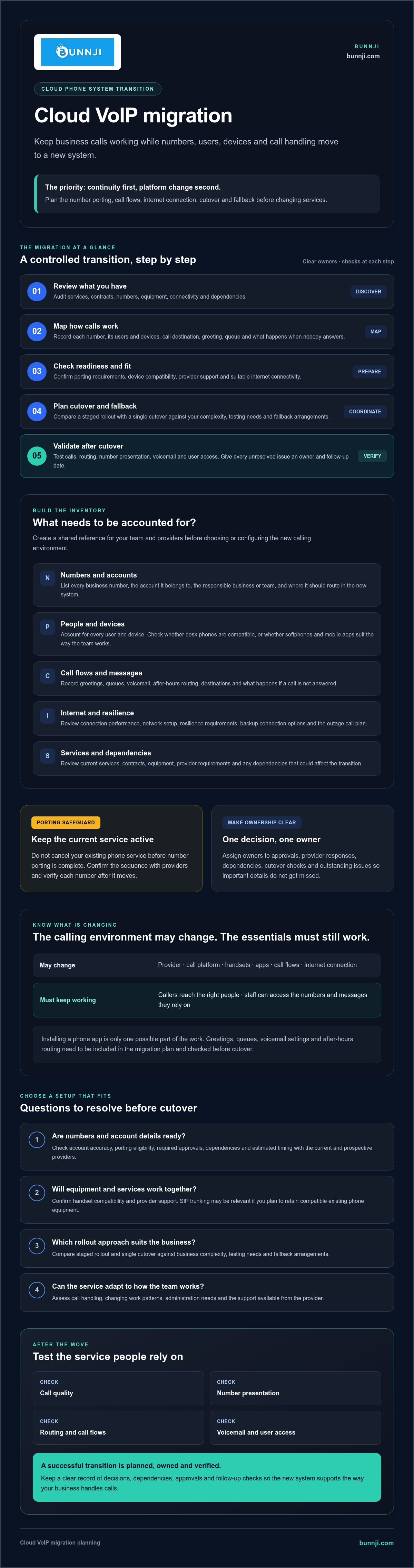
A cloud voip migration is easier to manage when every task has an owner, a check and a clear next step. Name a business owner to approve decisions and a provider contact to coordinate technical work. Record dependencies, approvals, dates and escalation contacts in one shared plan so neither side has to guess who is responsible.
Use this sequence as a working plan, adapting it with your provider to suit your system:
- Discover: The business owner approves the inventory of numbers, users, devices and current call flows. The provider contact identifies account, connectivity and equipment dependencies.
- Design: The business owner signs off on the proposed call flows and user requirements. The provider contact documents the configuration, porting sequence and responsibilities.
- Prepare: Confirm device readiness, staff access and the cutover window. Tell staff what’s changing, when it’s happening and where to get help.
- Test: Use test users to check inbound and outbound calls, routing, voicemail and user access. Ask the provider how to verify emergency calling procedures safely, rather than placing an uncoordinated test call.
- Cut over: Follow the agreed checklist, confirm number status and test priority call paths with named contacts available to investigate issues.
- Review: The business owner records outstanding issues, assigns owners and confirms when essential calling is working as expected.
What to complete before the migration date
Don’t approve the live change until the number and user inventory, call-flow design and device requirements are agreed. Confirm test results for key scenarios, including what happens when a call is unanswered or routed to a queue. Make sure staff know whether they’ll use a desk phone, computer or mobile app, and how to report access or call-quality problems.
How to manage cutover day and early support
Keep the provider contact and business owner reachable through the agreed cutover window. Work through the checklist: check number presentation, inbound and outbound calls, priority routes, voicemail and devices. Monitor call quality and direct each issue to a named contact, with an agreed escalation path if it isn’t resolved.
Before the change, document fallback actions for a porting delay, configuration fault or internet outage. Specify who can authorise each action and how calls should be handled while the issue is investigated. Keep the fallback plan available until the business confirms its essential calling works. For help reviewing cloud phone requirements and connectivity dependencies, explore Bunnji’s business phone and internet options.
After cloud VoIP migration, validate service and plan what comes next
Cutover isn’t the finish line. In the days and weeks after your cloud VoIP migration, check that the new system works in real business conditions, not just in a handover test. Confirm that calls connect clearly, business numbers present correctly, routing follows the agreed call flows, voicemail works and users can sign in from their assigned devices.
What should you review in the first weeks after migration?
Sample inbound and outbound calls across teams, locations and devices. Include key workflows such as calls to a main number, transfers between staff, queue handling and unanswered calls. Ask staff to flag problems with call quality, access or routing. Keep an issue log with an owner and agreed follow-up date for each item.
Look for patterns, not just isolated faults. Review support responses, recurring call issues and unexpected dependencies on a particular device, network connection or user account. Check the provider’s agreed service responsibilities against what’s happening in practice. Update staff instructions once the new process is stable, and remove obsolete system access only after confirming it’s no longer needed.
How can the phone system support future business changes?
Once core calling is stable, consider whether the system can support changes in how your business works. Would CRM integration reduce manual call notes? Could calendar-linked call handling suit your customer workflows? Assess these options against a clear use case rather than adding features simply because they’re available. Bunnji’s AI voice agents can integrate with CRMs and calendars, making them one capability Australian businesses may choose to evaluate as their needs develop.
For future planning, explore relevant discussion of AI voice agents and how they may fit business call handling. Keep the decision practical: identify the problem, confirm the system can support the required workflow, and check who will manage setup and ongoing responsibilities.
A short post-migration review can bring the whole picture together. Revisit call quality, unresolved issues, connectivity resilience, provider responsibilities and telecommunications costs once the service has settled. Record what’s working, what needs attention and when to review it again. If you’re comparing options or planning a move, Bunnji is an Australian provider to consider for cloud phone systems, SIP trunking and business connectivity. Share your requirements and evaluation priorities when discussing what may suit your business.
Make your next phone-system move with confidence
A successful cloud voip migration is more than a platform switch. Start with a clear view of your numbers, users, devices and call flows, then match the cutover approach to your business needs. Include connectivity resilience in the plan, assign owners to key decisions and test essential calling before treating the move as complete.
After cutover, check that numbers present correctly, calls route as intended and staff can use the system. Record feedback and unresolved issues so each follow-up has a clear owner. These practical steps help protect continuity now and give your phone system room to support future changes.
Bunnji provides cloud VoIP systems and SIP trunking for Australian businesses, along with business connectivity and internet redundancy guidance. Talk through your cloud VoIP migration with Bunnji and discuss the requirements that matter to your team. With a considered plan and the right support, you can move forward with greater clarity and confidence.
Frequently Asked Questions
What is cloud VoIP migration?
Cloud VoIP migration is the process of moving business calling from a legacy phone system or existing provider to a phone service hosted over the internet. Depending on your setup, it may involve transferring numbers, configuring call flows, preparing devices and helping staff learn the new system. Before choosing an approach, document what’s changing and what must keep working, including key numbers, queues, greetings and voicemail.
How long does a cloud VoIP migration take?
There’s no single timeframe that suits every business. Timing can depend on the number of users and phone numbers, call-routing complexity, provider coordination, porting requirements and internet readiness. Ask providers to create a schedule based on your inventory, dependencies and testing needs. Treat any estimate as specific to your project, not a universal promise, and confirm what could affect the proposed dates before setting a cutover window.
Can we keep our existing business phone numbers when moving to cloud VoIP?
Keeping your existing business numbers may be possible, but eligibility and requirements depend on the numbers, account details and providers involved. Confirm who owns each number and ask what information or approvals are needed before setting a cutover date. Find out which provider manages each step and when the old service should change. Keep it active until the agreed porting process is complete and you’ve tested calls to the destination numbers.
What happens to business calls if the internet goes down after migration?
Cloud VoIP calls may be affected if the internet connection they rely on becomes unavailable. Before migrating, ask your provider whether a backup connection is suitable for your location and service, and agree how priority calls should be handled during an outage. Options depend on your setup, so confirm and test the fallback process rather than assuming it will work. Make sure staff know what to do and whom to contact.
Is cloud VoIP reliable for Australian businesses using NBN?
Reliability depends on the complete setup, not just the phone platform or having an NBN connection. Consider connection performance, network configuration, power, provider support and backup arrangements. Ask your provider to assess your business requirements and explain how faults are handled. If calls are critical to daily operations, agree on an alternative call-handling approach and test it. No connection should be treated as outage-proof without a suitable continuity plan.
Do we need to replace all our desk phones during cloud VoIP migration?
Not necessarily. Whether you can keep existing desk phones depends on their compatibility, configuration and the service you choose. Some businesses use compatible handsets, softphones on computers or a mix of devices. Ask your provider to check each handset model and explain any support implications. Include devices in your migration inventory before buying equipment or onboarding users, so you can decide what to retain, replace or configure.
How can we reduce disruption during a cloud VoIP cutover?
Reduce disruption by preparing an accurate inventory of numbers, users and call flows, then agreeing responsibilities and a realistic schedule with your providers. Test important call scenarios before changing live services, tell staff what’s changing and name contacts for escalating issues. Prepare a fallback plan for connectivity or configuration problems. After cutover, verify priority numbers, call paths, voicemail and user access before treating the migration as complete, and assign owners to any outstanding issues.


