

What happens when a client calls during a tax deadline and their accountant is unavailable? If the call isn’t routed clearly, a staffing gap or connectivity issue can mean a missed opportunity to help. Choosing the best voip system for accounting firms means looking beyond call quality: the system needs to support reliable call handling, protect client information and give your team a plan for disruption.
It’s understandable to focus first on features and price. But a good fit also depends on how calls move between reception, accountants and mobile or remote staff, and what happens if your internet connection drops. Security controls, software integrations and number-porting requirements deserve a close look before you commit.
This 2026 buyer’s guide compares VoIP capabilities against the realities of accounting workflows. You’ll learn what to assess for call routing, recording, reporting, integrations, security and continuity, including how cloud VoIP and internet redundancy can work together. We’ll also cover practical steps for planning a lower-disruption changeover, from confirming responsibilities and porting details to testing call flows before your team relies on them.
Key Takeaways
- The best voip system for accounting firms should match your call flows, seasonal demand and staff availability, not just offer a long feature list.
- Use a comparison table to weigh hosted VoIP, SIP trunking and app-based calling against your firm’s needs, then ask providers to demonstrate how each option works.
- Check that your preferred system works with your practice-management, CRM and accounting software, and confirm its security and data-handling controls.
- Before changing providers, document your numbers, devices, call flows and contract obligations, then plan configuration and testing in stages.
- Consider cloud VoIP, connectivity and internet redundancy together. A telecommunications audit can help clarify what your firm needs to verify.
What makes a VoIP system right for an accounting firm?
Accounting-firm VoIP is a business phone system that carries calls over an internet connection rather than a traditional phone line, helping a firm manage client calls across its team and supported devices. The technology is known as Voice over Internet Protocol (VoIP). The right setup depends on how your firm handles client access, confidentiality, busy periods and staff availability, not simply on the number of features in a provider’s sales material.
Start by listing the calls your team receives: existing clients seeking an update, prospective clients asking about services, document follow-ups and internal transfers. A phone system manages how calls arrive, move between people and reach voicemail. It isn’t practice-management or workflow software, which organises client records, tasks and deadlines. The tools may complement each other, but check any claimed integration against the specific software and workflow your firm uses.
Which accounting-firm calls need the clearest handling?
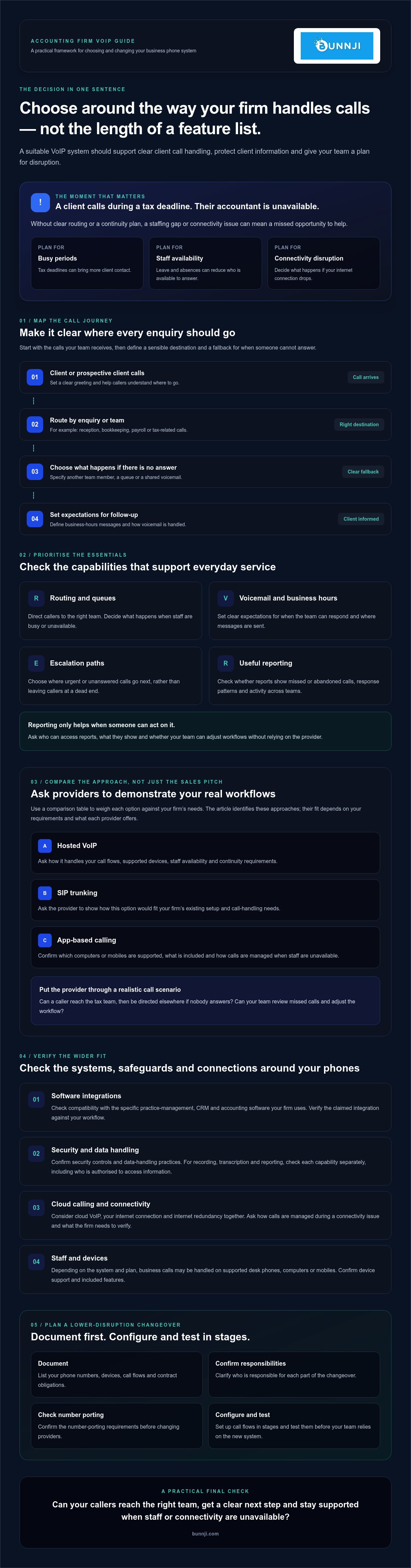
Map each enquiry to a sensible destination. Reception might handle general questions, while bookkeeping, payroll and tax-related calls go to the relevant team or assigned person. A clear greeting sets expectations, and routing and transfer options help clients avoid being passed around. Decide how unanswered calls should be handled when a staff member is away or already on a call. For example, should the call go to another team member, a shared voicemail or a queue? Make the choice clear for each call type.
What does cloud VoIP change for a firm’s team?
Depending on the system and plan, staff may be able to handle business calls through supported desk phones, computers or mobiles. That can help a team use one business calling setup across office and flexible work arrangements, but device support and features vary. Confirm what’s included, which devices are supported and how calls are managed when staff are unavailable. For broader context, see this guide to business VoIP in Australia.
Accounting firms also need to plan for changes in demand. Tax periods and deadlines can bring more client contact, while leave or staff absences can reduce the number of people available to answer. Ask how the system can handle these situations: can calls be directed to another team member, and can callers leave a message with clear expectations for follow-up? Confirm the available queueing, routing and reporting options rather than assuming every provider offers the same tools.
Before comparing vendors, define the call experience you want. Note who answers each call type, which conversations need careful handling and what should happen when the intended person can’t respond. This practical map gives your firm a clearer basis for assessing the best voip system for accounting firms against actual workflows.
Which VoIP features should accounting firms prioritise?
Choose features according to how they support daily client service, not by how long a vendor’s feature list is. Clear call handling may matter more than advanced extras if clients struggle to reach the right person or follow up on unanswered calls.
Start by checking whether the system can support:
- Routing and queues: Direct callers to the right team and decide what happens when staff are busy or unavailable.
- Voicemail and business hours: Set clear expectations for when the team can respond and where messages are sent.
- Escalation paths: Decide where urgent or unanswered calls go next, rather than leaving callers at a dead end.
- Useful reporting: Review missed or abandoned calls, response patterns and activity across teams.
How should call routing and reporting support client service?
Ask vendors to demonstrate menus and routing rules using realistic call scenarios. For example, can a caller reach the tax team, then be directed elsewhere if no one answers? Find out which reports identify missed or abandoned calls, which authorised staff can access them, and whether your team can adjust workflows without relying on the vendor. Reporting is useful only when someone reviews it and can act on what it shows.
Confirm how voicemail is delivered, who can access it and whether the system supports your firm’s preferred message-handling process. Treat call recording, transcription and reporting as separate capabilities to verify, including their access controls and data handling. Don’t assume a feature is included or that its default settings meet your firm’s confidentiality requirements.
Can VoIP connect with accounting software and AI call handling?
Before speaking with providers, list your actual practice-management, CRM, calendar and accounting platforms, including versions. Ask vendors to demonstrate each required integration using your firm’s software, and clarify what information passes between systems. A claim that a platform “integrates” doesn’t necessarily confirm that the specific workflow you need is supported.
AI reception or voice agents may suit routine enquiries, but assess the intended use and confirm how the system hands calls to staff, escalates complex questions and handles information shared by callers. Bunnji offers AI voice solutions. Its overview of AI voice agents for Australian firms provides broader context.
The FCC’s VoIP information provides general details about VoIP services. For Australian emergency-calling arrangements, ask your provider to explain the options for the proposed system. To clarify current numbers, contracts, connectivity and requirements, consider a telecommunications audit such as those offered by Bunnji.
How do accounting firms compare VoIP systems beyond the feature list?
Compare each option against a defined firm requirement, then ask for evidence that it works as described. Match every feature to a specific client-service or operational need, and treat anything unverified as an open question. A vendor demonstration, written response or contract term is more useful than a broad sales claim.
First, identify which approach fits your existing setup. Hosted VoIP uses a provider-hosted phone platform. SIP trunking connects compatible existing phone infrastructure to internet-based calling, which may suit a firm that wants to retain some equipment. App-based calling uses supported software on computers or mobiles. Each option has different equipment, connectivity and administration considerations to verify with the provider.
| Comparison criterion | Firm requirement | Evidence to request | Unresolved question |
|---|---|---|---|
| System approach | Fit with current phones, network and working arrangements | Demonstration using your proposed setup | Which equipment or connectivity must change? |
| Service and support | Clear responsibilities for setup, faults and account changes | Written support arrangements and escalation process | What support is available, and when? |
| Numbers and exit | Keep required numbers and understand the changeover path | Porting steps, number ownership terms and exit process in writing | What happens to numbers, data and equipment if you leave? |
| Contract terms | Understand commitments and any dependencies | Full contract, renewal and termination terms | Are there obligations tied to hardware or connectivity? |
What should firms check for privacy, security and call records?
Ask how access controls, authentication, retention settings and administrator permissions work. For recordings, transcripts or AI processing, confirm what is captured, how it is stored, who can access it and how long it is retained. The NIST security considerations for VoIP offer technical background, but don’t treat them as a substitute for advice on Australian requirements. Have your adviser check applicable privacy and call-recording obligations before enabling these features.
How should firms assess reliability and business continuity?
Ask vendors to document what happens during an internet outage, power issue or platform disruption. Compare available failover options, such as diverting calls to mobiles or using alternative connectivity, and establish who configures and tests each one. Assess how the service depends on your NBN or fibre connection, along with any backup. A backup option can support continuity planning, but it doesn’t guarantee uninterrupted calling.
Record what the provider has confirmed, what remains untested and who owns each follow-up. That gives your firm a fair basis for comparing the best voip system for accounting firms for its needs, rather than choosing on features alone.
How can an accounting firm plan a low-disruption VoIP changeover?
A low-disruption VoIP changeover follows six stages: audit current services, define requirements, validate the provider, configure the system, test call flows and review the results. Assign an owner for each stage, schedule the cutover around the firm’s workload and agree how clients will be kept informed. Document rollback steps so the team knows what to do if a critical call flow doesn’t work as expected.
What should a firm audit before selecting a provider?
Make an inventory of business numbers, users, extensions, devices, voicemail settings and call flows. Note call volumes and busy periods, staff working arrangements, internet dependencies and existing equipment. Record contract end dates and number-porting requirements. Then separate must-have workflows, such as reaching reception or the tax team, from optional features. This gives vendors a practical brief and helps the firm identify migration dependencies early.
Use the audit to create a changeover plan with named responsibilities. Confirm who approves the call design, coordinates with the provider, informs staff and clients, and makes the cutover decision. Where possible, choose a time outside a known peak workload. Document rollback steps, including who can authorise them and how the firm will handle calls if the new setup needs attention.
Use this sequence to keep the changeover organised:
- Audit: Inventory numbers, users, devices, call flows, voicemail, connectivity and contract obligations.
- Set requirements: Prioritise essential call handling and mark optional capabilities separately.
- Validate the provider: Confirm number porting, dependencies, support arrangements and responsibilities in writing.
- Configure: Set up users, greetings, routing, voicemail and agreed escalation paths.
- Test: Run through normal and fallback scenarios, record issues and obtain approval before cutover.
- Review: Check call handling after the change and assign follow-up actions for any problems.
How can teams test the system before switching fully?
Test inbound and outbound calls, transfers, queues, voicemail and after-hours messages against the firm’s agreed call flows. Check connectivity and any documented fallback options, then record what worked and what needs fixing. Make sure users can access the required apps or devices and understand call handling, escalation and support contacts. Get approval from the responsible person before switching the main numbers.
Even the best voip system for accounting firms needs a changeover plan that maintains access while the team adapts. A telecommunications audit can help clarify existing numbers, contracts, connectivity and requirements. Explore Bunnji’s telecommunications audit options as one way to prepare for that review.
Choosing a VoIP system for your accounting firm with Bunnji
By this stage, your firm should have a practical brief: the calls you need to handle, the staff and devices involved, the software you rely on, and the security and continuity questions a provider must answer. Use that brief to assess fit rather than assume a phone system is accounting-specific. Confirm integrations with your actual software and versions, and ask for written details about security controls, data handling, number porting, emergency calling, support and outage arrangements.
Bunnji provides cloud VoIP, SIP trunking, telecommunications audits and business connectivity options. These services may be relevant if you’re considering a new hosted phone setup, reviewing existing telephony infrastructure or checking how connectivity affects calling. The right option depends on your firm’s current arrangements and requirements, so ask Bunnji to confirm what can support your particular call flows and working practices.
What can Bunnji help an accounting firm assess?
A discussion can start with how your team answers client calls, where calls should go when someone is unavailable, and which supported devices staff need. A telecommunications audit can help clarify existing numbers, contracts, connectivity and requirements. You can also explore whether internet redundancy planning is relevant to your continuity needs. Treat it as an option to assess, not a promise that calls will remain available during every outage.
Bring specific questions. Can the proposed system support the call flows you’ve mapped? What device options are available? What happens if your internet connection or the phone platform is disrupted? Ask for clear answers on every capability that matters to your firm, including whether it’s included and what your team would need to configure or manage.
What should you prepare before speaking with a VoIP adviser?
A short preparation list makes the conversation more useful. Gather your current business numbers, users, call flows, devices, software platforms and existing telecommunications agreements. Note busy periods, client-service pain points, reporting needs and any call-handling steps that involve confidential or time-sensitive discussions. Include unresolved questions about security, recordings, integrations, number porting and continuity.
Invite the people who understand both client workflows and the technical or commercial arrangements. That may include the person responsible for reception, practice operations, IT or provider contracts. Together, they can distinguish essential requirements from optional features and record what still needs verification before a decision or changeover.
If you’ve prepared your requirements and want to explore whether Bunnji’s business phone and connectivity options may suit your firm, discuss your business phone requirements with Bunnji. The best voip system for accounting firms is the one that fits your confirmed needs, with responsibilities and open questions clear before you commit.
Make your next phone-system decision with confidence
The best voip system for accounting firms is the one that fits your client-call workflows, security needs and continuity plans, with key capabilities confirmed rather than assumed. Compare providers against real requirements, verify how the system handles your firm’s software and information, and plan the changeover around your team’s workload.
Bunnji provides cloud VoIP and SIP trunking, and offers telecommunications audits and internet redundancy guidance. AI voice agents and receptionists are also part of its service suite. Ask Bunnji to confirm whether its options fit your firm’s call handling, device access and connectivity requirements, and what you’ll need to verify before making a decision.
Bring your current numbers, call flows, software and agreements to start a focused discussion. Discuss your accounting firm’s VoIP requirements with Bunnji and take the next step towards a phone setup your team can assess with clarity and confidence.
Frequently Asked Questions
What is the best VoIP system for an accounting firm?
The best VoIP system for an accounting firm is one that fits its call workflows, security requirements, team arrangements and continuity plans. Compare how each option routes client enquiries, handles unanswered calls and supports staff devices. Then verify integrations with the firm’s actual software, along with security controls, support arrangements, number porting and outage options. Request demonstrations and written answers so your choice rests on confirmed capabilities, not a feature list alone.
Is VoIP suitable for accounting firms handling confidential client calls?
VoIP can be suitable, but the firm should assess the provider’s security controls and data-handling practices before using it for confidential conversations. Ask about authentication, user permissions, recordings, transcripts, retention and who can access call data. Check whether the proposed setup meets your firm’s requirements, and have an appropriate adviser review relevant privacy and call-recording obligations. Don’t assume that encryption or a security certification is included without verifying it with the provider.
Can a VoIP system integrate with accounting software such as Xero or MYOB?
Some VoIP systems may connect with business software, but compatibility with Xero, MYOB or another platform must be confirmed for the specific system and version your firm uses. Give the provider a list of your practice-management, CRM, calendar and accounting tools, then ask for a demonstration of the exact workflow you need. Clarify what information is shared, how access is managed and whether an integration requires extra configuration or a third-party service.
How much does a VoIP system cost for an accounting firm?
There isn’t one reliable price for every accounting firm. A quote may depend on the number of users, required call-handling features, supported devices, connectivity, existing equipment and any setup or integration work. Ask providers for an itemised quote that distinguishes recurring charges from one-off costs and clarifies contract terms, number porting and optional services. Compare the full proposal against your requirements rather than choosing on a headline price alone.
What happens to accounting-firm calls if the internet goes down?
If the internet connection supporting the VoIP service fails, calls may be disrupted unless a suitable failover arrangement has been configured. Ask the provider what happens during an internet outage, power issue or platform disruption, and whether options such as mobile diversion or alternative connectivity are available. Confirm who sets up and tests those arrangements. Treat internet redundancy as part of continuity planning, not as a guarantee that calls will never be interrupted.
Can an accounting firm keep its existing business phone number when switching to VoIP?
Keeping an existing number may be possible through number porting, but it isn’t automatic or guaranteed for every number and setup. Ask the proposed provider to confirm eligibility, required account details, the porting process and any timing dependencies in writing. Coordinate the changeover with both providers, and avoid cancelling the existing service until the port has been completed and tested. Include key numbers in your migration plan so clients know how to reach the firm.
Should an accounting firm use AI to answer client calls?
AI call handling may suit routine enquiries, such as directing callers or sharing approved information, but it won’t be right for every conversation. Define which calls it can manage, when it must hand over to a person and how urgent or sensitive enquiries are escalated. Before use, verify how caller information is processed and handled, then test the experience with realistic scenarios. Keep a clear alternative for callers who need human assistance.
How long does it take to switch an accounting firm to VoIP?
There’s no single changeover timeframe. It depends on factors such as the number of users and devices, call-flow complexity, number porting, existing contracts, connectivity requirements and how much testing is needed. Ask the provider for a proposed schedule that identifies dependencies, responsibilities and approval points. Build in time to test calls, voicemail, transfers and fallback arrangements, and schedule the cutover around the firm’s workload rather than a busy client period.


