

Searching for reliable business IT support can bring up plenty of providers, but proximity alone won’t keep work moving. Dependable technical assistance depends on clear ownership: who handles an outage, what the agreement covers and how internet and phones fit into the support plan. When comparing business IT support providers, look beyond location to the responsibilities a potential partner will clearly take on.
When technology problems interrupt staff or customer service, you need to know who to contact, what response to expect and how issues will be escalated. You also need clear answers about cybersecurity, backups and recovery, rather than a patchwork of responsibilities spread across providers.
This guide compares common support models, explains what to clarify about response expectations and outlines the technical capabilities to assess. You’ll also learn how managed IT, connectivity, networking, cybersecurity and phone systems can work together, so you can choose a partner like Bunnji that fits your business and helps reduce avoidable disruption.
Key Takeaways
- Define which business systems need support, then clarify what a provider is responsible for before you engage.
- Ask how support requests are logged, prioritised and escalated, and check that the process suits your team.
- Compare managed IT, pay-as-needed assistance and in-house capability by ownership, predictability and internal workload.
- Prepare for a smoother handover by documenting users, access ownership and dependencies, including internet and phones.
- Consider managed IT, cybersecurity, networking, business connectivity and cloud VoIP together when assessing a technology partner.
What does local IT support mean for an Australian business?
A staff member can’t access a shared file, the office Wi-Fi drops out, or the phone system stops handling calls. Even everyday faults can stall work and frustrate customers, especially when nobody knows who owns the fix. IT support means assistance with the technology a business relies on, but the way that assistance is delivered can vary considerably.
Reactive support focuses on fixing problems after they occur. Ongoing management takes a broader view, with agreed responsibilities for maintaining and monitoring technology, depending on the provider’s scope. Put simply, managed support is an ongoing arrangement for defined technology responsibilities, while one-off troubleshooting addresses a specific problem when it arises. The managed services model describes this proactive approach in contrast with traditional break-fix support.
“Local” should mean an accessible, accountable service relationship, not an assumption that someone will visit your premises. Ask how to contact the provider, who takes responsibility for a request and how it will be followed up. Confirm any on-site coverage separately. Don’t assume it from a provider’s location or marketing language.
What can business IT support cover?
Depending on the agreement, support may cover staff devices, network access, user accounts and cybersecurity. But “IT support” isn’t a complete scope by itself. Internet connectivity, phone systems and hardware may sit under separate services or agreements, even when they affect the same workflow. A dropped connection, for example, can disrupt both access to business systems and customer calls.
Before signing, get the scope in writing. Check which systems, users and business locations are included, what tasks are excluded, and who handles issues that cross provider boundaries. This helps prevent a fault being passed between suppliers without clear ownership.
When is outside IT support worth considering?
Recurring outages, unresolved support requests and staff losing time to avoidable technical problems can signal that current arrangements aren’t working. A growing team may also outgrow informal help from one technically confident employee, particularly if that person’s other responsibilities leave little time for support or documentation.
That doesn’t mean every business needs to outsource everything. The right arrangement depends on your internal capability, the systems you rely on and the impact of disruption. You might need specialist help to complement an in-house contact, support for defined areas or broader ongoing management. Start by identifying where the risks and workload exceed the capacity you have today.
How to assess an IT support provider before you engage
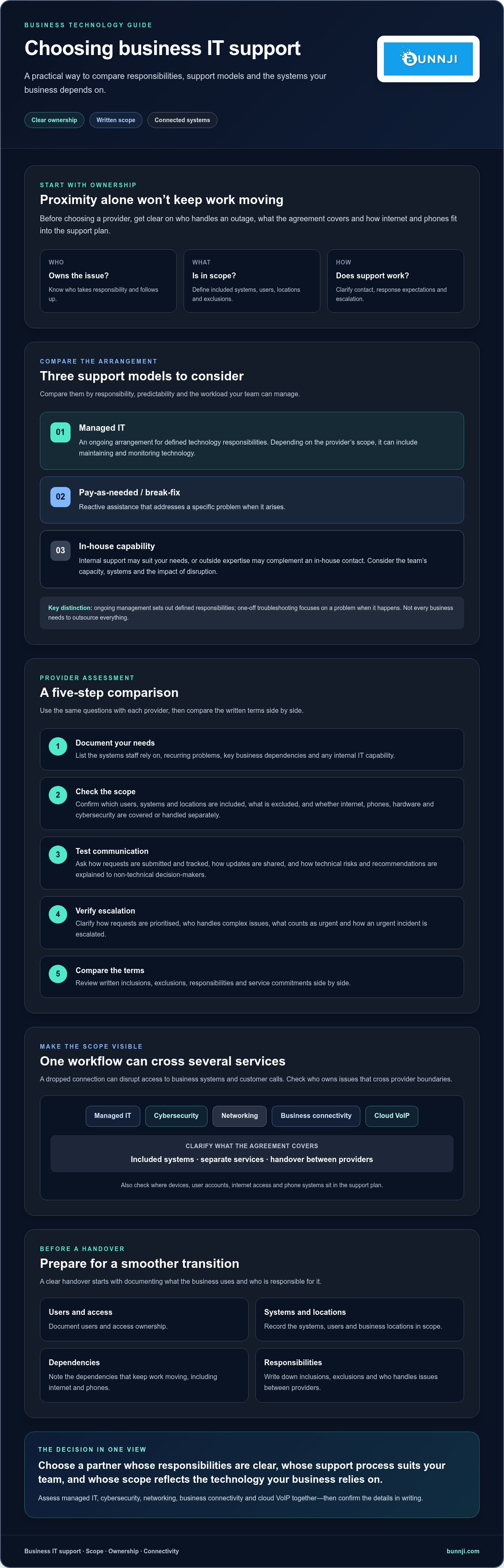
When comparing business IT support providers, look past broad promises of “complete support”. A good fit depends on what the provider will take responsibility for, how you’ll reach them and what happens when an issue affects essential work. A clear written scope is more useful than an impressive list of capabilities.
Use this sequence to compare providers on consistent terms:
- 1. Document your needs. List the systems staff rely on, recurring problems, key business dependencies and any internal IT capability.
- 2. Check the scope. Ask which users, systems and locations are included, what’s excluded, and whether internet, phones, hardware and cybersecurity are covered by this agreement or handled separately.
- 3. Test communication. Ask how support requests are submitted and tracked, how you’ll receive updates, and how technical risks and recommended actions will be explained to non-technical decision-makers.
- 4. Verify escalation. Find out how requests are prioritised, who handles complex issues and how an urgent incident is escalated. Ask the provider to explain its process rather than assuming a particular service desk model.
- 5. Compare terms. Review the written inclusions, exclusions, responsibilities and service commitments side by side before deciding.
For cybersecurity, ask how the provider’s proposed support aligns with your business needs. The Australian government cybersecurity guide can help you identify practical topics to discuss, including how your business protects its systems and information.
Which service commitments should you confirm?
Ask what support hours apply, whether response targets are specified, who your escalation contacts are and what the provider classifies as urgent. Clarify whether assistance is remote, whether on-site visits are available, and how after-hours work is arranged or charged. Treat each as a question, not an assumed inclusion. Check that agreed commitments appear in the signed contract or service schedule, rather than relying on a sales conversation.
How should you test a provider’s fit?
Ask for a practical example of how they’d approach an issue affecting a business-critical system. Listen for clear steps: how they’d assess the impact, communicate progress and involve the right people. You’re assessing the quality of their explanation, not asking them to promise a particular outcome.
A scoped discovery conversation can help both sides clarify requirements before you commit to a long-term arrangement. You can also review this guide to managed IT support for growing businesses. If you want to clarify whether Bunnji’s managed IT and related business technology services fit your requirements, you can discuss your support needs with Bunnji.
Managed IT, break-fix or in-house support: which model fits?
The right support model depends on your business size, internal skills, how critical your systems are and how much disruption you can tolerate. If you’re comparing local it support melbourne options, weigh who owns ongoing tasks and how support affects your team, not just how a provider describes its service.
| Model | Ownership and predictability | Internal workload and likely fit |
|---|---|---|
| Managed support | Defined responsibilities continue under an ongoing agreement. Regular arrangements can make support activities more predictable, but inclusions and service commitments vary. | Can reduce the need for staff to coordinate every technical task. May suit businesses that need continuing support but don’t have enough internal capacity or specialist skills. |
| Pay-as-needed assistance | External help is engaged for particular issues or tasks. There may be less ongoing commitment, but the response process and availability depend on the arrangement. | Staff still need to identify problems and arrange help. May suit businesses with occasional support needs and the capacity to manage issues between engagements. |
| Internal IT capability | Responsibility sits within the business, giving direct oversight of priorities. Continuity depends on staffing and documented processes. | Can suit organisations with the skills and capacity to manage their systems internally. Consider cover for leave, competing priorities and specialist requirements. |
What does managed IT support usually involve?
Managed support may include ongoing assistance and proactive oversight, such as monitoring or maintenance, but those tasks aren’t automatic inclusions. Check the contract for specific responsibilities covering security, backups and routine upkeep, as well as what remains yours or another provider’s to manage.
A service description explains what a provider says it does. A service-level commitment sets out agreed obligations, such as response targets, if included in the signed terms. Read both carefully. Managed support doesn’t have to mean handing over every decision: define approval steps, access boundaries and which changes require your sign-off.
When might internal or break-fix support be enough?
If your technology needs are limited, your team has capable internal skills and faults are infrequent, internal support or occasional external assistance may be workable. The risk is relying on one person who also has other duties, or only addressing faults after they’ve disrupted work.
Review the real capacity available, how you’d recover essential systems and what downtime means for staff and customers. If the business can’t absorb delays or key knowledge sits with one employee, a different model or added external support may be worth considering. Choose the arrangement that fits your actual risk and capacity, not an assumed need to outsource everything.
How to prepare your business for a smooth IT support transition
A provider change can affect more than computers. Staff access, customer calls and essential workflows may all depend on systems managed by different suppliers. A clear handover helps the incoming provider understand what’s in place before access or services change, and helps your team know who is responsible for each step.
Before onboarding, assemble a current list of systems, users, suppliers, account owners, known faults and recovery arrangements. This gives everyone a practical starting point and makes gaps easier to spot.
What information should you gather first?
Build an inventory of devices, software, users, key suppliers and business-critical services. Include internet connections and phone systems wherever they support customer contact or essential workflows. Note recurring faults and outages, along with relevant supplier agreements and renewal or changeover details. A concise record is more useful than relying on one employee’s memory.
Record who owns domain, cloud, network and administrator accounts, and how access can be transferred securely. Don’t put passwords in an ordinary handover document or send them through an unsecured channel. Confirm a suitable secure process with the outgoing and incoming providers.
How do you protect continuity during a changeover?
Agree the handover plan before changing access or suppliers. Set out who is responsible for each task, the order of changes, how staff will be kept informed and who to contact if a step disrupts normal work. For phone services, include dependencies such as internet connectivity, business numbers and call handling. This Australian business VoIP strategy guide can help you consider how phone-system requirements fit into the wider transition.
Check who is responsible for backups and recovery, and confirm what is backed up, where it is held and how restoration would be handled. Don’t assume a backup is current or that recovery has been tested. Ask the responsible provider to explain the arrangements and any gaps before the changeover begins.
Finally, agree how administrator access will be transferred, reviewed and retained after the handover. Keep a record of completed tasks and unresolved issues so responsibility doesn’t disappear between providers. If you’re planning a change, discuss your IT and business connectivity requirements with Bunnji to clarify which services may fit your needs.
How Bunnji can help connect IT, cybersecurity and business communications
Business systems don’t operate in isolation. An internet fault can affect access to cloud tools and interrupt cloud phone calls. A network issue may disrupt staff access, while a security concern can involve devices, accounts and connectivity. If different suppliers manage each part, it may take time to work out who owns the issue and where it should be escalated.
Bunnji provides managed IT and cybersecurity alongside networking, business NBN, fibre and 5G connectivity, and cloud VoIP and business phone systems. Having related services available through one provider may help your business assess how these dependencies fit together. Confirm exactly which systems and responsibilities are included in any agreement.
Where can joined-up technology support help?
Consider a fault that affects both internet access and customer calls. Knowing which provider manages the connection, which supports the phone system and how each team coordinates can make responsibilities clearer. Ask who owns each system and what escalation path applies if an issue crosses service boundaries.
Phone requirements deserve particular attention if call handling is important to your customers. For businesses considering automated call answering, Bunnji’s AI voice agents guide for Australian firms explores this area. The right option will depend on your needs and how your phone services connect with your wider systems.
A telecommunications audit may also help surface potential hidden costs and security vulnerabilities before you make changes. Treat it as a way to identify matters for review, not a guarantee that every risk or cost will be found. Confirm the audit’s scope and deliverables before proceeding.
What should you discuss with Bunnji?
Bring a clear picture of your current systems, recurring issues and business priorities. Include expectations around support and recovery, plus any connections between your IT, internet and phones. Then ask what’s covered, what’s excluded, how support is delivered and how issues are escalated. Confirm any service commitments in writing before deciding.
A conversation can help clarify requirements and whether the available service scope is relevant to your business. It doesn’t replace checking the agreement or confirming operational details. If you’re reviewing your IT and communications arrangements, talk with Bunnji about your business requirements.
Choose support that gives your business clarity and control
Choosing local it support melbourne starts with more than finding a nearby provider. Define which systems need support, compare managed, pay-as-needed and in-house options, then confirm responsibilities, response expectations and exclusions in writing. A well-planned handover, including access ownership, internet and phone dependencies, backups and recovery arrangements, can help reduce confusion when support changes.
Bunnji provides managed IT, networking and cybersecurity alongside business connectivity and cloud VoIP. Its telecommunications audits may help identify potential hidden costs and vulnerabilities, giving you useful points to consider as you review your technology arrangements. Confirm the specific scope and service commitments before making a decision.
If you’re assessing your current setup or planning a change, discuss your business technology needs with Bunnji. A clear conversation about your systems, priorities and expectations can help you decide what support fits. With the right responsibilities agreed upfront, you can move forward with greater confidence.
Frequently Asked Questions
What does local IT support include for a business?
Business IT support is assistance with the technology your team uses, but the exact scope depends on the provider and agreement. It may cover devices, networks, user access and cybersecurity, while internet, phone systems or hardware may be arranged separately. Ask for a written list of included systems, users, locations and tasks, plus exclusions. Confirm who handles an issue that crosses between IT and another supplier.
How do I choose an IT support provider for my business?
Choose a provider by matching its written scope and support process to your business needs. Document key systems and recurring issues, then ask how requests are logged, prioritised and escalated. Check support hours, response targets, communication channels and any on-site arrangements in the agreement. If you’re searching for local it support melbourne, treat proximity as one consideration, not proof of service coverage or a substitute for clear responsibilities.
Is managed IT support better than break-fix support?
Managed IT support may suit businesses that need ongoing assistance and clearly assigned responsibilities, while break-fix support can work for occasional, specific issues. Neither model is automatically better. Compare how each handles prevention, ownership, internal workload and recovery if an essential system fails. Check whether monitoring, maintenance, security and backups are explicitly included. Your choice should reflect your internal skills, system criticality and ability to manage disruption.
Can an IT support provider help with cybersecurity?
Yes, some IT providers offer cybersecurity alongside managed IT, but the tasks included vary. Ask whether the agreement covers security responsibilities, which systems are in scope and how concerns are communicated or escalated. Don’t assume general IT support includes every security measure your business may need. Bunnji offers cybersecurity and managed IT services; confirm the specific scope and responsibilities before engaging a provider.
How much does business IT support cost in Australia?
Business IT support costs depend on the service model, number of users or devices, systems covered and the provider’s agreed responsibilities. Because scope varies, compare written proposals on the same basis rather than relying on a headline fee. Check what is included, what may incur additional charges and how out-of-scope work is handled. Ask providers to explain the proposal in plain English before you commit.
What should I ask before changing IT support providers?
Before changing providers, ask how the handover will work, who owns each task and how access will be transferred securely. Confirm responsibility for administrator accounts, internet, phones, backups and recovery arrangements. Request an inventory of systems, users, suppliers, recurring faults and current agreements. Agree how staff will be kept informed and how unresolved issues will be tracked, so important responsibilities don’t fall between providers during the transition.
Does business IT support include on-site visits?
Not necessarily. Some support may be delivered remotely, while on-site visits may be available, excluded or arranged separately depending on the provider’s service terms. Ask whether visits are included, what circumstances qualify and how they’re requested. Check the signed agreement for any location limits, charges or availability conditions. Don’t assume a provider offers on-site support, or emergency attendance, simply because it describes its service as local.


