

What if automated phone answering for business could catch calls your team misses without leaving customers stuck in a loop? When staff are busy, away from their desks or off the clock, callers still need a clear next step. Automation can route calls, take messages and book appointments, but it also needs a reliable way to hand over when a person is needed.
It’s reasonable to ask whether an automated system will understand callers, work with your existing phone setup and connect with your CRM or calendar. Poorly planned automation can add friction instead of removing it. The goal isn’t to replace every human conversation. It’s to make sure each call has a clear route to resolution, whether that means completing a routine task or reaching the right person.
This practical guide explains how automated phone answering works, which calls it can handle and where human support matters. You’ll learn how to map a call flow with sensible escalation and fallback options, and what to check about integrations, reliability and caller experience before making a change. The result should be a more responsive call-handling process, with the human touch still within reach.
Key Takeaways
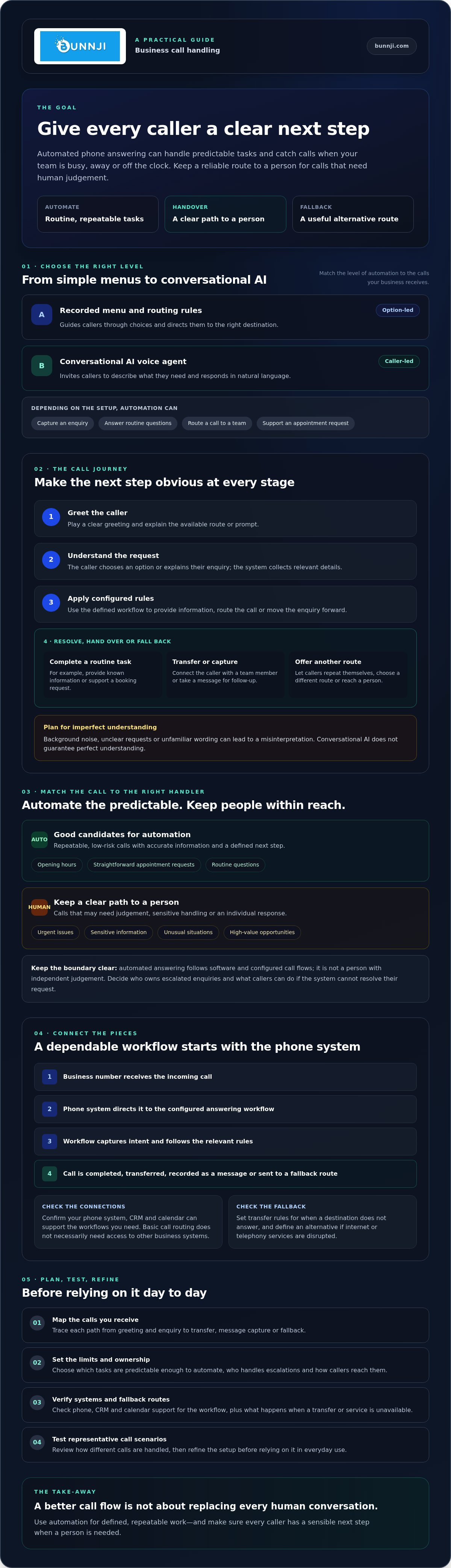
- Automated phone answering for business ranges from simple call menus to conversational AI. Match the level of automation to the calls your business receives.
- Map each call’s path from greeting and enquiry through to transfer, message capture or a fallback option.
- Use automation for predictable tasks, while keeping a clear path to a person for complex or sensitive calls.
- Check that your phone system, CRM and calendar can support the workflows you need before choosing a solution.
- Test representative call scenarios, review how they’re handled and refine the setup before relying on it day to day.
What automated phone answering for business can and cannot do
Automated phone answering for business uses configured technology to answer calls, interpret a caller’s request or direct them to the next step. It can be as simple as a recorded menu with routing rules, or as conversational as an AI voice agent that responds to callers in natural language. An automated attendant is one established form of call handling, typically guiding callers through options and directing them to the right destination.
Depending on how it’s set up, an automated system can capture an enquiry, answer routine questions, route a call to a team or support an appointment request. It isn’t a person with independent judgement, and it won’t automatically know what to do with every unexpected request. Its usefulness depends on the workflow, connected systems, complexity of the call and whether a person can step in when needed.
How an automated business call is handled
The caller hears a greeting, then provides information or explains what they need. A menu may ask them to choose an option, while a voice agent may invite them to describe their enquiry. The system follows configured rules to respond, collect relevant details, route the call or take a message. For example, rules might direct an appointment request towards a booking process and send a different enquiry to the appropriate team.
Conversational AI can make the exchange feel less like a fixed menu, but it doesn’t guarantee perfect understanding. Background noise, unclear requests or unfamiliar wording can lead to a misinterpretation. A well-planned flow gives callers a way to repeat themselves, choose another route or reach a person.
Which calls suit automation, and which need a person?
Start with repeatable, low-risk calls, such as requests for opening hours or a straightforward appointment. These are easier to handle consistently when the system has accurate information and a defined next step. Calls involving an urgent issue, sensitive information, an unusual situation or a high-value opportunity may need a person’s judgement. Make escalation easy to find, rather than trapping callers in repeated prompts.
Definition: Automated answering uses software and configured call flows to respond to or route calls. A human answering service uses people to speak with callers, take messages and, depending on its arrangement, handle other reception tasks. Neither model suits every enquiry, so consider caller expectations and the kind of help each call requires.
Think of automation as one part of a broader call-handling process, not a standalone bot. Set clear limits, decide who owns escalated enquiries, and check that callers have a useful fallback if the system can’t resolve their request.
How automated phone answering connects with your business phone system
Automated answering needs more than a voice agent. It needs a phone system to receive the call, identify the business number dialled and apply the right call flow. A cloud VoIP system can provide that foundation, with routing rules that send calls to an automated workflow, a team member or another destination. PCMag’s explanation of an automated attendant offers useful context for how automated call handling fits within a phone system.
Think of the setup as a connected sequence: the system plays a greeting, captures the caller’s intent, provides information or asks follow-up questions, then transfers the call, records a message or uses a fallback route. For example, a caller asking for a particular team could be directed there, while a request the system can’t resolve could be passed to a person. Transfer rules should account for who is available and what happens if the chosen destination doesn’t answer.
What happens between the phone system and the voice agent?
An incoming call reaches the business number and is directed by the phone system to the configured answering workflow. The voice agent handles the interaction, then the workflow determines what happens next. That might mean transferring the caller to a team member, capturing details for follow-up or returning the call to a standard phone-system route. The design should also account for the underlying internet and telephony services. If either is disrupted, the business needs a defined alternative path. Assess connectivity and resilience as part of solution design, rather than treating them as separate concerns.
CRM, calendar and business data connections
Basic call routing doesn’t necessarily need access to customer records. Tasks such as checking appointment availability, booking a time or updating a call record do. Those actions rely on an authorised integration with the relevant CRM, calendar or business system, plus clear rules about what information the agent can read or change. Support varies between solutions, so confirm that your required systems and workflows are supported before choosing a setup.
Map the information exchange before implementation. Decide what the caller needs to provide, which system should receive it and what confirmation the caller should hear. Bunnji implements AI voice agents and receptionists that can handle calls, book appointments and sync with business CRMs and calendars. For broader context on the technology, read the AI voice agents guide for Australian firms.
When assessing cloud VoIP and AI voice agent options, consider how the phone system, connectivity and business workflows will work together. That joined-up view helps you plan a dependable call journey, with a clear route to a person when automation isn’t the right fit.
Automated answering vs a human receptionist: choose the right call model
Neither automation nor a human receptionist is the right answer for every call. Automated phone answering for business is often a practical fit for structured, repeatable enquiries. People are better placed to handle nuance, emotion and unexpected situations. A blended model can use automation to identify the caller’s need, then pass the conversation to a person when appropriate. The key is making that handover clear and easy.
An automated attendant can guide callers through options and route calls, while conversational voice agents may handle a broader exchange. Compare the models against the work your callers actually need done:
| Consideration | Automated answering | Human receptionist | Blended approach |
|---|---|---|---|
| Routine-call consistency | Follows configured prompts and rules consistently. | Can adapt the conversation, though handling may vary between people. | Automates repeatable steps while a person handles exceptions. |
| Complex judgement | Works best with defined requests and clear boundaries. | Can interpret context and respond to unexpected details. | Uses automation for initial triage, then escalates when judgement is needed. |
| Handover | Depends on transfer rules and fallback options being set up. | Can respond directly and decide who should follow up. | Needs a clear trigger and destination for each escalation. |
| Workflow integration | May connect to business systems if the required integrations are supported. | Can use existing processes and update records, depending on staff access and procedures. | Can combine automated information capture with human follow-up. |
When automated answering is a practical fit
Consider automation for common questions, predictable routing or structured appointment requests. It may also suit callers who want a quick self-service option, such as finding the right team without waiting for a receptionist. Before relying on it, make sure the answers stay current, routing rules reflect how the business operates, and escalation contacts are maintained. A stale answer or outdated route can turn a simple interaction into a frustrating one.
When a human or blended approach makes more sense
Keep a person within reach for sensitive, emotional, unusual or high-stakes conversations. A caller with a complicated request may need questions, reassurance or judgement that a configured workflow can’t provide. In a blended flow, automation can establish the reason for calling and direct routine requests, while transferring other calls to a team member. Make the option to reach a person obvious, and decide what happens if that person isn’t available.
Choose based on your call types, caller expectations, staffing and business hours. The aim isn’t to replace reception staff. It’s to shape a call model that handles straightforward needs efficiently while preserving a genuine human response where it matters.
How to plan and test automated phone answering for your business
A reliable setup starts with real caller needs, not a menu of features. Before choosing automated phone answering for business, work out which enquiries it should resolve, where it must hand over and how you’ll tell whether the call flow is working.
Map caller needs before configuring the system
Review representative call types and group them by purpose, urgency and the outcome the caller needs. Use themes from existing enquiries, but don’t circulate unnecessary personal or sensitive information when planning or testing. Write approved answers, define what the system must not attempt, and assign a team or destination to every escalation path.
Use this sequence to plan the workflow:
- Review calls. Identify common reasons people contact the business and where current handling becomes difficult.
- Prioritise use cases. Start with predictable tasks that have a clear answer or outcome.
- Map routes. Decide what callers hear, what information the system collects and where each call goes next.
- Configure. Set up the greeting, responses, routing, transfers, message capture and fallback options.
- Test. Run realistic scenarios with staff before making the workflow available to callers.
- Refine. Review results and feedback, then update answers and routes as the business changes.
Pilot, review and improve the call flow
Test more than the ideal path. Try different ways callers might phrase the same request, details that could be misheard, out-of-scope questions and transfer attempts when a staff member is unavailable. Check what happens if a transfer fails: does the caller get another option, leave a message or receive a clear instruction? Staff can also flag confusing prompts before the workflow reaches customers.
After launch, use available system reporting to monitor answer completion, transfers, abandoned calls and booking outcomes. Look for patterns rather than treating one unusual call as proof the whole flow is failing. If callers often abandon at the same prompt, or transfers repeatedly miss their destination, adjust that part and test it again. Collect caller feedback where practical, and review it alongside the call data.
Keep ownership clear. Assign someone to maintain approved answers, routing rules and escalation contacts, and set a regular review point so changes to staffing or business processes don’t leave callers following an outdated path. Once you’ve defined your requirements, review your business phone system options with the call flow and integration needs in mind.
Make automated phone answering part of a dependable business phone setup
A voice agent is only one part of the call-handling arrangement. Automated phone answering for business depends on a suitable phone system, reliable connectivity and workflows that someone in your team is responsible for maintaining. Before proceeding, make sure the setup fits the calls you receive and has a clear fallback if a transfer, integration or connection doesn’t work as intended.
Use this checklist to compare options:
- Call types: Which enquiries can the system resolve, and which should go straight to a person?
- Integrations: Are the CRM, calendar and other business systems you need supported?
- Human handover: Where do escalated calls go, and what happens if that destination is unavailable?
- Reporting: Can you review call outcomes, transfers and other measures relevant to your workflow?
- Resilience: What happens to call handling during an internet or telephony disruption?
Also review privacy, call-recording and data-handling practices against current Australian obligations. Requirements can depend on the circumstances, so verify what applies to your business rather than assuming the same approach suits every call flow.
Questions to ask a provider before proceeding
Ask the provider to explain which calls and actions the solution supports, where its limits are and how it handles a request it can’t resolve. Confirm integration availability, transfer behaviour, fallback options and available reporting. Clarify who configures and maintains the call flow, how changes are managed, and what support arrangements and contractual terms apply. Check internet dependency and continuity options too, including what callers experience if the connection or usual destination is unavailable.
Where Bunnji can help with call automation
Bunnji provides AI voice agents and receptionists that can handle calls, book appointments and sync with business CRMs and calendars. Confirm which specific systems are supported during planning. Bunnji also provides cloud VoIP systems and telecommunications guidance, helping businesses assess automated answering alongside their phone setup and workflows. For more context, see the business VoIP strategy guide.
A considered setup brings the call flow, phone system and connectivity together, with clear ownership for ongoing changes. If you’re assessing an integrated approach, you can discuss your business phone requirements with Bunnji.
Build a call flow that works for your team and callers
Effective automated phone answering for business isn’t about automating every conversation. It’s about choosing calls the system can handle reliably, connecting it to the right phone and business workflows, and making it straightforward for callers to reach a person when they need one.
Start with your common enquiries, define the routes and fallback options, then test the call flow with realistic scenarios. Check that any CRM or calendar connections support the actions you need, and decide who will keep answers, escalation contacts and routing rules up to date. A suitable cloud phone system and dependable connectivity are part of that plan, not an afterthought.
Bunnji implements AI voice agents and receptionists for business call handling and appointment workflows, alongside cloud VoIP systems and telecommunications and connectivity guidance. If you’re ready to assess how these pieces could work together, discuss an automated answering setup that fits your business. A considered first step can help you improve responsiveness while keeping human support close at hand.
Frequently Asked Questions
Can automated phone answering for business transfer a caller to a person?
Yes, it can be configured to transfer suitable calls, depending on the phone system and workflow. Decide which requests need a person, where those calls should go and what callers hear if nobody is available. For example, a complex enquiry might transfer to a team member or move to message capture. Test both successful and failed transfers before launch, and explain clearly how callers can reach human support.
Is automated phone answering the same as an AI receptionist?
Not always. Automated answering can include recorded prompts, menu-based routing, voicemail workflows and conversational AI voice agents. An AI receptionist is generally designed to understand caller requests and perform configured tasks, but capabilities vary between systems. Before choosing one, check what it can actually do, which integrations it supports and how it responds to requests outside its scope. The label alone doesn’t confirm what the system can handle.
How does automated phone answering work with a business phone system?
An incoming call is directed through a configured phone workflow, which may play a greeting, identify the caller’s needs, then answer, route or escalate the call. More advanced workflows can connect with business systems for tasks such as appointment requests. Confirm the required VoIP setup, supported integrations and internet dependencies with the provider. Also agree on fallback arrangements so callers have a next step if the usual route is unavailable.
Can an automated phone answering system book appointments?
Some systems can support appointment booking when the relevant calendar integration, permissions and workflow are configured. Confirm whether the system can check availability, collect the required details, handle changes and provide the intended confirmation. Test common requests as well as unusual ones, such as a caller asking for a time that isn’t available. Make sure there’s a clear handover option if the system can’t complete the booking.
Will callers know they are speaking to an automated system?
The caller experience depends on how the system is designed and introduced. Use a clear greeting, concise prompts and an easy way to reach a person. Don’t imply the system is human. Before launch, ask staff or customers who weren’t involved in setup to try the call flow. Check whether they understand the options and can recover easily if the system mishears or misunderstands a request.
What should a business check before using automated phone answering?
Start with the calls the system should handle, caller needs, escalation rules and intended outcomes. Then check compatibility with your phone system, required integrations, reporting, internet dependency and support arrangements. Review privacy, call-recording and data-handling practices against current Australian requirements, and verify what applies to your business. Pilot the call flow with realistic scenarios, then review operating results and feedback before expanding its role.
Does automated phone answering work during an internet outage?
It depends on the provider, phone system and configuration. Cloud-based phone and voice-agent services may rely on internet connectivity, so ask what happens to incoming calls if the connection or system becomes unavailable. Check whether calls can follow an alternative route, what callers will hear and who maintains that fallback. Test the agreed arrangement and include it in your business continuity planning, rather than assuming calls will keep flowing as usual.


